
Introduction
Coaching programs are one of the most profitable services that entrepreneurs, consultants, educators, and experts can offer online.
Whether you provide:
- Business coaching
- Executive coaching
- Career coaching
- Life coaching
- Productivity coaching
- Health coaching
- AI coaching
- Marketing coaching
Pinterest can become a powerful source of qualified coaching leads.
Unlike many social platforms that focus on short-term engagement, Pinterest users actively search for solutions, guidance, and transformation. This makes Pinterest an ideal platform for promoting coaching programs.
Adobe Express makes it easy to create professional Coaching Program Pins using:
- Pinterest templates
- Brand Kits
- AI-powered design tools
- Adobe Stock assets
- Coaching promotion layouts
- Fast export workflows
In this guide, you’ll learn how to create Pinterest Coaching Program Pins using Adobe Express.
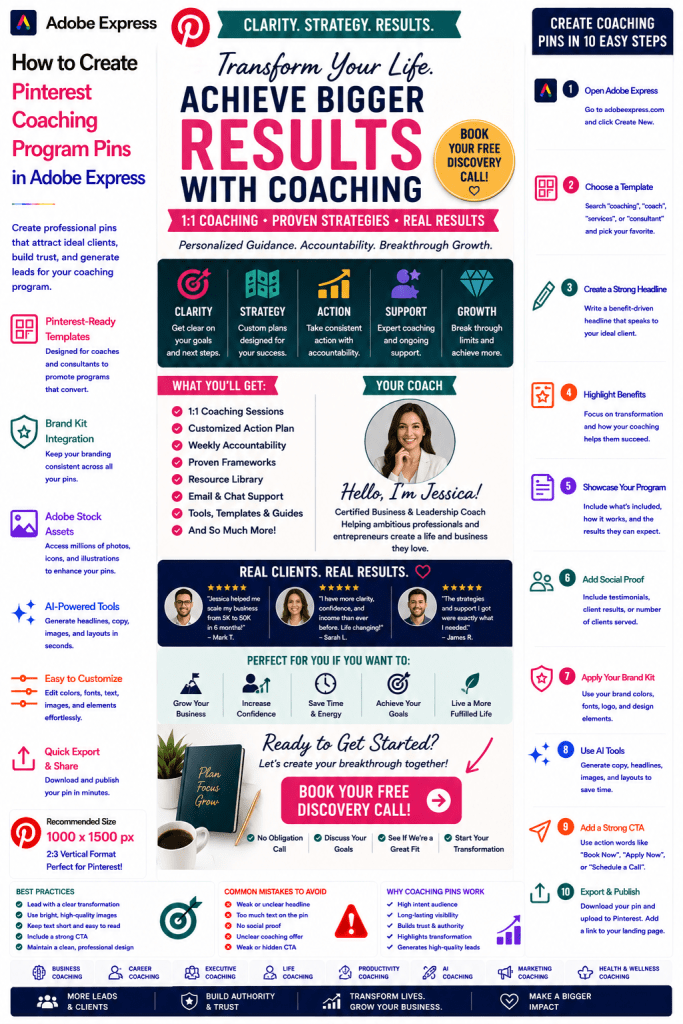
What Are Pinterest Coaching Program Pins?
Coaching Program Pins are Pinterest graphics designed to attract potential clients and encourage them to learn more, book a consultation, or enroll in a coaching program.
Examples include:
Business Growth Coaching
AI Strategy Coaching
Executive Leadership Coaching
Productivity Coaching
Career Development Coaching
Marketing Coaching
Mindset Coaching
Personal Development Coaching
The goal is to convert Pinterest traffic into coaching clients.
Why Coaching Pins Perform Well
Pinterest users are often searching for solutions to real problems.
Benefits include:
High Intent Audience
Users are actively looking for help.
Long-Term Visibility
Pins can generate leads for months or years.
Authority Building
Coaching content establishes expertise.
Trust Development
Pinterest allows you to demonstrate value before selling.
High Revenue Potential
Coaching programs often have premium pricing.
Pinterest can become a powerful lead-generation channel.
Best Coaching Niches for Pinterest
Popular coaching categories include:
Business Coaching
Career Coaching
Executive Coaching
Productivity Coaching
AI Coaching
Marketing Coaching
Wellness Coaching
Financial Coaching
Leadership Coaching
Personal Development Coaching
Focus on solving a specific problem.
Recommended Pinterest Pin Size
Pinterest recommends:
1000 × 1500 Pixels
2:3 Vertical Format
Adobe Express includes Pinterest-ready templates optimized for lead generation.
Step 1: Open Adobe Express
Sign in to Adobe Express.
From the dashboard:
Click Create New
or
Search Pinterest Templates
Adobe Express offers many coaching and service-promotion templates.
Step 2: Choose a Coaching Promotion Template
Browse categories such as:
Coaching
Business
Services
Professional Development
Personal Growth
Consulting
Choose a design that emphasizes transformation.
Step 3: Create a Strong Headline
Examples:
Scale Your Business Faster
Build Better AI Systems
Become a More Effective Leader
Achieve Your Goals Faster
Unlock Your Full Potential
Focus on the outcome your clients want.
Step 4: Highlight Coaching Benefits
Examples:
Personalized Guidance
Accountability
Faster Results
Expert Support
Strategic Planning
Proven Frameworks
Explain why coaching accelerates success.
Step 5: Showcase the Coaching Program
Examples:
1-on-1 Sessions
Group Coaching
Weekly Calls
Custom Action Plans
Resource Libraries
Private Support
Show what clients receive.
Step 6: Apply Your Brand Kit
Adobe Express Brand Kits simplify branding.
Apply:
Brand Colors
Brand Fonts
Logos
Design Assets
Consistent branding increases trust.
Step 7: Add Social Proof
Examples:
Client Testimonials
Success Stories
Case Studies
Client Results
Number of Clients Served
Social proof significantly improves conversion rates.
Step 8: Use Adobe Express AI Features
Adobe Express AI tools can generate:
Headlines
Coaching Graphics
Promotional Copy
CTA Suggestions
Design Variations
AI helps accelerate content creation.
Step 9: Add a Strong Call-to-Action
Examples:
Book a Discovery Call
Apply Now
Schedule a Consultation
Start Your Transformation
Learn More
Join the Program
The CTA should be highly visible.
Step 10: Export and Publish
When complete:
Save Project
Download Pin
Create Variations
Upload to Pinterest
Your Coaching Program Pin is ready.
Creating Business Coaching Pins
Examples:
Startup Coaching
Business Growth Coaching
Strategic Planning Coaching
Entrepreneur Coaching
Business coaching programs perform exceptionally well.
Creating AI Coaching Pins
Examples:
AI Adoption Coaching
AI Strategy Consulting
Prompt Engineering Coaching
AI Automation Coaching
AI coaching is a rapidly growing niche.
Creating Career Coaching Pins
Examples:
Career Transition Coaching
Leadership Development
Interview Coaching
Executive Coaching
Career-focused content attracts motivated professionals.
Creating Productivity Coaching Pins
Examples:
Time Management Coaching
Goal Achievement Coaching
Performance Coaching
Focus Coaching
Productivity remains a strong Pinterest category.
Creating Wellness Coaching Pins
Examples:
Mindset Coaching
Life Coaching
Wellness Coaching
Habit Building Programs
Personal growth content performs well on Pinterest.
Best Practices for Coaching Program Pins
Focus on Results
Sell transformation, not coaching sessions.
Use Social Proof
Build trust and credibility.
Show Your Personality
People buy coaching from people they trust.
Keep Messaging Clear
Avoid complexity.
Include a Strong CTA
Encourage consultation bookings.
These practices improve conversion rates.
Common Coaching Promotion Mistakes
Generic Messaging
Fails to communicate value.
No Social Proof
Reduces trust.
Weak CTA
Lowers lead generation.
Too Much Text
Creates visual clutter.
No Clear Outcome
Makes the offer less compelling.
Avoiding these mistakes improves results.
Example Workflow
Imagine promoting a coaching offer.
Program
AI Strategy Coaching
Includes
- Weekly Sessions
- Personalized Roadmap
- Resource Library
- Ongoing Support
Outcome
Implement AI Faster and More Successfully
CTA
Book a Discovery Call
This structure performs exceptionally well on Pinterest.
Why Adobe Express Is Ideal for Coaching Program Pins
Adobe Express combines:
Professional Templates
Brand Management
AI Design Tools
Service Promotion Layouts
Easy Editing
Fast Export
Pinterest-Friendly Formats
This makes it one of the easiest platforms for promoting coaching services online.
Conclusion
Pinterest Coaching Program Pins are highly effective for generating leads, building authority, attracting ideal clients, and growing a coaching business.
By combining templates, Brand Kits, AI-powered tools, and streamlined workflows, Adobe Express enables coaches and consultants to create professional Coaching Program Pins quickly and consistently.
Whether you’re promoting business coaching, AI consulting, career coaching, executive development, or personal growth programs, Adobe Express provides everything needed to create high-converting Pinterest Coaching Program Pins.
Continue Learning Adobe Express
To learn more about Pinterest marketing, explore these guides:
- How to Create Pinterest Community Promotion Pins in Adobe Express
- How to Create Pinterest Membership Promotion Pins in Adobe Express
- How to Create Pinterest Course Promotion Pins in Adobe Express
For advanced marketing workflows, also read:
- Adobe Express Marketing Automation: The Complete Guide
- Adobe Express Content Calendars: The Complete Guide
- Adobe Express Workflow Automation: The Complete Guide







