
Pinterest is an excellent platform for promoting events.
Unlike many social media platforms where posts disappear quickly, Pinterest Pins can continue driving registrations, awareness, and traffic for weeks or even months.
Whether you’re promoting:
- Conferences
- Workshops
- Seminars
- Webinars
- Product launches
- Networking events
- Community gatherings
- Training sessions
Pinterest Event Promotion Pins can help attract a highly engaged audience actively searching for opportunities, learning experiences, and activities.
Adobe Express makes it easy to create professional Event Promotion Pins using:
- Pinterest templates
- Brand Kits
- AI-powered design tools
- Adobe Stock assets
- Event marketing layouts
- Fast export workflows
In this guide, you’ll learn how to create Pinterest Event Promotion Pins using Adobe Express.
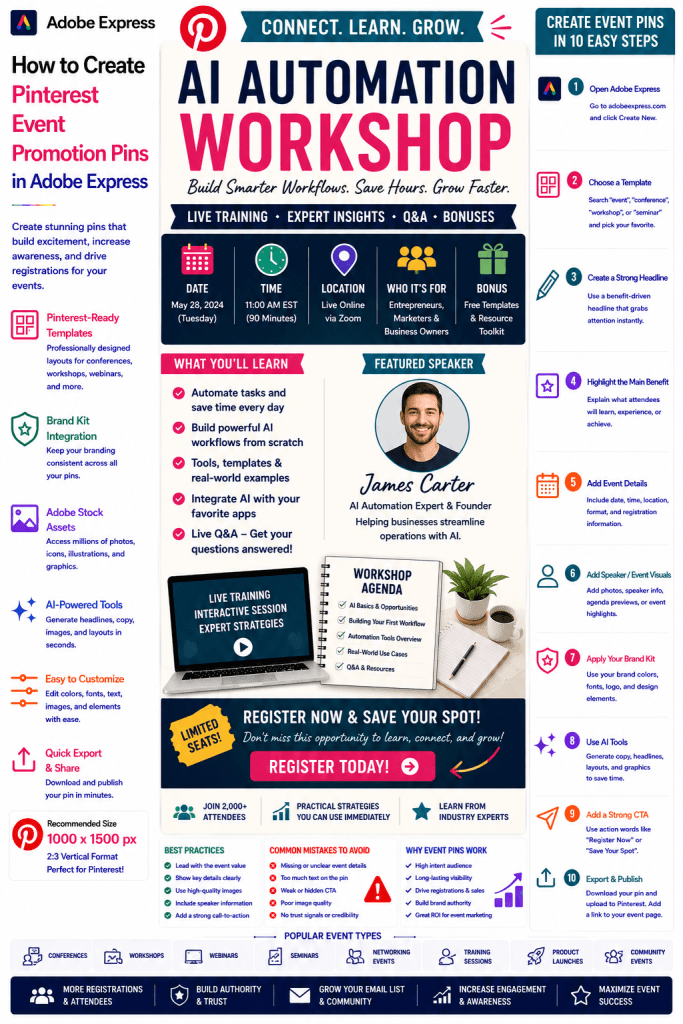
What Are Pinterest Event Promotion Pins?
Event Promotion Pins are Pinterest graphics designed to advertise an upcoming event and encourage users to attend, register, or learn more.
Examples include:
Marketing Conference
AI Workshop
Business Networking Event
Local Community Fair
Product Launch Event
Design Meetup
Virtual Training Session
Industry Summit
The objective is to increase awareness and registrations.
Why Event Pins Perform Well
Pinterest users often search for opportunities and experiences.
Benefits include:
Increased Visibility
Pinterest expands event reach.
Long Content Lifespan
Pins remain discoverable over time.
Higher Engagement
Visual event promotions attract attention.
Better Registration Rates
Pins can drive targeted traffic.
Brand Awareness
Events help establish authority.
Pinterest can become an important event marketing channel.
Best Events to Promote on Pinterest
Popular event categories include:
Business Events
Marketing Conferences
AI Workshops
Educational Seminars
Creative Events
Networking Sessions
Product Launches
Community Gatherings
Online Events
Professional Training
Choose events that provide clear value.
Recommended Pinterest Pin Size
Pinterest recommends:
1000 × 1500 Pixels
2:3 Vertical Format
Adobe Express includes Pinterest-ready event templates.
Step 1: Open Adobe Express
Sign in to Adobe Express.
From the dashboard:
Click Create New
or
Search Pinterest Templates
Adobe Express offers many event-focused layouts.
Step 2: Choose an Event Promotion Template
Browse categories such as:
Events
Conferences
Workshops
Business
Education
Marketing
Select a layout that emphasizes event details.
Step 3: Create a Strong Headline
Examples:
Free AI Workshop
Marketing Summit 2026
Startup Growth Conference
Design Networking Event
Business Strategy Seminar
The headline should communicate value immediately.
Step 4: Highlight the Main Benefit
Examples:
Learn New Skills
Meet Industry Experts
Build Valuable Connections
Discover New Trends
Accelerate Business Growth
Users care about outcomes.
Step 5: Include Essential Event Information
Examples:
Date
Time
Location
Online or In-Person
Registration Details
Speaker Information
Event details should be easy to find.
Step 6: Apply Your Brand Kit
Adobe Express Brand Kits simplify branding.
Apply:
Brand Colors
Brand Fonts
Logos
Design Assets
Consistent branding increases trust.
Step 7: Add Event Visuals
Examples:
Speaker Photos
Venue Images
Workshop Screenshots
Agenda Previews
Event Highlights
Previous Event Photos
Visuals help users imagine the experience.
Step 8: Use Adobe Express AI Features
Adobe Express AI tools can generate:
Headlines
Event Graphics
Promotional Copy
Layout Variations
CTA Suggestions
AI can speed up event promotion design.
Step 9: Add a Strong Call-to-Action
Examples:
Register Now
Save Your Spot
Get Tickets
Join Us
Learn More
Attend the Event
The CTA should stand out clearly.
Step 10: Export and Publish
When complete:
Save Project
Download Pin
Create Variations
Upload to Pinterest
Your Event Promotion Pin is ready.
Creating Conference Promotion Pins
Examples:
Industry Conferences
Business Summits
Marketing Events
Technology Conferences
Conference audiences often plan attendance months in advance.
Creating Workshop Promotion Pins
Examples:
AI Workshops
SEO Training
Design Classes
Business Strategy Sessions
Workshops perform particularly well on Pinterest.
Creating Community Event Pins
Examples:
Local Meetups
Networking Events
Charity Events
Community Festivals
These events benefit from visual storytelling.
Creating Product Launch Event Pins
Examples:
New Product Releases
Software Launches
Book Launches
Course Launches
Launch events often generate excitement and engagement.
Creating Educational Event Pins
Examples:
Training Sessions
Seminars
Certifications
Professional Development Events
Educational content is one of Pinterest’s strongest categories.
Best Practices for Event Promotion Pins
Lead With the Event Value
Focus on benefits first.
Display Key Details Clearly
Reduce uncertainty.
Use High-Quality Visuals
Improve engagement.
Include Speaker Information
Build credibility.
Use a Strong CTA
Drive registrations.
These practices improve event performance.
Common Event Promotion Mistakes
Missing Date Information
Creates confusion.
Weak Headline
Fails to attract attentionOvercrowded Design
Makes details hard to find.
Weak CTA
Reduces registrations.
No Trust Signals
Lowers confidence.
Avoiding these mistakes improves results.
Example Workflow
Imagine promoting an event.
Event
AI Automation Workshop
Benefit
Learn to Build Automated Workflows
Includes
- Live Training
- Templates
- Q&A Session
CTA
Register Today
This structure performs exceptionally well on Pinterest.
Why Adobe Express Is Ideal for Event Promotion Pins
Adobe Express combines:
Professional Templates
Brand Management
AI Design Tools
Event Promotion Layouts
Easy Editing
Fast Export
Pinterest-Friendly Formats
This makes it one of the easiest tools for promoting events online.
Conclusion
Pinterest Event Promotion Pins are highly effective for increasing visibility, driving registrations, building authority, and attracting highly targeted audiences.
By combining templates, Brand Kits, AI-powered tools, and streamlined workflows, Adobe Express enables creators and businesses to create professional Event Promotion Pins quickly and consistently.
Whether you’re promoting conferences, workshops, networking events, seminars, product launches, or training sessions, Adobe Express provides everything needed to create high-converting Pinterest Event Promotion Pins.
Continue Learning Adobe Express
To learn more about Pinterest marketing, explore these guides:
- How to Create Pinterest Webinar Registration Pins in Adobe Express
- How to Create Pinterest Lead Generation Pins in Adobe Express
- How to Create Pinterest Journal Promotion Pins in Adobe Express
For advanced marketing workflows, also read:
- Adobe Express Marketing Automation: The Complete Guide
- Adobe Express Content Calendars: The Complete Guide
- Adobe Express Workflow Automation: The Complete Guide







