One of the biggest reasons Adobe Express has become popular among marketers, small businesses, educators, content creators, and consultants is its extensive template library.
Templates eliminate the need to start every project from a blank canvas. Instead of spending hours designing layouts, users can begin with professionally designed frameworks and customize them for their own needs.
Combined with AI-powered content generation, Brand Kits, and automation features, templates form the foundation of many Adobe Express productivity workflows.
This guide explores everything you need to know about Adobe Express templates, including how they work, when to use them, and how to build scalable content systems around them.
What Are Adobe Express Templates?
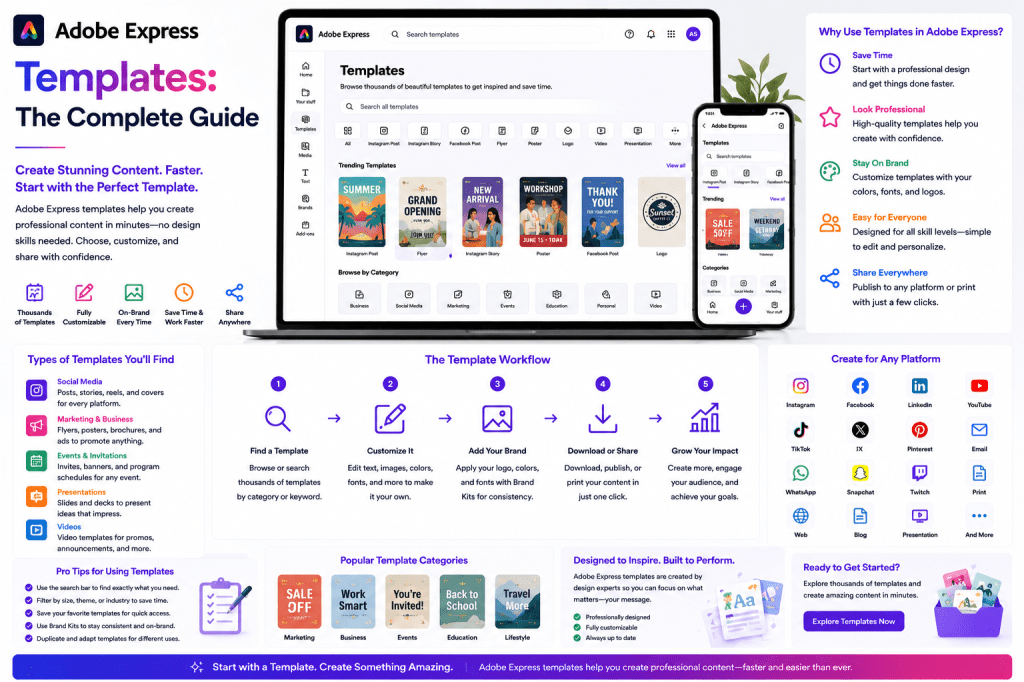
Templates are pre-designed layouts that provide a starting point for creating content.
A template typically includes:
- Layout structure
- Typography
- Color schemes
- Placeholder images
- Design elements
- Visual hierarchy
Instead of designing from scratch, users replace placeholder content with their own text, images, branding, and messaging.
The result is professional-quality content created in a fraction of the time.
Why Templates Matter
Many people mistakenly believe templates are only useful for beginners.
In reality, templates are heavily used by professional marketers and content teams because they:
- Save time
- Increase consistency
- Reduce design effort
- Improve productivity
- Accelerate content production
Templates allow teams to focus on messaging and strategy rather than rebuilding layouts repeatedly.
Types of Adobe Express Templates
Adobe Express includes templates for a wide variety of content formats.
Social Media Templates
Social media remains one of the most common uses for Adobe Express.
Template categories include:
- LinkedIn posts
- Instagram posts
- Instagram Stories
- Facebook posts
- X graphics
- Pinterest pins
These templates are already optimized for platform dimensions.
Marketing Templates
Marketing teams frequently use templates for:
- Advertisements
- Product launches
- Promotional campaigns
- Seasonal offers
- Event announcements
Templates accelerate campaign creation while maintaining visual quality.
Presentation Templates
Presentation templates help users create:
- Sales decks
- Business proposals
- Educational presentations
- Internal reports
- Client presentations
These templates reduce the time required to build professional slides.
Flyer Templates
Businesses often need promotional materials.
Examples include:
- Event flyers
- Service flyers
- Product promotions
- Workshop announcements
Templates simplify design while ensuring professional results.
Poster Templates
Poster templates are useful for:
- Events
- Conferences
- Educational programs
- Product launches
Adobe Express provides layouts optimized for visual impact.
Video Templates
Video continues to dominate online engagement.
Template categories include:
- Promotional videos
- Social media videos
- Educational videos
- Product videos
- Event videos
Templates help creators produce professional video content without advanced editing skills.
YouTube Templates
Content creators can use templates for:
- Thumbnails
- Channel banners
- Video announcements
- Promotional graphics
A consistent visual identity can improve channel recognition.
Business Templates
Professional organizations often use templates for:
- Reports
- Internal communications
- Company announcements
- Recruitment campaigns
Templates help maintain brand consistency across departments.
How Templates Improve Productivity
Templates reduce repetitive work.
Consider a marketing team producing:
- 20 social posts per week
- 5 campaign graphics
- 3 presentations
- 2 promotional flyers
Without templates:
Every asset starts from scratch.
With templates:
Layouts already exist.
Only content needs updating.
The productivity difference becomes substantial over time.
Using Templates with Brand Kits
Templates become even more powerful when combined with Brand Kits.
A Brand Kit includes:
- Logos
- Fonts
- Colors
- Brand assets
Benefits include:
Consistency
Every template aligns with brand standards.
Speed
Brand elements can be applied automatically.
Scalability
Multiple team members can create content while maintaining a unified appearance.
AI-Powered Template Creation
Adobe Express increasingly combines templates with AI.
AI can assist users by:
- Recommending templates
- Generating content
- Suggesting layouts
- Customizing designs
Example:
A user enters:
Create a LinkedIn post announcing a cybersecurity webinar.
The AI can generate content while selecting an appropriate template.
This significantly accelerates production.
Building a Template Library
One of the most effective productivity strategies is creating a custom template library.
Organizations often develop templates for:
- LinkedIn posts
- Case studies
- Product launches
- Announcements
- Educational content
Instead of searching for templates each time, teams reuse proven designs.
LinkedIn Template System
Many businesses publish frequently on LinkedIn.
A simple template library might include:
Thought Leadership Template
For industry insights.
Announcement Template
For company news.
Case Study Template
For customer success stories.
Educational Template
For tips and tutorials.
Event Promotion Template
For webinars and conferences.
With these five templates, hundreds of posts can be created quickly.
Instagram Template System
Instagram often requires greater visual consistency.
Common template categories include:
- Quote graphics
- Carousels
- Stories
- Promotions
- Product highlights
Creating a reusable template system dramatically reduces production effort.
YouTube Template System
YouTube creators benefit from consistency.
Template categories may include:
- Tutorial thumbnails
- Product review thumbnails
- Announcement graphics
- Community updates
A recognizable style improves brand recognition.
Content Repurposing with Templates
Templates are essential for content repurposing.
Example:
A blog article becomes:
- LinkedIn graphics
- Instagram carousel
- Presentation slides
- Infographic
- Promotional banner
Rather than designing every asset individually, template systems accelerate transformation.
Team Collaboration and Templates
Templates improve collaboration by providing standards.
Benefits include:
Faster Onboarding
New team members can immediately use approved designs.
Consistency
Everyone follows the same visual framework.
Reduced Review Time
Design approvals become simpler.
Better Scalability
Teams can increase content production without sacrificing quality.
Common Template Mistakes
Using Too Many Styles
A business should not use dozens of unrelated templates.
Consistency matters.
Ignoring Branding
Templates should align with company identity.
Over-Customizing
Excessive modifications often reduce efficiency.
Starting from Scratch
Many users forget templates exist and unnecessarily rebuild content.
Template Workflow Example
A weekly content workflow might look like:
Monday
Write article.
Tuesday
Create LinkedIn graphics using templates.
Wednesday
Build Instagram carousel from template.
Thursday
Generate promotional video using template.
Friday
Schedule content.
Templates dramatically reduce design time at every stage.
Adobe Express Templates vs Manual Design
| Feature | Templates | Manual Design |
|---|---|---|
| Setup Time | Very Fast | Slow |
| Consistency | High | Variable |
| Learning Curve | Low | Higher |
| Productivity | High | Moderate |
| Scalability | Excellent | Limited |
| Team Adoption | Easy | More Difficult |
Templates often provide the most efficient path for content production.
Future of Templates
Templates are evolving beyond static layouts.
Future developments will likely include:
- AI-generated templates
- Personalized templates
- Dynamic content adaptation
- Automated branding
- Workflow-aware template systems
Templates will increasingly become intelligent starting points rather than fixed designs.
Conclusion
Adobe Express templates are one of the platform’s most valuable productivity features.
By providing ready-made layouts for social media, marketing, presentations, videos, and business communications, templates enable users to create professional content faster and more consistently.
When combined with AI tools, Brand Kits, and automation features, templates become the foundation of scalable content production systems.
Organizations that invest in reusable template libraries often achieve higher content output, better brand consistency, and significantly improved productivity.
For many Adobe Express users, templates are not simply design shortcuts—they are the engine that powers efficient content creation.
Related Guides
- Adobe Express AI Assistant
- Adobe Express Automation
- Adobe Express Productivity Workflows
- Adobe Express AI Tools
- Adobe Express for Social Media
- Adobe Express Brand Kits Explained
- Adobe Express for Small Business
- Building a LinkedIn Content System with Adobe Express
- Content Repurposing Strategies with Adobe Express
- Creating a Marketing Template Library in Adobe Express







 Acrobat Express Pro