The biggest challenge facing content creators today is not a lack of ideas—it is managing the growing number of tasks required to transform those ideas into finished content.
A single piece of content often requires:
- Research
- Writing
- Graphic design
- Video creation
- Social media assets
- Publishing
- Repurposing
- Performance tracking
Without a structured workflow, content creation quickly becomes inefficient.
Adobe Express helps solve this problem by bringing together content creation, design, AI assistance, branding, collaboration, and publishing into a single platform.
This guide explains how to build productive workflows using Adobe Express and how individuals, teams, and businesses can create more content with less effort.
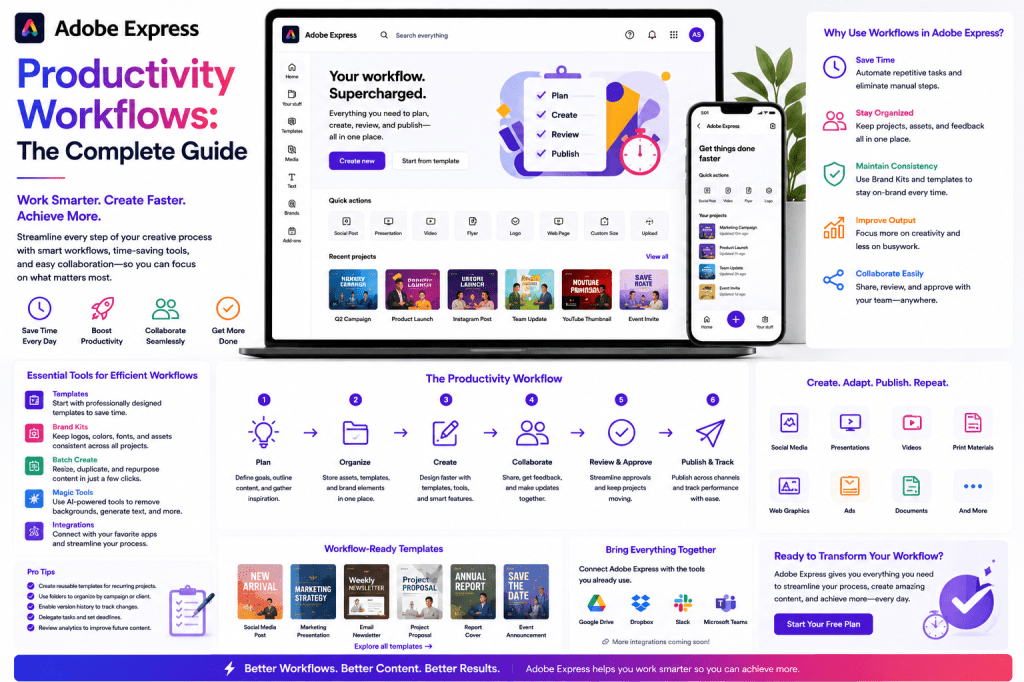
What Is a Productivity Workflow?
A productivity workflow is a repeatable sequence of steps used to complete a task efficiently.
For content creation, a workflow typically includes:
- Planning
- Creation
- Design
- Review
- Publishing
- Repurposing
- Measurement
The goal is not simply to work faster.
The goal is to reduce friction, eliminate repetitive work, and create consistent results.
Why Productivity Workflows Matter
Many creators spend too much time switching between tools.
A typical workflow might involve:
- Word processor
- Design software
- Image editor
- Video editor
- Social media scheduler
- Asset storage platform
This constant switching creates inefficiencies.
Adobe Express centralizes many of these activities into one environment.
Benefits include:
- Faster execution
- Better collaboration
- Fewer errors
- Consistent branding
- Reduced production costs
The Adobe Express Workflow Framework
Most successful Adobe Express workflows follow five stages.
Stage 1: Content Planning
Before creating content, define:
- Goals
- Audience
- Topics
- Publishing channels
Examples:
- Lead generation
- Brand awareness
- Education
- Product promotion
Adobe Express AI tools can assist with brainstorming and idea generation.
Example prompt:
Generate ten content ideas for a cybersecurity consultancy.
Stage 2: Content Creation
Once topics are selected, content production begins.
Adobe Express supports:
- Graphics
- Videos
- Presentations
- Social posts
- Marketing materials
AI features can accelerate:
- Writing
- Design concepts
- Visual generation
- Content adaptation
Stage 3: Brand Application
Brand consistency is essential.
Adobe Express Brand Kits allow teams to apply:
- Logos
- Fonts
- Colors
- Visual styles
This ensures every asset aligns with company standards.
Stage 4: Publishing
After approval, content moves to publication.
Common outputs include:
- LinkedIn posts
- Instagram content
- Facebook updates
- Presentations
- Marketing materials
Adobe Express scheduling capabilities streamline publication.
Stage 5: Repurposing
The most productive teams reuse content extensively.
One asset becomes many.
Example:
A webinar becomes:
- Blog article
- LinkedIn posts
- Carousel graphics
- Short videos
- Email newsletter
This dramatically improves content ROI.
Workflow #1: LinkedIn Content Engine
LinkedIn is one of the most popular professional platforms.
Many businesses struggle to publish consistently.
Adobe Express can support a repeatable LinkedIn workflow.
Weekly Process
Monday
Write a long-form article.
Tuesday
Create supporting graphics.
Wednesday
Generate multiple LinkedIn posts.
Thursday
Create quote graphics.
Friday
Schedule content for next week.
This process can create an entire week’s worth of LinkedIn content from a single article.
Workflow #2: Blog-to-Social Media System
This is one of the highest-value workflows available.
Step 1
Publish a blog article.
Example:
How AI Is Transforming Customer Support
Step 2
Extract key points.
Step 3
Generate social captions.
Step 4
Create graphics.
Step 5
Resize for multiple platforms.
Outputs might include:
- LinkedIn posts
- Instagram carousels
- X graphics
- Facebook content
One article becomes multiple assets.
Workflow #3: Small Business Marketing Workflow
Small businesses often have limited resources.
Adobe Express can serve as a complete marketing production system.
Monthly Planning
Create:
- Promotions
- Announcements
- Product launches
- Educational content
Weekly Production
Develop:
- Graphics
- Videos
- Social content
Daily Publishing
Schedule content in advance.
This reduces marketing workload while maintaining consistency.
Workflow #4: Presentation Creation Workflow
Presentations are common in:
- Sales
- Consulting
- Education
- Corporate communications
Adobe Express helps streamline:
- Slide creation
- Visual design
- Branding
- Graphics
Example workflow:
- Outline content.
- Generate slides.
- Apply Brand Kit.
- Add visuals.
- Export presentation.
This can reduce preparation time significantly.
Workflow #5: Video Content Workflow
Video content continues to grow across all platforms.
Adobe Express can support:
- YouTube Shorts
- Instagram Reels
- Promotional videos
- Educational clips
Workflow:
- Create script.
- Generate visuals.
- Assemble video.
- Add captions.
- Publish.
This process allows creators to produce videos more efficiently.
Workflow #6: Team Collaboration Workflow
Marketing teams often involve:
- Writers
- Designers
- Managers
- Stakeholders
Adobe Express helps coordinate these activities.
Benefits include:
Centralized Assets
Everyone works from approved resources.
Brand Consistency
Brand Kits reduce design variability.
Faster Reviews
Teams can collaborate without moving files between multiple tools.
AI-Powered Productivity Workflows
AI has become a major productivity accelerator.
Adobe Express AI tools can assist with:
Content Ideas
Example:
Generate content ideas for a financial services company.
Writing Assistance
Example:
Write a LinkedIn post about cybersecurity awareness.
Content Expansion
Example:
Expand this paragraph into a 500-word article.
Content Summarization
Example:
Convert this article into five social media posts.
These capabilities reduce manual effort throughout the workflow.
Building a Content Repurposing Machine
The most productive content teams think in terms of content assets rather than individual posts.
Consider a single webinar.
It can become:
- Blog articles
- LinkedIn posts
- Infographics
- Videos
- Presentations
- Email content
Adobe Express makes this transformation process much faster.
Time-Saving Features
Templates
Reduce design time.
Brand Kits
Eliminate repetitive branding work.
AI Assistant
Accelerate writing and ideation.
Quick Resize
Adapt content for multiple channels.
Scheduling
Reduce daily publishing effort.
Combined, these features create substantial productivity gains.
Measuring Workflow Success
A productive workflow should improve:
Speed
How quickly content is created.
Consistency
How regularly content is published.
Quality
How professional assets appear.
Scalability
How easily content volume increases.
ROI
How much value content generates relative to effort invested.
Common Workflow Mistakes
Creating Everything from Scratch
Templates exist to save time.
Ignoring Repurposing Opportunities
One asset should support multiple outputs.
Lack of Planning
Without a content calendar, production becomes reactive.
Overusing AI
AI should assist creativity, not replace human judgment.
No Standardized Process
Teams perform better when workflows are documented and repeatable.
Future of Productivity Workflows
Several trends are reshaping content operations:
- AI-generated content
- Automated design systems
- Workflow orchestration
- Multi-channel publishing
- Content personalization
Adobe Express is evolving to support these increasingly sophisticated workflows.
The platform is moving beyond graphic design and becoming a content operations environment.
Conclusion
Adobe Express productivity workflows help individuals and teams streamline content creation from idea generation to publication.
By combining AI tools, templates, Brand Kits, design capabilities, and publishing features, Adobe Express enables organizations to create more content without increasing complexity.
The most successful users treat Adobe Express not simply as a design application but as the foundation of a repeatable content production system.
When workflows are properly designed, businesses can improve consistency, increase output, maintain brand standards, and spend more time on strategy rather than repetitive production tasks.
Related Guides
- Adobe Express AI Assistant
- Adobe Express Automation
- Adobe Express for Social Media
- Adobe Express AI Tools
- Adobe Express Templates
- Adobe Express Brand Kits Explained
- Adobe Express for Small Businesses
- Building an AI Content Publishing System with Adobe Express
- Creating a LinkedIn Workflow with Adobe Express
- Content Repurposing Strategies Using Adobe Express







 Acrobat Express Pro