Modern content creation rarely happens in isolation.
Most businesses use multiple tools for:
- Content creation
- Document management
- Collaboration
- File storage
- Marketing
- Social media
- Productivity
The challenge is connecting these systems into a smooth workflow.
Adobe Express addresses this challenge through integrations that allow users to connect content creation with the broader tools they already use.
Rather than constantly moving files between applications, integrations help streamline workflows, improve collaboration, and reduce manual effort.
This guide explores the Adobe Express integration ecosystem and explains how businesses can use these connections to improve productivity.
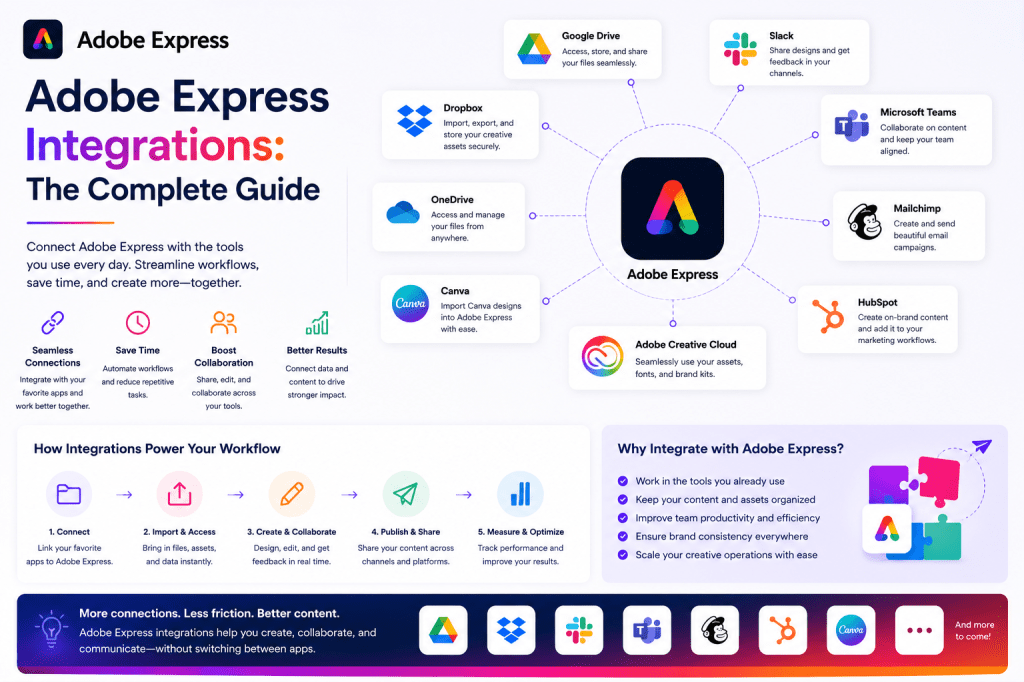
What Are Adobe Express Integrations?
Integrations allow Adobe Express to work alongside other platforms and services.
Instead of treating Adobe Express as a standalone design tool, integrations transform it into part of a larger content production system.
Benefits include:
- Faster workflows
- Reduced duplication
- Easier collaboration
- Better file management
- Improved productivity
For many organizations, integrations are what make Adobe Express truly valuable.
Why Integrations Matter
A typical content workflow may involve:
- Writing content
- Designing graphics
- Storing files
- Collaborating with teams
- Publishing content
- Managing projects
Without integrations, users spend significant time:
- Downloading files
- Uploading files
- Moving assets
- Searching for versions
Integrations help eliminate these inefficiencies.
Adobe Creative Cloud Integration
One of the most important Adobe Express integrations is its connection with the broader Adobe ecosystem.
This allows users to move assets between Adobe Express and applications such as:
- Adobe Photoshop
- Adobe Illustrator
- Adobe Premiere Pro
- Adobe Acrobat
This creates a workflow where professionals can combine advanced editing tools with Adobe Express productivity features.
Adobe Acrobat Integration
Many businesses rely heavily on PDF documents.
Adobe Express integration with Acrobat enables workflows involving:
- Marketing materials
- Reports
- Presentations
- Educational content
- Business documentation
Common use cases include:
PDF to Visual Content
Convert document content into social media graphics.
Presentation Assets
Transform reports into presentation materials.
Marketing Content
Repurpose PDF content into promotional assets.
For organizations already using Acrobat, this integration creates valuable content opportunities.
Adobe Firefly Integration
Adobe Firefly powers many AI-driven features within Adobe Express.
Adobe Firefly enables:
- AI image generation
- Text effects
- Visual concepts
- Creative ideation
Benefits include:
- Faster content creation
- Custom visual assets
- Reduced dependency on stock images
Firefly effectively extends Adobe Express into an AI-powered content platform.
Microsoft 365 Integration
Many organizations operate within the Microsoft ecosystem.
Adobe Express integrates with tools commonly used by business teams.
Benefits include:
- Easier content sharing
- Improved collaboration
- Faster asset creation
Common use cases include:
Business Presentations
Create visuals for internal meetings.
Marketing Materials
Develop branded assets for campaigns.
Team Communication
Support organizational announcements and updates.
For Microsoft-centric organizations, this integration reduces friction between productivity and content creation.
Microsoft Teams Integration
Collaboration has become increasingly important for modern businesses.
Adobe Express can support Teams-based workflows by enabling:
- Shared content creation
- Branded communications
- Marketing asset collaboration
Benefits include:
- Faster reviews
- Centralized discussions
- Improved workflow visibility
This is particularly useful for distributed teams.
Google Drive Integration
Many businesses store files in Google Drive.
Integration helps users:
- Access assets quickly
- Maintain centralized storage
- Reduce duplicate files
Common content types include:
- Images
- Presentations
- Brand assets
- Marketing materials
This streamlines asset management while reducing administrative overhead.
Google Workspace Workflows
Organizations using Google Workspace often create:
- Documents
- Presentations
- Marketing plans
- Educational resources
Adobe Express complements these workflows by providing:
- Visual content
- Graphics
- Social media assets
- Promotional materials
The combination of productivity tools and content creation tools creates an efficient workflow environment.
Dropbox Integration
Dropbox remains a popular platform for file storage and collaboration.
Adobe Express users can leverage Dropbox to:
- Store assets
- Access brand resources
- Share files with clients
- Maintain project archives
Benefits include:
- Simplified asset management
- Centralized storage
- Better collaboration
Social Media Platform Integrations
One of the most valuable categories involves social media workflows.
Adobe Express supports content creation for:
- X
Integration with publishing workflows enables users to move more efficiently from creation to distribution.
Benefits include:
- Faster publishing
- Consistent branding
- Reduced workflow complexity
LinkedIn Content Workflows
Many businesses use LinkedIn for:
- Thought leadership
- Lead generation
- Employer branding
- Professional networking
Adobe Express supports LinkedIn content creation through:
- Graphics
- Carousels
- Promotional assets
- Educational visuals
Businesses can streamline LinkedIn production while maintaining a professional appearance.
YouTube Creator Workflows
Content creators often require:
- Thumbnails
- Channel graphics
- Promotional assets
- Community content
Adobe Express helps create these assets efficiently.
Integration with broader content workflows helps creators maintain consistency across channels.
Content Repurposing Across Platforms
Integrations become particularly valuable during content repurposing.
Example:
A report stored in Google Drive can become:
- Social graphics
- Presentation slides
- Promotional assets
- Marketing content
Adobe Express acts as the transformation layer within the workflow.
Brand Management Integrations
Organizations frequently maintain branding resources across multiple systems.
Integrations help connect:
- Brand assets
- Templates
- Shared libraries
- Marketing resources
Benefits include:
- Better consistency
- Faster production
- Reduced duplication
Team Collaboration Workflows
Many content projects involve:
- Writers
- Designers
- Marketers
- Managers
- Stakeholders
Adobe Express integrations help support collaboration through:
- Shared assets
- Centralized workflows
- Improved accessibility
This reduces delays and communication bottlenecks.
AI-Powered Workflow Integrations
As AI becomes increasingly important, integrations are expanding beyond file management.
Future workflows may include:
- AI-generated content
- Automated content adaptation
- Campaign generation
- Content planning assistance
Adobe Express is positioned to become a central component of AI-assisted content operations.
Example Integrated Workflow
Consider a marketing team.
Step 1
Create article content.
Step 2
Store source materials in Google Drive.
Step 3
Use Adobe Express to generate graphics.
Step 4
Apply Brand Kit.
Step 5
Create social media assets.
Step 6
Publish across channels.
Step 7
Archive assets.
This workflow minimizes manual effort while improving consistency.
Common Integration Mistakes
Too Many Tools
Not every tool needs integration.
Focus on high-value workflows.
Poor Asset Organization
Even integrated systems require structured file management.
Ignoring Brand Standards
Integrated workflows should still follow branding guidelines.
Lack of Documentation
Teams should understand how systems connect.
Document workflows clearly.
Adobe Express as a Content Hub
Many organizations eventually use Adobe Express as a central content production layer.
Content flows in from:
- Documents
- Presentations
- Brand assets
- Creative Cloud applications
Content flows out to:
- Social media
- Marketing campaigns
- Presentations
- Promotional materials
This hub-and-spoke model improves efficiency and scalability.
Future of Adobe Express Integrations
Several trends are shaping the future:
- AI workflow integration
- Cross-platform collaboration
- Automated content pipelines
- Smart asset management
- Personalized content delivery
Adobe Express is evolving from a design tool into a connected content operations platform.
Conclusion
Adobe Express integrations play a critical role in modern content workflows.
By connecting content creation with storage platforms, collaboration tools, Adobe applications, AI services, and publishing channels, integrations help organizations reduce friction and improve productivity.
Businesses that leverage these integrations effectively can streamline operations, maintain stronger branding, create content faster, and scale marketing efforts more efficiently.
As content production becomes increasingly complex, integrated workflows will become one of the most important competitive advantages available to modern organizations.
Related Guides
- Adobe Express AI Assistant
- Adobe Express Automation
- Adobe Express Productivity Workflows
- Adobe Express Templates
- Adobe Express Brand Kits
- Adobe Express Content Repurposing
- Adobe Express for Small Business
- Adobe Express AI Tools
- Adobe Express for Marketing Teams
- Building an AI Content Publishing System with Adobe Express







 Acrobat Express Pro