Introduction
Marketing campaigns are rarely a single piece of content.
A modern campaign may involve:
- Social media posts
- Landing page graphics
- Promotional videos
- Email banners
- Presentation slides
- Event materials
- Sales collateral
- Internal communications
Coordinating all of these assets can become challenging, especially when multiple teams are involved.
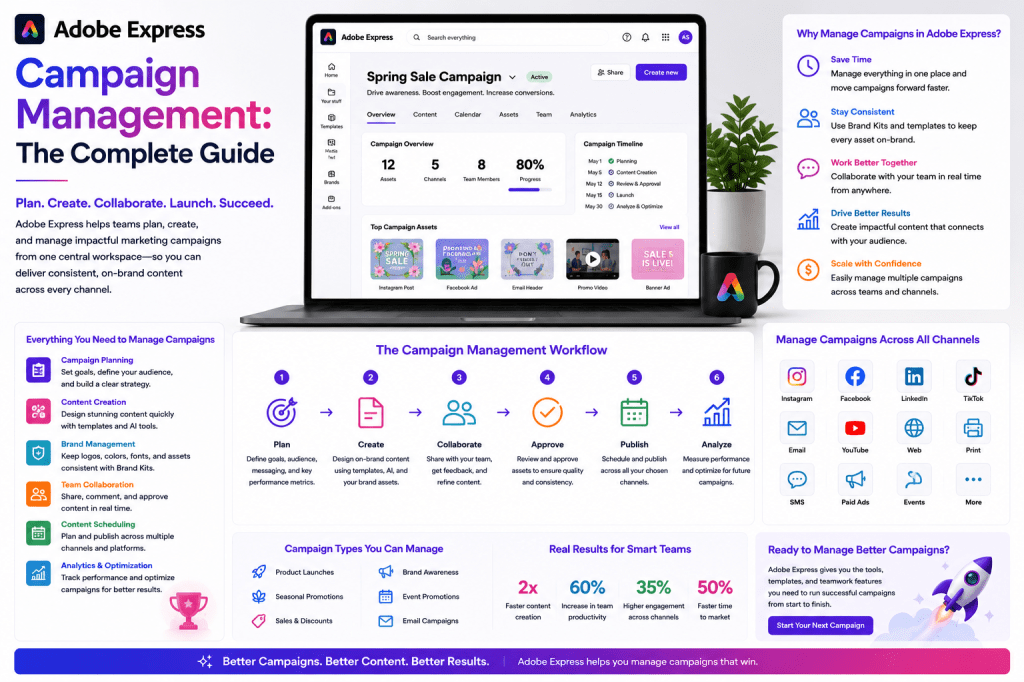
Campaign management is the process of planning, creating, executing, monitoring, and optimizing marketing initiatives in a structured and repeatable way.
Adobe Express helps simplify campaign management by providing a centralized environment for content creation, branding, collaboration, asset production, and content repurposing.
This guide explores how Adobe Express can support campaign management workflows for businesses, agencies, and marketing teams.
What Is Campaign Management?
Campaign management is the practice of organizing and executing marketing initiatives from start to finish.
Typical campaign activities include:
- Goal setting
- Audience targeting
- Content creation
- Asset production
- Distribution
- Performance measurement
The objective is to ensure all campaign elements work together to achieve a business outcome.
Why Campaign Management Matters
Without structured campaign management, organizations often face:
Inconsistent Messaging
Different teams communicate different messages.
Missed Deadlines
Assets are delivered late.
Brand Inconsistency
Campaign materials look disconnected.
Reduced Performance
Poor coordination impacts results.
Higher Costs
Rework and inefficiencies increase expenses.
Campaign management introduces structure and accountability.
Where Adobe Express Fits
Adobe Express supports campaign execution by helping teams create and manage campaign assets efficiently.
Key capabilities include:
- Templates
- AI-assisted content creation
- Brand Kits
- Video production
- Content repurposing
- Collaboration workflows
Adobe Express acts as the creative production layer of a campaign.
Types of Marketing Campaigns
Different campaigns require different content strategies.
Product Launch Campaigns
Promote new products or services.
Common assets:
- Announcement graphics
- Product videos
- Social media content
- Sales presentations
Adobe Express helps produce these assets quickly.
Lead Generation Campaigns
Designed to attract potential customers.
Examples:
- Webinars
- Downloadable resources
- Educational content
Supporting assets often include:
- Landing page visuals
- Promotional graphics
- Social media posts
Brand Awareness Campaigns
Focus on visibility rather than immediate sales.
Examples:
- Thought leadership
- Educational content
- Industry insights
Adobe Express templates help maintain visual consistency.
Event Marketing Campaigns
Support:
- Conferences
- Workshops
- Webinars
- Product launches
Required assets often include:
- Registration graphics
- Speaker announcements
- Promotional videos
- Event reminders
Recruiting Campaigns
Organizations increasingly market employment opportunities.
Campaign assets may include:
- Recruitment graphics
- Employee stories
- Employer branding content
Adobe Express simplifies production.
The Campaign Management Framework
A successful campaign follows a structured process.
Step 1: Define Objectives
Examples:
Generate Leads
Collect prospect information.
Increase Awareness
Reach new audiences.
Promote Products
Drive sales.
Educate Customers
Build understanding and trust.
Clear objectives guide campaign decisions.
Step 2: Define Target Audience
Campaigns should focus on specific groups.
Examples:
- IT managers
- Small business owners
- HR professionals
- Marketing leaders
Understanding the audience influences content creation.
Step 3: Develop Messaging
Campaign messaging should be:
- Consistent
- Relevant
- Clear
- Action-oriented
Adobe Express AI can help generate message variations.
Step 4: Create Campaign Assets
Typical campaign assets include:
Social Media Graphics
Drive awareness and engagement.
Videos
Explain products and services.
Presentations
Support sales and education.
Promotional Materials
Encourage action.
Adobe Express templates accelerate production.
Step 5: Apply Brand Standards
Brand consistency is essential.
Adobe Express Brand Kits help standardize:
- Logos
- Fonts
- Colors
- Visual identity
This ensures a cohesive campaign experience.
Step 6: Launch and Distribute
Campaign assets are published across channels.
Examples:
- YouTube
- Websites
Consistent execution improves effectiveness.
Campaign Planning with Adobe Express
Adobe Express supports campaign planning by helping teams create assets aligned with campaign goals.
Examples:
Awareness Campaign
Create educational content.
Product Launch
Develop promotional graphics.
Webinar Promotion
Create event marketing assets.
Templates make planning more efficient.
Campaign Asset Libraries
One of the most effective strategies is maintaining reusable campaign assets.
Examples:
Product Launch Templates
Announcements and feature highlights.
Webinar Templates
Registration promotions and reminders.
Event Templates
Speaker announcements and schedules.
Reusable assets reduce production time.
AI-Powered Campaign Creation
Adobe Express AI can assist throughout campaign development.
Examples include:
Campaign Ideas
Generate themes and concepts.
Example:
Create a campaign promoting cybersecurity awareness for midsize businesses.
Messaging Variations
Generate alternative headlines and captions.
Promotional Content
Develop social media copy and marketing messages.
AI accelerates campaign creation.
Campaign Management for Small Businesses
Small businesses often have limited marketing resources.
Adobe Express enables owners to:
- Create campaign assets
- Maintain branding
- Produce social content
- Support promotions
without relying on large teams.
Campaign Management for Agencies
Agencies frequently manage campaigns for multiple clients.
Adobe Express helps through:
Client Brand Kits
Maintain branding standards.
Templates
Accelerate asset creation.
Content Repurposing
Increase campaign reach.
Collaboration
Improve team efficiency.
Campaign Management for Marketing Teams
Internal marketing departments often coordinate:
- Product marketing
- Demand generation
- Events
- Content marketing
Adobe Express supports campaign execution across these activities.
Content Repurposing Within Campaigns
Campaigns should maximize asset value.
Example:
Original asset:
Webinar.
Repurposed assets:
- Social media posts
- Video clips
- Infographics
- Presentation slides
- Blog articles
Adobe Express helps transform content efficiently.
Multi-Channel Campaign Execution
Modern campaigns rarely operate on a single platform.
Examples:
Thought leadership.
Visual engagement.
YouTube
Video education.
Direct communication.
Website
Conversion destination.
Adobe Express helps create assets for each channel.
Campaign Calendars
Campaign calendars improve coordination.
Typical schedule:
Pre-Launch
Awareness content.
Launch Week
Announcements and promotions.
Follow-Up
Case studies and customer stories.
Planning ahead improves consistency.
Campaign Performance Metrics
Monitor:
Reach
How many people saw the campaign.
Engagement
Interactions with content.
Leads
Prospects generated.
Conversions
Desired actions completed.
ROI
Business impact.
Performance data informs future campaigns.
Common Campaign Management Mistakes
No Clear Objective
Campaigns need measurable goals.
Inconsistent Branding
Brand Kits help prevent this.
Insufficient Planning
Campaigns perform better when prepared in advance.
Weak Distribution
Great content still requires promotion.
Lack of Measurement
Performance should always be monitored.
Example Product Launch Campaign
Imagine launching a new service.
Campaign assets might include:
LinkedIn Posts
Industry-focused announcements.
Promotional Graphics
Visual highlights.
Webinar
Feature demonstration.
Presentation
Sales enablement.
Follow-Up Content
Customer education.
Adobe Express supports every stage.
Adobe Express vs Traditional Campaign Workflows
| Feature | Adobe Express | Traditional Workflow |
|---|---|---|
| Asset Creation | Fast | Slower |
| Branding | Centralized | Often Fragmented |
| Templates | Extensive | Variable |
| AI Assistance | Built-In | Separate Tools |
| Content Repurposing | Efficient | More Manual |
| Collaboration | Streamlined | More Complex |
Adobe Express reduces friction throughout campaign execution.
Future of Campaign Management
Several trends are shaping the future:
- AI-assisted campaign creation
- Automated content adaptation
- Predictive campaign planning
- Multi-channel orchestration
- Creative workflow automation
Adobe Express is increasingly positioned to support these developments.
Conclusion
Campaign management is essential for organizations seeking to coordinate content, branding, messaging, and distribution effectively.
Adobe Express supports campaign execution through templates, AI tools, Brand Kits, content repurposing workflows, video production capabilities, and collaborative asset creation.
Whether managing product launches, lead generation initiatives, event promotions, or awareness campaigns, Adobe Express helps teams create and scale campaign assets more efficiently.
For businesses, agencies, and marketing departments looking to improve campaign execution, Adobe Express provides a practical and highly productive foundation.
Related Guides
- Adobe Express AI Assistant
- Adobe Express Marketing Automation
- Adobe Express Content Calendars
- Adobe Express Content Repurposing
- Adobe Express Templates
- Adobe Express Brand Kits
- Adobe Express for Marketing Teams
- Adobe Express for Agencies
- Adobe Express for LinkedIn Marketing
- Building an AI Content Publishing System with Adobe Express







 Acrobat Express Pro