One of the biggest challenges facing growing businesses is maintaining brand consistency.
As content production increases, companies often discover that different team members use:
- Different colors
- Different fonts
- Different logos
- Different design styles
- Different messaging approaches
The result is an inconsistent brand experience that can confuse customers and weaken brand recognition.
Adobe Express addresses this challenge through Brand Kits.
A Brand Kit acts as a central repository for your company’s visual identity, making it easy to apply approved branding across every piece of content.
Whether you are a solo entrepreneur, a marketing team, an agency, or a large organization, Brand Kits can dramatically improve efficiency and consistency.
This guide explores everything you need to know about Adobe Express Brand Kits and how to use them effectively.
What Is a Brand Kit?
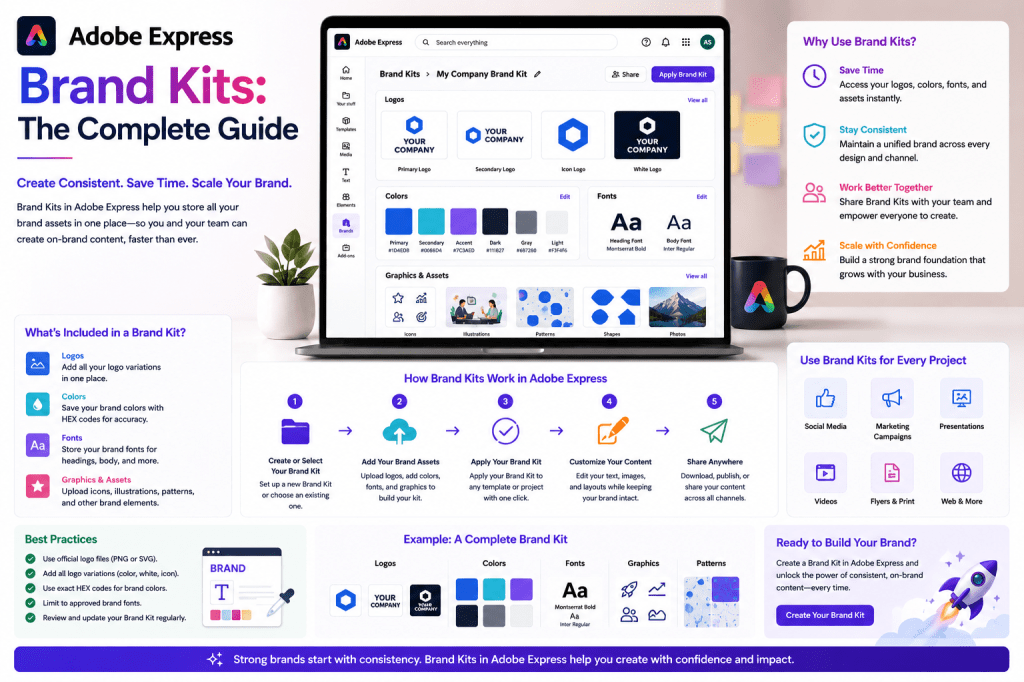
A Brand Kit is a collection of brand assets stored in one place.
Typical components include:
- Company logos
- Brand colors
- Fonts
- Graphics
- Icons
- Visual guidelines
Rather than manually applying these elements to every project, Adobe Express allows users to access and apply them automatically.
Think of a Brand Kit as your company’s design system.
Why Brand Consistency Matters
Strong brands are instantly recognizable.
Consider companies such as:
- Adobe
- Apple
- Nike
People recognize them because their branding remains consistent across:
- Websites
- Advertisements
- Social media
- Presentations
- Product packaging
Consistency builds:
- Trust
- Recognition
- Professionalism
- Credibility
Without consistency, brands appear fragmented.
What Can Be Stored in an Adobe Express Brand Kit?
Adobe Express allows organizations to centralize key branding assets.
Logos
Logos are often the most recognizable brand element.
Organizations frequently maintain multiple versions:
- Primary logo
- Secondary logo
- Icon-only version
- Light version
- Dark version
Brand Kits keep these assets organized and accessible.
Brand Colors
Color consistency is essential.
Most organizations define:
Primary Colors
Core brand colors used most frequently.
Secondary Colors
Supporting colors for specific content.
Accent Colors
Used sparingly to draw attention.
Brand Kits ensure that approved colors are always available.
Fonts
Typography plays a major role in brand identity.
Brand Kits allow organizations to standardize:
- Headings
- Subheadings
- Body text
- Call-to-action styles
This prevents teams from introducing random font choices.
Images and Graphics
Many organizations maintain libraries of:
- Product images
- Team photos
- Illustrations
- Icons
- Marketing graphics
These assets can be included within branding systems.
Benefits of Adobe Express Brand Kits
Faster Content Creation
Instead of manually locating logos and color codes, users can access everything instantly.
This reduces production time significantly.
Consistent Branding
Every graphic, presentation, and social media post follows the same visual standards.
Consistency improves professionalism.
Easier Collaboration
Teams often struggle when multiple contributors create content.
Brand Kits provide a shared reference point.
Everyone uses the same assets.
Reduced Design Errors
Common mistakes include:
- Wrong logo version
- Incorrect color usage
- Unapproved fonts
Brand Kits help eliminate these problems.
Better Scalability
As content volume increases, maintaining consistency becomes more difficult.
Brand Kits allow organizations to scale content production without sacrificing quality.
How Brand Kits Fit into Content Workflows
Brand Kits are most effective when integrated into repeatable workflows.
A typical process looks like:
- Create content.
- Select template.
- Apply Brand Kit.
- Publish content.
This ensures consistency without adding extra effort.
Brand Kits and Social Media
Social media often requires high-volume content production.
Examples include:
- LinkedIn posts
- Instagram graphics
- Facebook updates
- X posts
- Pinterest pins
Without a Brand Kit, every asset may look slightly different.
With a Brand Kit:
- Colors remain consistent.
- Fonts remain consistent.
- Logos appear correctly.
This strengthens brand recognition.
Brand Kits and Marketing Campaigns
Marketing campaigns typically involve multiple assets.
Examples include:
- Advertisements
- Landing pages
- Email graphics
- Social content
- Presentation materials
Brand Kits help ensure every component reflects the same identity.
This creates a cohesive customer experience.
Brand Kits and Presentations
Presentations often influence:
- Sales outcomes
- Client relationships
- Internal communications
A presentation that follows brand standards appears more professional.
Brand Kits help standardize:
- Slide colors
- Typography
- Visual assets
This improves presentation quality while reducing preparation time.
Building Your First Brand Kit
Creating a Brand Kit is relatively straightforward.
Step 1: Gather Logos
Collect:
- Primary logo
- Secondary logo
- Icon versions
- Dark and light variants
Organize them clearly.
Step 2: Define Brand Colors
Document:
- Primary colors
- Secondary colors
- Accent colors
Include exact color values.
Step 3: Select Fonts
Identify approved fonts for:
- Headlines
- Subheadings
- Body content
Avoid using too many font families.
Step 4: Organize Visual Assets
Include:
- Photography
- Icons
- Illustrations
- Product images
Keep files organized and current.
Step 5: Create Usage Guidelines
Document:
- Logo placement rules
- Color usage recommendations
- Typography standards
These guidelines improve consistency across teams.
Brand Kits for Small Businesses
Small businesses often assume branding systems are only for large enterprises.
This is not true.
Even a solo entrepreneur benefits from:
- Consistent visuals
- Faster content creation
- Professional appearance
Brand Kits provide structure without complexity.
Brand Kits for Agencies
Agencies frequently manage multiple brands simultaneously.
A separate Brand Kit can be created for each client.
Benefits include:
- Faster project setup
- Fewer branding mistakes
- Improved collaboration
This can dramatically improve operational efficiency.
Brand Kits and AI Content Creation
As AI-generated content becomes more common, branding becomes increasingly important.
AI can generate:
- Graphics
- Marketing content
- Social posts
- Presentations
However, AI-generated assets still need branding.
Brand Kits provide that consistency layer.
They help ensure that AI-assisted content still looks and feels like your brand.
Common Brand Kit Mistakes
Too Many Colors
Brands often become inconsistent when too many colors are introduced.
Limit the palette.
Too Many Fonts
Using numerous font families creates visual confusion.
Keep typography simple.
Outdated Assets
Old logos and images should be removed.
Only approved assets should remain available.
Lack of Documentation
Without guidelines, team members may use assets incorrectly.
Document standards clearly.
Brand Kit Workflow Example
Imagine a company publishing:
- Three LinkedIn posts
- Two Instagram carousels
- One webinar promotion
- One presentation
Without Brand Kits:
Each asset requires manual branding.
With Brand Kits:
Brand elements are applied immediately.
This can save hours every week.
Brand Kits vs Manual Branding
| Feature | Brand Kits | Manual Branding |
|---|---|---|
| Consistency | High | Variable |
| Speed | Fast | Slower |
| Collaboration | Easy | Difficult |
| Error Rate | Low | Higher |
| Scalability | Excellent | Limited |
| Team Adoption | Simple | More Complex |
For growing organizations, Brand Kits quickly become indispensable.
Future of Brand Management
Brand management is evolving rapidly.
Future capabilities may include:
- AI-powered brand enforcement
- Automated design validation
- Intelligent template adaptation
- Personalized brand experiences
- Real-time compliance checking
Adobe Express is likely to continue expanding its branding capabilities as AI-driven content production becomes more widespread.
Conclusion
Adobe Express Brand Kits provide a powerful way to maintain consistency while increasing productivity.
By centralizing logos, colors, fonts, and visual assets, Brand Kits help teams create content faster while preserving brand integrity.
Whether you are a solo creator, small business owner, marketing team, consultant, or agency, Brand Kits can become the foundation of a scalable content creation system.
As organizations produce more content across more channels, having a structured branding system becomes increasingly important—and Adobe Express Brand Kits offer one of the simplest ways to achieve it.
Related Guides
- Adobe Express AI Assistant
- Adobe Express Automation
- Adobe Express AI Tools
- Adobe Express Templates
- Adobe Express Productivity Workflows
- Adobe Express for Social Media
- Adobe Express for Small Business
- Building a Content Production System with Adobe Express
- Adobe Express Content Repurposing Strategies
- Adobe Express vs Canva for Brand Management








