Social media has become one of the most important marketing channels for businesses, creators, consultants, educators, and entrepreneurs. The challenge is no longer deciding whether to use social media—it is producing enough high-quality content to stay visible.
Many organizations struggle with:
- Creating content consistently
- Maintaining brand consistency
- Designing engaging visuals
- Managing multiple social platforms
- Publishing content efficiently
Adobe Express was built to address these challenges.
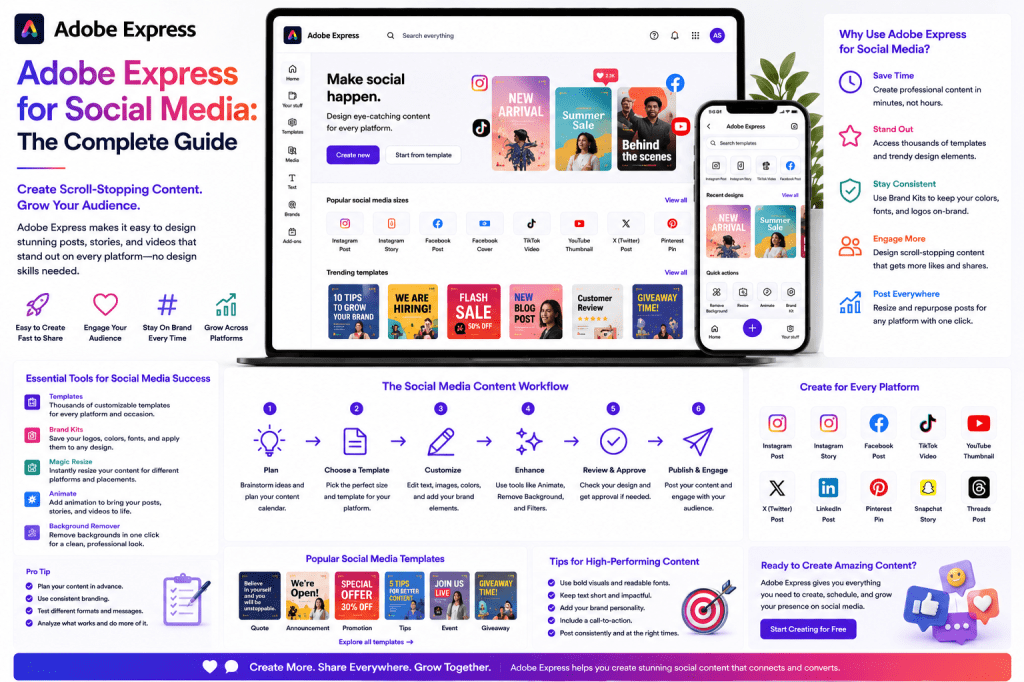
Combining AI-powered content generation, professional templates, brand management tools, image editing, video creation, and publishing features, Adobe Express helps users create social media content faster and at greater scale.
This guide explains how Adobe Express can support an entire social media workflow from idea generation to publication.
What Is Adobe Express for Social Media?
Adobe Express is a content creation platform that enables users to create:
- Social media graphics
- Videos
- Stories
- Reels
- Carousels
- Promotional content
- Advertisements
- Branded assets
Unlike traditional graphic design software, Adobe Express focuses on speed, accessibility, and productivity.
The platform is designed for people who need content quickly without spending hours learning professional design tools.
Why Social Media Teams Use Adobe Express
Modern social media management requires producing content for multiple channels simultaneously.
A typical content creator may need:
- LinkedIn posts
- Instagram graphics
- Facebook updates
- X posts
- Pinterest visuals
- YouTube thumbnails
Creating separate designs for each platform can become overwhelming.
Adobe Express simplifies the process through:
- Templates
- AI assistance
- Brand kits
- Content resizing
- Scheduling tools
Social Media Content Types You Can Create
Single-Image Posts
Single-image posts remain one of the most common content formats.
Examples include:
- Quotes
- Announcements
- Promotions
- Product launches
- Tips and tricks
Adobe Express provides templates that can be customized within minutes.
Carousel Posts
Carousel posts often generate strong engagement because they encourage interaction.
Popular formats include:
- Tutorials
- Step-by-step guides
- Case studies
- Lists
- Educational content
Adobe Express makes it easy to design multi-page carousel sequences.
Short Videos
Video continues to dominate social media engagement.
Adobe Express supports:
- Video editing
- Captions
- Motion graphics
- Text overlays
- Background music
This allows users to create social-ready videos without advanced editing software.
Stories
Stories are widely used on:
- Snapchat
Adobe Express includes story-sized templates optimized for mobile viewing.
Reels and Shorts
Short-form video is now essential for many creators.
Adobe Express supports content creation for:
- Instagram Reels
- YouTube Shorts
- TikTok-style videos
Users can quickly create vertical video content using templates and AI tools.
Adobe Express AI for Social Media
One of the platform’s most powerful capabilities is AI-assisted content creation.
Generating Post Ideas
Example prompt:
Give me ten social media content ideas for a cybersecurity consulting company.
The AI can generate a complete content plan within seconds.
Creating Captions
Example prompt:
Write an engaging LinkedIn post about AI adoption in healthcare.
The assistant generates draft captions that can be refined before publication.
Rewriting Content
Content can be adapted for different audiences.
Examples:
- Professional tone
- Friendly tone
- Educational tone
- Marketing tone
This helps repurpose content across platforms.
Creating Graphics
Users can generate visuals through Adobe Firefly-powered features.
Examples include:
- Marketing illustrations
- Background images
- Concept graphics
- Social media visuals
This reduces dependency on stock photography.
Building a Social Media Workflow
The most successful content creators follow a repeatable workflow.
Step 1: Content Planning
Identify:
- Topics
- Campaigns
- Goals
- Audience segments
Adobe Express AI can assist with idea generation.
Step 2: Content Creation
Create:
- Graphics
- Captions
- Videos
- Carousels
Templates accelerate production.
Step 3: Branding
Apply:
- Logos
- Colors
- Fonts
Brand Kits ensure consistency.
Step 4: Resizing
Adapt content for:
- X
Adobe Express automates much of this process.
Step 5: Scheduling
Plan content publication in advance.
Benefits include:
- Consistency
- Better organization
- Reduced daily workload
Adobe Express for LinkedIn
LinkedIn content typically requires a professional appearance.
Common LinkedIn content includes:
- Thought leadership posts
- Industry insights
- Company announcements
- Case studies
- Educational content
Adobe Express helps create:
- LinkedIn graphics
- Presentation-style posts
- Infographics
- Branded visual content
Many B2B marketers use Adobe Express as part of their LinkedIn content workflow.
Adobe Express for Instagram
Instagram places strong emphasis on visual quality.
Adobe Express supports:
- Feed posts
- Carousels
- Stories
- Reels
The platform’s template library simplifies visual production while maintaining professional standards.
Adobe Express for YouTube
YouTube creators can use Adobe Express to create:
- Thumbnails
- Channel banners
- Promotional graphics
- Short-form content visuals
A strong thumbnail can significantly impact click-through rates.
Adobe Express provides tools specifically designed for thumbnail creation.
Adobe Express for X
X content often requires concise messaging and eye-catching visuals.
Adobe Express can help users create:
- Quote graphics
- Data visualizations
- Promotional posts
- Announcement graphics
Visuals often increase engagement compared to text-only posts.
Using Brand Kits for Social Media
Brand consistency is critical for recognition.
Brand Kits help teams standardize:
- Fonts
- Logos
- Colors
- Brand assets
Benefits include:
Faster Content Creation
No need to manually apply brand elements.
Consistency
Every post aligns with organizational standards.
Scalability
Multiple team members can create content without introducing branding inconsistencies.
Content Repurposing Strategy
One of the most effective productivity strategies is content repurposing.
Example:
A single blog post can become:
- 5 LinkedIn posts
- 3 Instagram carousels
- 10 social graphics
- 1 short video
- 1 infographic
Adobe Express simplifies this transformation process.
Instead of creating everything from scratch, users can adapt existing content into multiple formats.
Example Weekly Content System
Monday
Publish a blog article.
Tuesday
Create LinkedIn content.
Wednesday
Design Instagram posts.
Thursday
Create short videos.
Friday
Schedule next week’s content.
Adobe Express supports every stage of this process.
Common Social Media Mistakes
Inconsistent Branding
Using different colors, fonts, and styles weakens brand identity.
Brand Kits help prevent this.
Overcomplicated Designs
Simple visuals often outperform cluttered graphics.
Posting Without Strategy
Content should support specific business goals.
Examples:
- Lead generation
- Awareness
- Education
- Community building
Ignoring Analytics
Successful social media programs continuously measure performance and adjust accordingly.
Adobe Express vs Traditional Design Tools
| Feature | Adobe Express | Traditional Design Software |
|---|---|---|
| Ease of Use | High | Moderate to High |
| Templates | Extensive | Limited |
| AI Assistance | Built-In | Often External |
| Social Media Focus | Strong | General Design |
| Content Resizing | Simple | Manual |
| Publishing Features | Included | Often Separate Tools |
For many social media teams, Adobe Express provides a faster workflow.
Future of Social Media Content Creation
Several trends are shaping the future:
- AI-generated content
- Automated content repurposing
- Personalized marketing
- Short-form video growth
- Workflow automation
Adobe Express is positioning itself at the center of these trends by combining content creation and productivity features within a single platform.
Conclusion
Adobe Express has become a powerful platform for social media content creation.
By combining AI-assisted writing, design automation, video tools, templates, brand management, and publishing capabilities, it enables businesses and creators to produce more content in less time.
Whether you are managing LinkedIn campaigns, building Instagram content, creating YouTube assets, or running multi-channel marketing initiatives, Adobe Express provides the tools needed to streamline production and maintain consistent quality.
For organizations looking to scale social media efforts without dramatically increasing workload, Adobe Express offers a practical and highly productive solution.
Related Guides
- Adobe Express AI Assistant
- Adobe Express Automation
- Adobe Express Productivity Workflows
- Adobe Express Brand Kits Explained
- Adobe Express Content Repurposing
- Adobe Express for Small Business
- Adobe Express AI Tools
- Building a LinkedIn Publishing System with Adobe Express
- Creating YouTube Thumbnails with Adobe Express
- Adobe Express vs Canva for Social Media Marketing








