Introduction
Modern content creation is rarely a solo activity.
Most projects involve multiple stakeholders:
- Marketers
- Designers
- Sales professionals
- HR teams
- Product managers
- Executives
- Customer Success teams
As organizations grow, collaboration becomes increasingly important.
The challenge is ensuring that teams can work together efficiently while maintaining consistency, visibility, and productivity.
Without effective collaboration, organizations often experience:
- Duplicate work
- Communication breakdowns
- Delayed approvals
- Brand inconsistencies
- Missed deadlines
Adobe Express helps solve these challenges by providing a shared environment for content creation, branding, asset reuse, and workflow standardization.
This guide explores how Adobe Express supports team collaboration across organizations of all sizes.
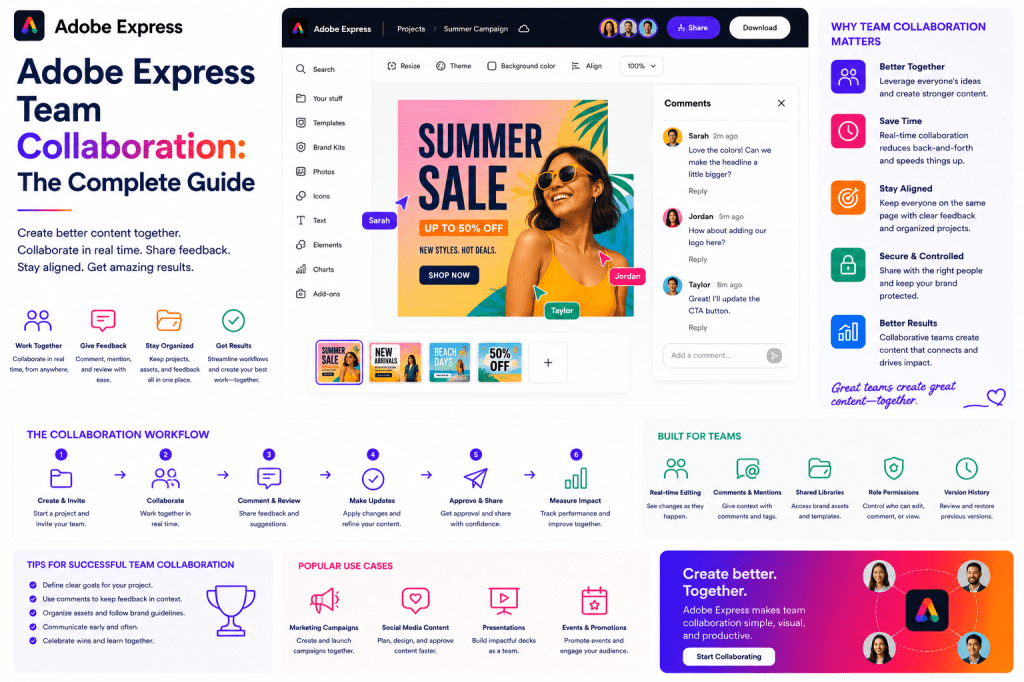
What Is Team Collaboration?
Team collaboration is the process of individuals working together toward a shared objective.
In content creation, collaboration often involves:
- Planning
- Creating
- Reviewing
- Approving
- Publishing
The goal is to coordinate efforts while reducing friction.
Why Collaboration Matters
Content production increasingly requires multiple perspectives.
For example, a product launch may involve:
Product Team
Defines features.
Marketing Team
Creates campaigns.
Sales Team
Develops customer-facing materials.
Customer Success Team
Creates onboarding resources.
Leadership
Approves messaging.
Collaboration ensures everyone remains aligned.
Common Collaboration Challenges
Organizations frequently struggle with:
Information Silos
Teams work independently.
Asset Duplication
Content is recreated unnecessarily.
Communication Delays
Projects stall waiting for feedback.
Version Confusion
Teams work from different files.
Brand Inconsistency
Content varies across departments.
Adobe Express helps address these issues.
Why Adobe Express Supports Collaboration
Adobe Express combines:
- Templates
- Brand Kits
- Shared assets
- AI-powered content creation
- Content repurposing
- Standardized workflows
These capabilities help teams collaborate more effectively.
The Collaboration Framework
Successful collaboration often follows a structured process.
1. Planning Together
Projects begin with shared objectives.
Examples include:
Marketing Campaigns
Promote products or services.
Recruitment Campaigns
Attract talent.
Product Launches
Generate awareness and adoption.
Internal Communications
Inform employees.
Clear objectives improve collaboration.
2. Shared Templates
Templates help teams work consistently.
Examples include:
Social Media Templates
Support recurring content.
Presentation Templates
Standardize business communications.
Event Templates
Accelerate promotions.
Templates reduce confusion and improve productivity.
3. Shared Brand Standards
Brand consistency is critical.
Adobe Express Brand Kits help teams use:
- Approved logos
- Official colors
- Standard fonts
- Brand-approved visuals
This ensures content remains aligned.
4. Content Creation
Multiple contributors can create content using shared resources.
Examples include:
- Marketing graphics
- Training materials
- Customer communications
- Presentations
Adobe Express simplifies content production.
5. Review and Feedback
Collaboration requires review.
Teams often evaluate:
Accuracy
Is the information correct?
Branding
Does it follow standards?
Messaging
Is communication consistent?
Structured reviews improve quality.
6. Approval and Publishing
Final approvals ensure readiness.
Approved content can then be distributed confidently.
Collaboration Across Departments
Adobe Express supports collaboration between many business functions.
Marketing and Sales
Marketing creates assets.
Sales uses them to engage prospects.
Shared templates improve consistency.
HR and Internal Communications
Employee communications require coordination.
Shared branding strengthens professionalism.
Product Marketing and Customer Success
Product updates often require:
- Launch assets
- Educational materials
- Customer communications
Adobe Express helps align these teams.
Leadership and Operations
Executives frequently communicate strategic initiatives.
Visual content helps improve clarity.
Building Collaborative Workflows
A simple workflow might include:
Step 1
Define objectives.
Step 2
Assign responsibilities.
Step 3
Create content.
Step 4
Review and revise.
Step 5
Approve assets.
Step 6
Publish and measure.
Adobe Express supports every stage.
Brand Kits as Collaboration Tools
Brand Kits provide a shared visual language.
Benefits include:
Faster Content Creation
Brand assets are immediately available.
Better Consistency
Every team uses approved resources.
Reduced Errors
Incorrect logos and colors become less common.
Brand Kits improve collaboration significantly.
Content Repurposing Across Teams
Repurposing often requires multiple departments.
Example:
Original asset:
Product webinar.
Repurposed into:
- Marketing campaign
- Sales presentation
- Training guide
- Customer onboarding material
- Internal communication
Adobe Express makes asset reuse easier.
AI-Powered Collaboration
Adobe Express AI helps teams collaborate more efficiently.
Examples include:
Content Drafting
Generate starting points.
Messaging Variations
Create alternatives quickly.
Campaign Ideas
Support brainstorming.
Content Adaptation
Customize materials for different audiences.
AI reduces manual effort.
Team Collaboration for Agencies
Agencies often manage:
- Multiple clients
- Multiple brands
- Multiple stakeholders
Adobe Express supports:
Client Brand Kits
Maintain separation.
Shared Templates
Improve consistency.
Content Reuse
Increase efficiency.
Faster Production
Support growth.
Team Collaboration for Enterprises
Large organizations benefit from:
Standardized Processes
Reduce complexity.
Shared Assets
Improve efficiency.
Governance
Strengthen compliance.
Cross-Department Alignment
Improve communication.
Adobe Express supports all four objectives.
Measuring Collaboration Success
Key metrics include:
Project Completion Time
How quickly work is delivered.
Approval Speed
Review efficiency.
Asset Reuse
Content utilization.
Brand Compliance
Consistency levels.
Team Productivity
Output improvements.
These indicators help optimize workflows.
Common Collaboration Mistakes
No Shared Standards
Creates inconsistency.
Excessive Meetings
Reduce productivity.
Duplicate Asset Creation
Waste resources.
Poor Communication
Creates delays.
Weak Governance
Reduces quality.
Example Collaborative Workflow
Imagine a company launching a new product.
Product Team
Defines features.
Marketing Team
Creates campaign assets.
Sales Team
Builds customer presentations.
Customer Success Team
Creates onboarding resources.
Leadership
Approves messaging.
Adobe Express provides a common content creation environment.
Adobe Express vs Traditional Collaboration Workflows
| Feature | Adobe Express | Traditional Workflow |
|---|---|---|
| Shared Templates | Built-In | Often Manual |
| Brand Governance | Strong | Variable |
| Asset Reuse | Easy | Difficult |
| AI Assistance | Available | Limited |
| Collaboration Support | High | Moderate |
| Productivity | High | Variable |
Adobe Express reduces collaboration friction.
Future of Team Collaboration
Several trends are reshaping collaboration:
- AI-assisted teamwork
- Automated content workflows
- Shared content ecosystems
- Cross-functional operations
- Collaborative content intelligence
Organizations that embrace these trends will be more productive and agile.
Conclusion
Team collaboration is essential for modern content creation.
As organizations grow, effective collaboration becomes increasingly important for maintaining productivity, consistency, and quality.
Adobe Express helps teams work together through Brand Kits, templates, content reuse, AI-powered tools, and standardized workflows.
Whether supporting marketing, sales, HR, customer success, training, or enterprise communications, Adobe Express provides a strong foundation for collaborative content production.
Organizations that build effective collaboration systems can create more content, maintain higher quality, and move faster than competitors.
Related Guides
- Adobe Express Enterprise Workflows
- Adobe Express Content Operations
- Adobe Express Creative Operations
- Adobe Express Digital Asset Management
- Adobe Express Workflow Automation
- Adobe Express Brand Management
- Adobe Express Marketing Automation
- Adobe Express AI Productivity
- Adobe Express Templates
- Adobe Express Brand Kits







 Acrobat Express Pro