
Online courses are one of the most profitable digital products you can promote on Pinterest.
Millions of Pinterest users actively search for ways to learn new skills, improve their careers, grow their businesses, and solve problems. This makes Pinterest an ideal platform for promoting online courses.
Whether you’re selling:
- AI courses
- Marketing courses
- SEO training
- Design classes
- Business coaching programs
- Productivity workshops
- Photography courses
- Personal development programs
Pinterest Course Promotion Pins can help drive traffic, increase enrollments, and grow your audience.
Adobe Express makes it easy to create professional Course Promotion Pins using:
- Pinterest templates
- Brand Kits
- AI-powered design tools
- Adobe Stock assets
- Course mockups
- Fast export workflows
In this guide, you’ll learn how to create Pinterest Course Promotion Pins using Adobe Express.
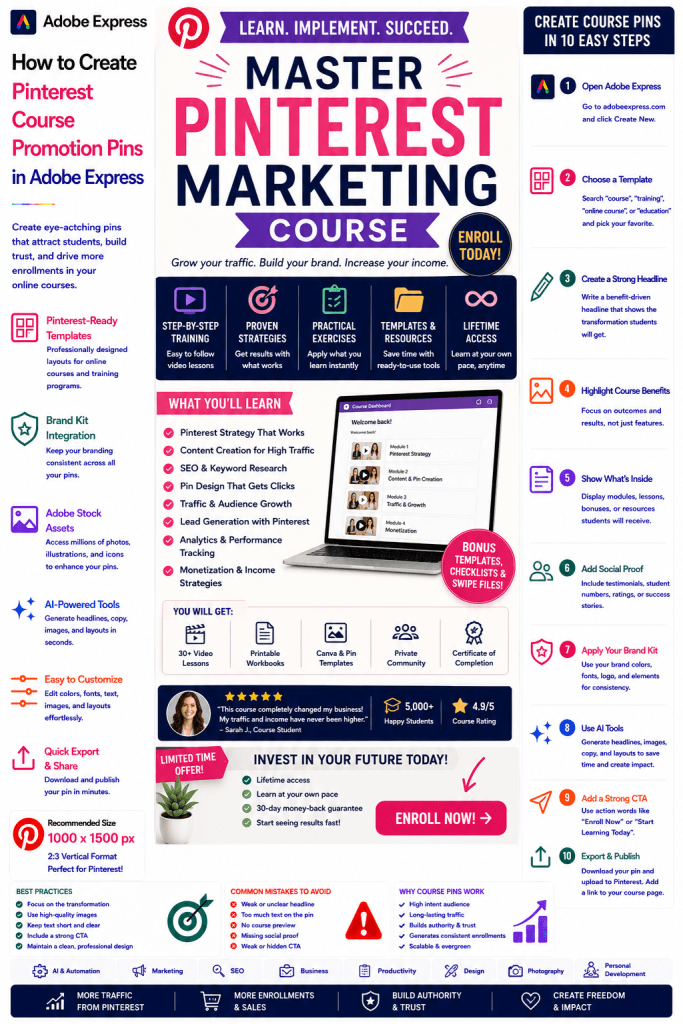
What Are Pinterest Course Promotion Pins?
Course Promotion Pins are Pinterest graphics designed to attract students and encourage course enrollments.
Examples include:
AI Agents Masterclass
SEO for Beginners
Pinterest Marketing Course
Content Marketing Academy
Graphic Design Bootcamp
Productivity Mastery Course
Business Growth Program
Social Media Marketing Training
The objective is to convert Pinterest users into students.
Why Course Pins Perform Well
Pinterest users are actively looking to learn.
Benefits include:
High Purchase Intent
Users are often searching for solutions.
Long-Term Traffic
Pins continue generating views over time.
Excellent Lead Generation
Course promotion often begins with a lead magnet.
Authority Building
Educational content establishes expertise.
Strong Revenue Potential
Courses can become scalable digital products.
Pinterest is ideal for educational marketing.
Best Course Topics for Pinterest
Popular course niches include:
Artificial Intelligence
Marketing
SEO
Business
Productivity
Design
Blogging
Finance
Personal Development
Entrepreneurship
Choose a course that solves a clear problem.
Recommended Pinterest Pin Size
Pinterest recommends:
1000 × 1500 Pixels
2:3 Vertical Format
Adobe Express provides Pinterest-ready templates optimized for conversions.
Step 1: Open Adobe Express
Sign in to Adobe Express.
From the dashboard:
Click Create New
or
Search Pinterest Templates
Adobe Express includes templates for educational products and promotions.
Step 2: Choose a Course Promotion Template
Browse categories such as:
Education
Training
Business
Marketing
Digital Products
Online Learning
Choose a design that highlights your course.
Step 3: Create a Strong Headline
Examples:
Learn AI Agents From Scratch
Master Pinterest Marketing
SEO Course for Beginners
Build Better Content Systems
Grow Your Business Faster
The headline should focus on the transformation.
Step 4: Highlight Course Benefits
Examples:
Learn New Skills
Increase Revenue
Save Time
Build Better Systems
Advance Your Career
Focus on outcomes students want.
Step 5: Showcase Course Content
Examples:
Course Modules
Lesson Previews
Student Dashboard
Worksheets
Templates
Bonus Resources
Users want to understand what they will receive.
Step 6: Apply Your Brand Kit
Adobe Express Brand Kits simplify branding.
Apply:
Brand Colors
Brand Fonts
Logos
Design Elements
Consistent branding improves credibility.
Step 7: Add Trust Signals
Examples:
Student Testimonials
Number of Students
Success Stories
Certifications
Industry Experience
Trust builders improve conversions.
Step 8: Use Adobe Express AI Features
Adobe Express AI tools can generate:
Headlines
Promotional Graphics
Course Visuals
Marketing Copy
CTA Suggestions
AI helps speed up content creation.
Step 9: Add a Strong Call-to-Action
Examples:
Enroll Today
Join the Course
Start Learning
Reserve Your Spot
Get Instant Access
Learn More
Your CTA should be highly visible.
Step 10: Export and Publish
When complete:
Save Project
Download Pin
Create Variations
Upload to Pinterest
Your Course Promotion Pin is ready.
Creating AI Course Promotion Pins
Examples:
AI Agents Course
Prompt Engineering Course
AI Automation Program
Machine Learning Training
AI education is one of the fastest-growing categories online.
Creating Marketing Course Pins
Examples:
Content Marketing Course
Email Marketing Training
Lead Generation Course
Social Media Marketing Academy
Marketing education performs exceptionally well on Pinterest.
Creating SEO Course Pins
Examples:
SEO Fundamentals
Technical SEO Training
Keyword Research Course
Link Building Program
SEO learners frequently search Pinterest for educational resources.
Creating Business Course Pins
Examples:
Startup Growth Course
Business Planning Program
Productivity Training
Leadership Course
Business-focused educational products attract motivated learners.
Creating Creative Course Pins
Examples:
Graphic Design Training
Adobe Express Course
Photography Masterclass
Video Editing Program
Creative audiences are highly active on Pinterest.
Best Practices for Course Promotion Pins
Focus on the Outcome
Sell the transformation, not the curriculum.
Use Professional Course Mockups
Increase perceived value.
Include Social Proof
Build trust.
Keep Designs Clean
Improve readability.
Use a Strong CTA
Encourage enrollments.
These practices improve conversion rates.
Common Course Promotion Mistakes
Weak Headline
Fails to communicate value.
No Course Preview
Users cannot evaluate the offer.
Too Much Text
Creates clutter.
No Social Proof
Reduces trust.
Weak CTA
Lowers conversions.
Avoiding these mistakes improves results.
Example Workflow
Imagine promoting a course.
Course
AI Agents Masterclass
Outcome
Build AI Systems That Save Time
Includes
- Video Lessons
- Templates
- Worksheets
- Community Access
CTA
Enroll Today
This structure performs exceptionally well on Pinterest.
Why Adobe Express Is Ideal for Course Promotion Pins
Adobe Express combines:
Professional Templates
Brand Management
AI Design Tools
Product Mockups
Easy Editing
Fast Export
Pinterest-Friendly Formats
This makes it one of the easiest tools for promoting online courses.
Conclusion
Pinterest Course Promotion Pins are highly effective for generating enrollments, building authority, attracting qualified leads, and growing educational businesses.
By combining templates, Brand Kits, AI-powered tools, and streamlined workflows, Adobe Express enables creators and businesses to create professional Course Promotion Pins quickly and consistently.
Whether you’re promoting AI training, marketing programs, SEO courses, business education, or creative workshops, Adobe Express provides everything needed to create high-converting Pinterest Course Promotion Pins.
Continue Learning Adobe Express
To learn more about Pinterest marketing, explore these guides:
- How to Create Pinterest Event Promotion Pins in Adobe Express
- How to Create Pinterest Webinar Registration Pins in Adobe Express
- How to Create Pinterest Lead Generation Pins in Adobe Express
For advanced marketing workflows, also read:
- Adobe Express Marketing Automation: The Complete Guide
- Adobe Express Content Calendars: The Complete Guide
- Adobe Express Workflow Automation: The Complete Guide







