Video has become one of the most important content formats on the internet.
Whether you are a small business owner, marketer, educator, consultant, content creator, or entrepreneur, video content can help you:
- Increase engagement
- Build brand awareness
- Explain products and services
- Educate customers
- Drive traffic
- Generate leads
The challenge is that traditional video editing software often has a steep learning curve.
Adobe Express addresses this problem by providing an accessible video creation platform that combines templates, AI-powered tools, stock assets, branding capabilities, and simplified editing features.
This guide explores how Adobe Express can be used for video creation and how organizations can build efficient video workflows.
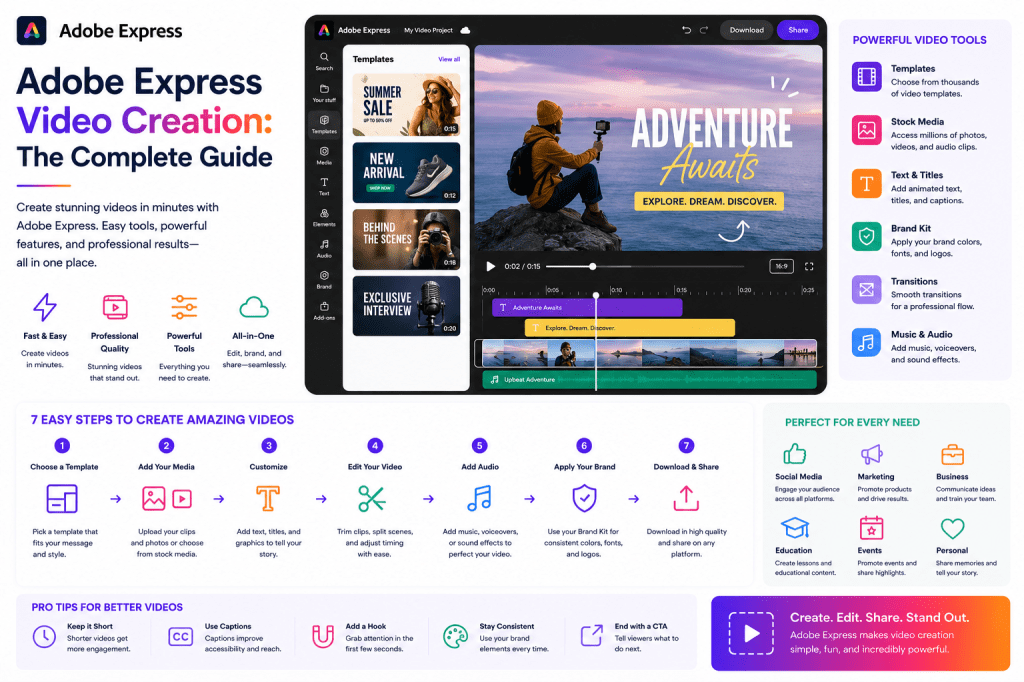
What Is Adobe Express Video Creation?
Adobe Express includes built-in video creation and editing tools designed for users who need professional-looking videos without becoming expert video editors.
Users can create:
- Social media videos
- Promotional videos
- Product demonstrations
- Educational content
- YouTube Shorts
- Instagram Reels
- Slideshows
- Event announcements
The platform emphasizes speed, simplicity, and productivity.
Why Video Matters
Video continues to outperform many other content formats.
Benefits include:
Higher Engagement
Videos often attract more attention than static graphics.
Better Information Retention
People tend to remember visual content more effectively.
Increased Reach
Most social media platforms prioritize video content.
Stronger Brand Connection
Video allows businesses to communicate personality and emotion.
These advantages make video a critical component of modern marketing.
Who Should Use Adobe Express for Video?
Adobe Express is particularly useful for:
Small Businesses
Create promotional videos without hiring editors.
Marketers
Produce campaign assets quickly.
Educators
Build instructional content.
Consultants
Create professional thought leadership videos.
Content Creators
Generate social media content efficiently.
Non-Designers
Create polished videos without advanced editing knowledge.
Types of Videos You Can Create
Social Media Videos
Social media platforms increasingly prioritize video.
Examples include:
- LinkedIn videos
- Instagram videos
- Facebook videos
- X video posts
Adobe Express provides templates optimized for social sharing.
Instagram Reels
Reels remain one of the most popular content formats.
Businesses can create:
- Educational clips
- Product showcases
- Behind-the-scenes content
- Tips and tutorials
Adobe Express helps simplify production.
YouTube Shorts
Short-form video continues to grow rapidly.
Adobe Express supports:
- Vertical video layouts
- Captions
- Branding
- Promotional elements
This makes it suitable for YouTube Shorts workflows.
Promotional Videos
Marketing teams frequently need videos for:
- Product launches
- Service announcements
- Special offers
- Event promotions
Adobe Express templates accelerate production.
Educational Videos
Educational content is valuable across many industries.
Examples include:
- Tutorials
- Training content
- Product walkthroughs
- Explainer videos
Adobe Express allows users to combine text, visuals, and narration into engaging educational content.
Slideshow Videos
Sometimes simple presentations can be transformed into videos.
Examples include:
- Case studies
- Customer success stories
- Product highlights
- Portfolio showcases
Slideshow videos are easy to create and highly versatile.
Core Video Features
Video Templates
Templates help users avoid starting from a blank timeline.
Benefits include:
- Faster production
- Professional layouts
- Consistent branding
Templates can be customized for virtually any purpose.
Text Overlays
Text overlays help communicate key messages.
Common uses include:
- Headlines
- Captions
- Call-to-actions
- Explanations
This improves accessibility and viewer comprehension.
Transitions
Transitions help create smooth movement between scenes.
Benefits include:
- Better flow
- More professional appearance
- Improved viewer experience
Music and Audio
Audio is critical for engagement.
Adobe Express allows users to add:
- Background music
- Voiceovers
- Sound effects
This helps create more dynamic content.
Branding Elements
Brand consistency remains important for video.
Users can incorporate:
- Logos
- Colors
- Fonts
- Brand graphics
through Adobe Express Brand Kits.
AI-Powered Video Features
Artificial intelligence is increasingly influencing video production.
Adobe Express AI tools help users:
Generate Ideas
Create video concepts quickly.
Create Scripts
Develop initial content drafts.
Generate Visual Assets
Create supporting imagery.
Repurpose Content
Transform articles into video content.
These capabilities significantly reduce production effort.
Creating a Promotional Video
A typical workflow might look like:
Step 1
Define objective.
Example:
Promote a new service offering.
Step 2
Select a video template.
Step 3
Add branding.
Step 4
Insert text and visuals.
Step 5
Add music.
Step 6
Export and publish.
Many promotional videos can be completed in under an hour.
Creating Social Media Videos
Social media videos should be:
- Short
- Clear
- Engaging
- Mobile-friendly
A common structure includes:
Hook
Capture attention immediately.
Value
Deliver useful information.
Call-to-Action
Tell viewers what to do next.
Adobe Express templates help enforce this structure.
Creating Educational Videos
Educational content performs well because it provides value.
Examples include:
- How-to videos
- Product tutorials
- Industry insights
- Training materials
Adobe Express allows users to combine:
- Slides
- Graphics
- Narration
- Branding
into cohesive educational videos.
Content Repurposing for Video
Video creation becomes easier when existing content is reused.
A blog article can become:
- Short video clips
- Educational videos
- Social media videos
- Presentation-based videos
Adobe Express helps transform written content into visual formats.
This significantly improves content ROI.
Video Workflows for Small Businesses
Small businesses often have limited resources.
A simple weekly workflow might include:
Monday
Publish article.
Tuesday
Create promotional video.
Wednesday
Create social clips.
Thursday
Create educational content.
Friday
Schedule publishing.
This workflow can support consistent marketing without overwhelming staff.
Video Workflows for Consultants
Consultants frequently need:
- Thought leadership videos
- Webinar promotions
- Client education content
Adobe Express enables professional video production without requiring extensive technical skills.
Video Workflows for Marketing Teams
Marketing departments often create:
- Campaign videos
- Product launches
- Brand awareness content
- Event promotions
Adobe Express can accelerate these workflows through templates and reusable assets.
Using Brand Kits in Video Production
Brand Kits improve consistency across video content.
Benefits include:
Unified Appearance
Every video follows brand standards.
Faster Production
Brand assets are readily available.
Improved Recognition
Viewers associate videos with the organization more easily.
Common Video Creation Mistakes
Overly Long Videos
Attention spans are limited.
Keep videos focused.
Weak Opening
The first few seconds are critical.
Start with a strong hook.
Inconsistent Branding
Brand Kits help prevent this.
No Call-to-Action
Every video should have a purpose.
Tell viewers what to do next.
Poor Audio Quality
Audio often matters as much as visuals.
Ensure clarity and consistency.
Adobe Express vs Traditional Video Editors
| Feature | Adobe Express | Advanced Video Editors |
|---|---|---|
| Ease of Use | High | Moderate to Difficult |
| Learning Curve | Low | Higher |
| Templates | Extensive | Limited |
| AI Assistance | Built-In | Varies |
| Social Media Focus | Strong | General |
| Advanced Editing | Limited | Extensive |
| Productivity | Excellent | Moderate |
Adobe Express prioritizes speed and accessibility rather than advanced cinematic editing.
Future of Video Creation
Several trends are shaping video production:
- AI-generated content
- Automated editing
- Personalized video experiences
- Short-form video growth
- Workflow automation
Adobe Express is increasingly incorporating these capabilities into its platform.
Conclusion
Adobe Express makes video creation accessible to businesses, marketers, educators, consultants, and creators who need professional content without the complexity of traditional video editing software.
Through templates, AI tools, Brand Kits, audio capabilities, and social-media-focused workflows, Adobe Express enables users to produce engaging videos quickly and efficiently.
For many organizations, the platform offers an ideal balance between simplicity and capability—allowing them to create more video content while spending less time on production.
As video continues to dominate digital communication, Adobe Express is becoming an increasingly valuable tool for organizations looking to scale their content efforts.
Related Guides
- Adobe Express AI Assistant
- Adobe Express Automation
- Adobe Express Productivity Workflows
- Adobe Express Templates
- Adobe Express Brand Kits
- Adobe Express Content Repurposing
- Adobe Express Integrations
- Adobe Express for Small Business
- Adobe Express AI Tools
- Adobe Express for Social Media







 Acrobat Express Pro