Every organization has workflows.
Some workflows are efficient.
Others are filled with repetitive tasks, manual processes, bottlenecks, and unnecessary delays.
As content demands increase, businesses often discover that creating content is not their biggest challenge.
Managing the process is.
Teams spend significant amounts of time:
- Recreating assets
- Applying branding
- Requesting approvals
- Updating content
- Reformatting designs
- Repurposing materials
- Coordinating between departments
Workflow automation helps reduce this effort.
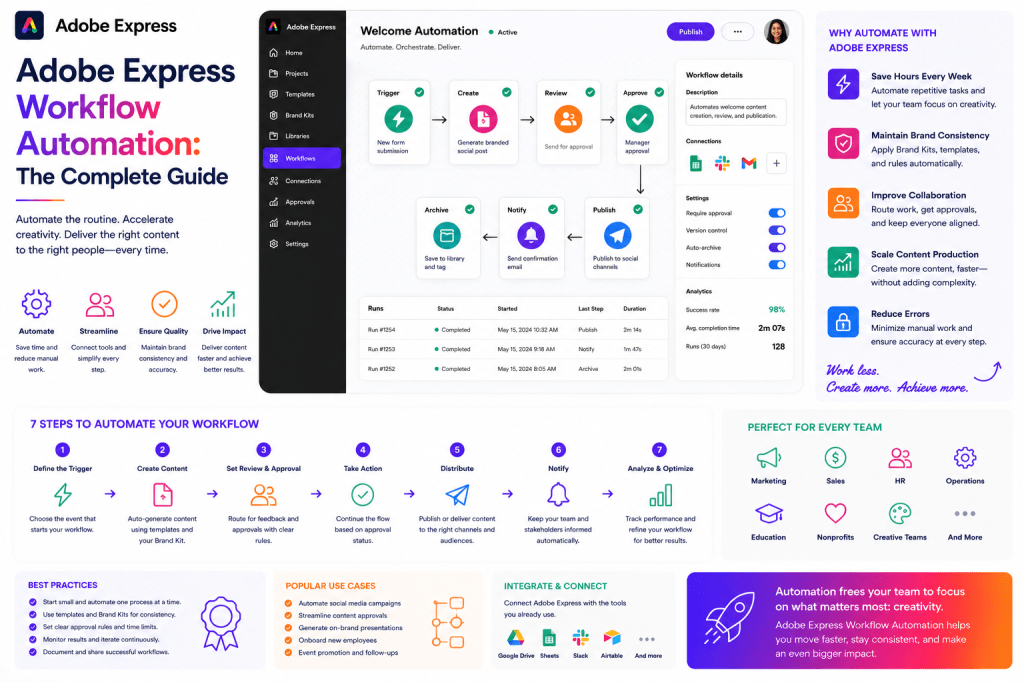
Adobe Express supports workflow automation by combining templates, Brand Kits, AI-powered content creation, content repurposing, and standardized production systems.
This guide explores how organizations can use Adobe Express to automate content workflows and improve productivity.
What Is Workflow Automation?
Workflow automation is the use of systems, processes, and technology to reduce manual work.
The objective is simple:
Eliminate repetitive tasks so people can focus on higher-value activities.
Automation can apply to:
- Content creation
- Marketing campaigns
- Internal communications
- Training materials
- Customer onboarding
- Brand management
The result is greater efficiency and consistency.
Why Workflow Automation Matters
Organizations increasingly face:
More Content Demand
Every channel requires content.
Faster Timelines
Campaigns move quickly.
Limited Resources
Teams must accomplish more with fewer people.
Higher Expectations
Audiences expect timely communication.
Workflow automation helps organizations scale without dramatically increasing workload.
Common Workflow Problems
Many teams experience:
Repetitive Tasks
The same activities occur repeatedly.
Approval Delays
Projects wait for review.
Asset Duplication
Existing content is recreated.
Inconsistent Branding
Different teams use different assets.
Manual Content Adaptation
Content is repeatedly resized and reformatted.
Automation helps solve these challenges.
Why Adobe Express Supports Workflow Automation
Adobe Express includes several automation-friendly capabilities:
- Templates
- Brand Kits
- AI tools
- Content repurposing
- Asset reuse
- Standardized workflows
Together these features reduce manual effort across content operations.
The Workflow Automation Framework
Automation typically focuses on six areas.
1. Planning Automation
Content planning often involves repetitive activities.
Examples include:
Content Calendars
Schedule recurring content.
Campaign Planning
Standardize launch processes.
Editorial Workflows
Create repeatable publishing systems.
Planning frameworks reduce decision fatigue.
2. Creation Automation
Content creation often contains repetitive elements.
Adobe Express helps automate:
Design Layouts
Templates provide structure.
Brand Application
Brand Kits apply standards.
Content Variations
Assets can be adapted quickly.
Creation becomes significantly faster.
3. Branding Automation
One of the most valuable automation opportunities.
Adobe Express Brand Kits automate:
Logo Usage
Approved assets remain available.
Typography
Consistent fonts are applied.
Color Selection
Brand palettes remain standardized.
Visual Consistency
Content follows organizational guidelines.
This reduces branding errors.
4. Content Repurposing Automation
One asset can become many.
Example:
Original asset:
Webinar.
Repurposed into:
- Social media graphics
- Blog articles
- Video clips
- Presentations
- Infographics
Adobe Express simplifies these transformations.
5. Approval Automation
Organizations often create repeatable approval workflows.
Examples include:
Marketing Reviews
Campaign validation.
Legal Reviews
Compliance checks.
Executive Approvals
Leadership authorization.
Standardized processes reduce delays.
6. Distribution Automation
Publishing content can also become standardized.
Examples include:
- Marketing campaigns
- Employee communications
- Educational resources
- Customer onboarding materials
Automation helps ensure consistency.
Workflow Automation for Marketing Teams
Marketing departments frequently automate:
Campaign Creation
Templates reduce effort.
Social Media Content
Standardized assets improve speed.
Product Launches
Repeatable workflows improve execution.
Educational Content
Scalable production systems.
Adobe Express supports each of these activities.
Workflow Automation for Agencies
Agencies often face:
- Multiple clients
- Multiple brands
- Multiple campaigns
Automation helps agencies:
Improve Efficiency
Reduce repetitive work.
Increase Output
Create more content.
Maintain Consistency
Use Brand Kits and templates.
Improve Profitability
Lower production costs.
Workflow Automation for HR Teams
HR departments can automate:
Recruitment Content
Standardized campaigns.
Employee Communications
Repeatable announcements.
Onboarding Materials
Reusable resources.
Training Content
Scalable learning systems.
Adobe Express helps streamline HR content production.
Workflow Automation for Customer Success
Customer Success teams frequently automate:
Onboarding Assets
Standardized experiences.
Training Materials
Reusable content.
Product Adoption Campaigns
Repeatable communications.
Customer Updates
Consistent messaging.
Automation improves scalability.
AI and Workflow Automation
Artificial intelligence is becoming a major automation driver.
Adobe Express AI can assist with:
Content Drafting
Generate starting points.
Idea Generation
Support planning.
Messaging Variations
Create alternatives.
Asset Creation
Reduce manual work.
AI helps accelerate workflows.
Building an Automated Workflow
A simple automation framework might include:
Step 1
Define recurring activities.
Step 2
Create templates.
Step 3
Build Brand Kits.
Step 4
Develop approval processes.
Step 5
Implement content repurposing.
Step 6
Measure outcomes.
Adobe Express supports each stage.
Templates as Automation Tools
Templates are among the most powerful workflow automation assets.
Examples include:
Social Media Templates
Recurring content.
Event Templates
Promotional campaigns.
Presentation Templates
Standardized communications.
Training Templates
Educational resources.
Templates eliminate repetitive design work.
Content Operations and Automation
Workflow automation is a key component of Content Operations.
Benefits include:
Faster Production
More content in less time.
Better Consistency
Standardized outputs.
Reduced Errors
Less manual intervention.
Improved Scalability
Support for growth.
Adobe Express helps enable all four.
Measuring Workflow Automation Success
Important metrics include:
Time Saved
Reduction in manual effort.
Production Speed
Faster content creation.
Brand Compliance
Consistency improvements.
Asset Reuse
Content utilization.
Team Productivity
Operational gains.
Measurement helps identify opportunities for optimization.
Common Workflow Automation Mistakes
Automating Poor Processes
Automation improves workflows.
It does not fix broken ones.
Ignoring Governance
Standards remain important.
Too Many Exceptions
Reduce consistency.
Poor Documentation
Teams need clarity.
Lack of Measurement
Improvement becomes difficult.
Example Automated Workflow
Imagine a monthly product update campaign.
Planning
Content calendar triggers activity.
Creation
Templates accelerate production.
Branding
Brand Kits apply standards.
Review
Stakeholders approve assets.
Distribution
Content is published.
Repurposing
Assets support future initiatives.
Adobe Express can support every stage.
Adobe Express vs Traditional Workflows
| Feature | Adobe Express | Traditional Workflow |
|---|---|---|
| Templates | Extensive | Variable |
| Brand Automation | Strong | Manual |
| AI Assistance | Built-In | Limited |
| Content Repurposing | Easy | Time-Consuming |
| Workflow Consistency | High | Variable |
| Productivity | High | Moderate |
Adobe Express helps organizations reduce friction across content production.
Future of Workflow Automation
Several trends are shaping the future:
- AI-powered content systems
- Automated asset creation
- Intelligent workflow orchestration
- Dynamic content adaptation
- Personalized content production
Workflow automation will become increasingly important as content volumes continue to grow.
Workflow Automation Maturity Model
Level 1: Manual
Content created individually.
Level 2: Structured
Templates introduced.
Level 3: Standardized
Workflows documented.
Level 4: Automated
AI and automation support scale.
Adobe Express can support progression through every stage.
Conclusion
Workflow automation is becoming a competitive advantage for organizations that create content at scale.
By reducing repetitive work, improving consistency, and accelerating production, automation allows teams to focus on strategic and creative activities.
Adobe Express supports workflow automation through templates, Brand Kits, AI-powered content creation, content repurposing workflows, and standardized production systems.
Whether supporting marketing, sales, HR, customer success, education, or enterprise communications, Adobe Express helps organizations build faster, more efficient content workflows.
As AI and automation continue to reshape content production, Adobe Express is positioned to play an increasingly important role in modern workflow management.
Related Guides
- Adobe Express Enterprise Workflows
- Adobe Express Team Collaboration
- Adobe Express Content Operations
- Adobe Express Creative Operations
- Adobe Express Marketing Automation
- Adobe Express AI Productivity
- Adobe Express Digital Asset Management
- Adobe Express Brand Management
- Adobe Express Templates
- Adobe Express Brand Kits







 Acrobat Express Pro