YouTube has evolved from a simple video-sharing platform into one of the world’s largest content ecosystems.
Today, creators use YouTube to:
- Build audiences
- Generate revenue
- Promote businesses
- Educate customers
- Establish authority
- Create communities
However, successful YouTube channels require much more than recording videos.
Creators must also produce:
- Thumbnails
- Channel branding
- Promotional graphics
- YouTube Shorts
- Community posts
- Social media assets
- Presentation slides
- Marketing materials
Adobe Express helps simplify these tasks by combining design tools, AI-powered content creation, video editing capabilities, Brand Kits, templates, and content repurposing workflows into a single platform.
This guide explores how YouTube creators can use Adobe Express to improve efficiency and grow their channels.
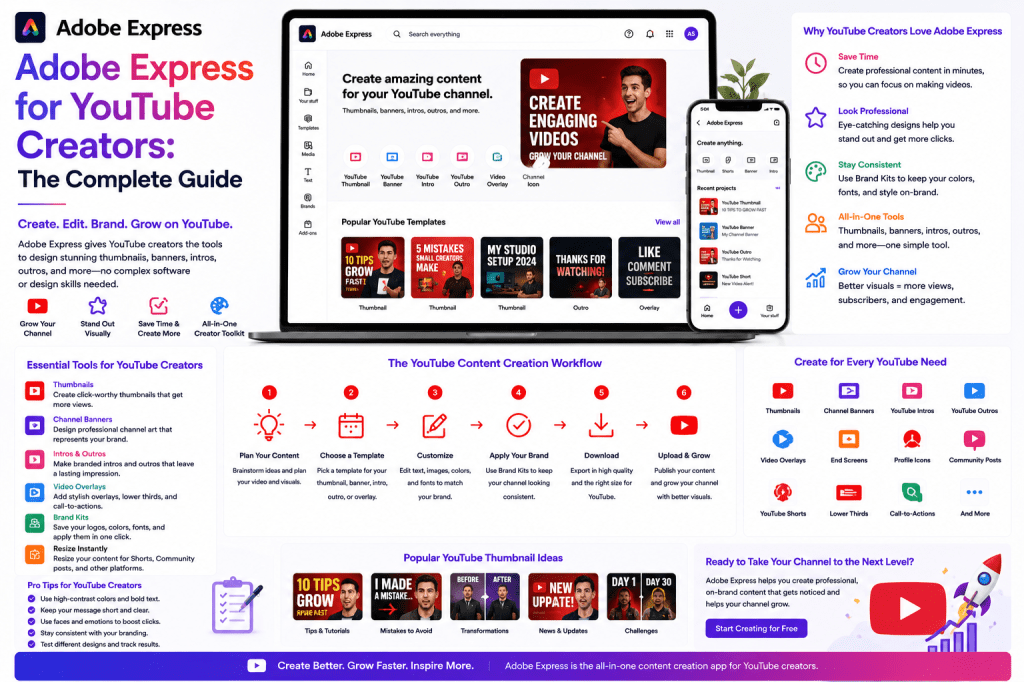
Why YouTube Creators Need More Than Video Editing
Many creators focus entirely on video production.
However, channel growth is often influenced by factors outside the video itself.
Examples include:
Thumbnail Quality
Higher click-through rates.
Channel Branding
Improved recognition.
Content Promotion
Increased visibility.
Shorts Strategy
Expanded reach.
Social Media Distribution
Additional traffic sources.
Adobe Express supports all of these activities.
What Is Adobe Express?
Adobe Express is a content creation platform that helps users create:
- Graphics
- Videos
- Presentations
- Social media content
- Marketing materials
Its focus is on accessibility and productivity rather than advanced professional editing.
For YouTube creators, Adobe Express functions as a content production companion rather than a replacement for dedicated video editing software.
Who Should Use Adobe Express?
Adobe Express is particularly valuable for:
New Creators
Create professional assets without extensive design experience.
Educational Channels
Develop supporting visuals and presentations.
Business Channels
Produce marketing and promotional content.
Solo Creators
Reduce production workload.
Agencies Managing Channels
Create scalable YouTube workflows.
Creating YouTube Thumbnails
Thumbnails are often the most important visual asset on YouTube.
A great thumbnail can significantly increase click-through rates.
Adobe Express helps creators build:
- Tutorial thumbnails
- Product review thumbnails
- Educational thumbnails
- Promotional thumbnails
through templates and design tools.
Characteristics of Effective Thumbnails
Successful thumbnails often include:
Clear Subject
The main focus is immediately obvious.
Strong Contrast
Important elements stand out.
Readable Text
Short and impactful wording.
Consistent Branding
Recognizable channel identity.
Adobe Express templates provide strong starting points.
Building a Thumbnail System
One of the most effective strategies is creating reusable thumbnail templates.
Example categories:
Tutorials
Step-by-step educational content.
Reviews
Product evaluations.
News Updates
Industry developments.
Case Studies
Real-world examples.
Templates reduce production time and improve consistency.
Creating YouTube Channel Branding
Branding helps viewers recognize content instantly.
Adobe Express can be used to create:
- Channel banners
- Profile graphics
- Video overlays
- Promotional assets
Consistent branding strengthens channel identity.
Using Brand Kits for YouTube
Adobe Express Brand Kits allow creators to standardize:
- Colors
- Fonts
- Logos
- Visual styles
Benefits include:
Faster Production
Assets are readily available.
Better Recognition
Viewers identify content more easily.
Professional Appearance
Consistent presentation across videos.
Creating YouTube Shorts
Short-form video has become increasingly important.
YouTube Shorts can:
- Reach new audiences
- Increase visibility
- Promote long-form content
Adobe Express supports:
- Vertical video formats
- Captions
- Branding
- Promotional visuals
This makes Shorts production more efficient.
Promotional Graphics for YouTube Videos
Many creators overlook promotion.
A single YouTube video can be supported by:
LinkedIn Graphics
Promote business-focused content.
Instagram Posts
Reach broader audiences.
X Graphics
Drive additional engagement.
Facebook Content
Support community building.
Adobe Express simplifies the creation of promotional assets.
AI-Powered Content Creation
Adobe Express AI tools help creators accelerate production.
Examples include:
Video Title Ideas
Generate headline concepts.
Example:
Create ten YouTube title ideas about AI agents.
Video Descriptions
Draft descriptions quickly.
Promotional Captions
Create social media content.
Thumbnail Concepts
Generate creative directions.
AI helps reduce creative friction.
Content Repurposing for YouTube Creators
One of the most valuable strategies is content repurposing.
A single YouTube video can become:
Blog Article
Expand on the video’s topic.
LinkedIn Post
Share insights.
Instagram Carousel
Visual summary.
Infographic
Key statistics.
Newsletter Content
Audience engagement.
Adobe Express supports the entire repurposing process.
Educational Channel Workflows
Educational creators often produce:
- Tutorials
- Explanations
- Walkthroughs
- Demonstrations
Adobe Express helps create:
- Supporting visuals
- Presentation slides
- Educational graphics
- Promotional materials
This improves viewer understanding.
Business YouTube Channel Workflows
Businesses frequently use YouTube for:
- Product education
- Customer onboarding
- Thought leadership
- Marketing
Adobe Express supports these initiatives through scalable content production.
Weekly Creator Workflow
A simple workflow might look like:
Monday
Research and scripting.
Tuesday
Video recording.
Wednesday
Video editing.
Thursday
Create thumbnail and promotional assets.
Friday
Publish and distribute.
Adobe Express supports stages four and five particularly well.
Building a YouTube Content Engine
Successful creators think in systems rather than individual videos.
Example:
One Video
Core asset.
Thumbnail
Improve clicks.
Shorts
Increase discovery.
Social Posts
Expand reach.
Blog Article
Improve SEO.
Infographic
Support education.
One video becomes multiple content assets.
Collaboration for YouTube Teams
Larger channels often involve:
- Editors
- Designers
- Producers
- Marketing teams
Adobe Express helps standardize:
- Branding
- Templates
- Asset creation
This improves operational efficiency.
YouTube Marketing Campaigns
Video launches can be supported through:
Countdown Graphics
Build anticipation.
Announcement Posts
Drive awareness.
Promotional Videos
Increase engagement.
Community Graphics
Support audience interaction.
Adobe Express simplifies campaign asset creation.
Measuring Success
Important metrics include:
Click-Through Rate
Thumbnail effectiveness.
Watch Time
Audience retention.
Subscribers
Channel growth.
Engagement
Comments and interactions.
External Traffic
Visitors from social platforms.
These insights help refine future content.
Common YouTube Creator Mistakes
Weak Thumbnails
Low click-through rates.
Inconsistent Branding
Reduced recognition.
No Promotion Strategy
Videos receive limited exposure.
Ignoring Shorts
Missed discovery opportunities.
Lack of Repurposing
Underutilized content assets.
Adobe Express vs Traditional Creator Workflows
| Feature | Adobe Express | Traditional Workflow |
|---|---|---|
| Thumbnail Creation | Fast | Manual |
| Branding | Centralized | Fragmented |
| Social Promotion | Easy | More Complex |
| Shorts Support | Strong | Varies |
| Content Repurposing | Efficient | Time-Consuming |
| AI Assistance | Built-In | Separate Tools |
Adobe Express helps reduce workload while improving consistency.
Future of Creator Workflows
Several trends are shaping creator operations:
- AI-assisted content creation
- Automated repurposing
- Multi-platform publishing
- Personalized content
- Creator productivity systems
Adobe Express continues expanding its capabilities in these areas.
Conclusion
YouTube success depends on much more than producing great videos.
Creators also need strong thumbnails, consistent branding, promotional content, Shorts strategies, and efficient workflows.
Adobe Express provides a practical solution for managing these supporting activities through templates, Brand Kits, AI tools, video capabilities, and content repurposing workflows.
Whether you are a solo creator, educator, business owner, or agency managing YouTube channels, Adobe Express can help streamline content production and support channel growth.
For creators seeking to build scalable systems rather than constantly starting from scratch, Adobe Express offers a powerful foundation.
Related Guides
- Adobe Express AI Assistant
- Adobe Express Video Creation
- Adobe Express Content Repurposing
- Adobe Express Templates
- Adobe Express Brand Kits
- Adobe Express for Marketing Teams
- Adobe Express for Agencies
- Adobe Express for LinkedIn Marketing
- Building an AI Content Publishing System with Adobe Express
- Adobe Express vs Canva







 Acrobat Express Pro