Introduction
When people look for an easy-to-use design platform, two names almost always appear at the top of the list:
Both platforms allow users to create graphics, videos, presentations, social media content, marketing materials, and branded assets without requiring advanced design skills.
Both offer:
- Templates
- AI tools
- Brand management
- Collaboration features
- Content creation workflows
But despite their similarities, they serve slightly different audiences and priorities.
This guide compares Adobe Express and Canva across the categories that matter most to businesses, marketers, creators, educators, consultants, and small teams.
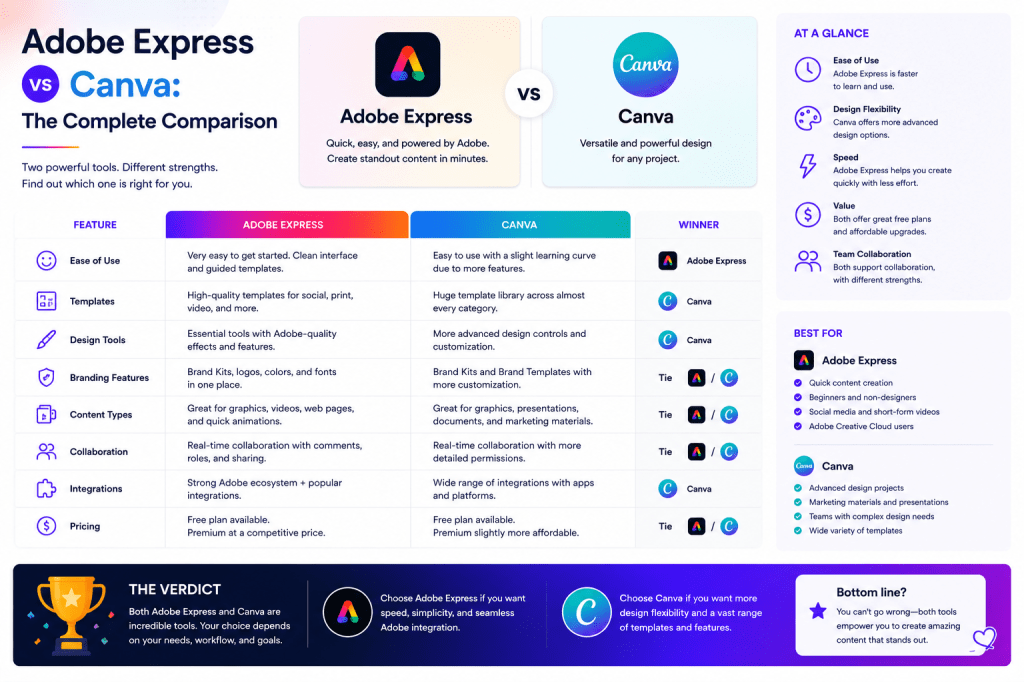
Quick Verdict
If your organization already uses Adobe products, Adobe Express is often the stronger choice.
If your primary goal is simplicity and a massive template ecosystem, Canva remains extremely compelling.
Choose Adobe Express if:
- You use Adobe Creative Cloud
- You use Adobe Acrobat
- You want deeper Adobe ecosystem integration
- You need access to Adobe Firefly AI features
- You value professional creative workflows
Choose Canva if:
- You prioritize ease of use
- You want an enormous template library
- You need quick content creation
- Your team has little design experience
- You primarily focus on social media marketing
For many businesses, both platforms are capable solutions.
Platform Overview
Adobe Express
Adobe Express is Adobe’s simplified content creation platform designed for:
- Marketing teams
- Small businesses
- Content creators
- Educators
- Consultants
It combines:
- Graphic design
- Video creation
- AI tools
- Templates
- Brand Kits
- Publishing workflows
with deep connections to the Adobe ecosystem.
Canva
Canva focuses on democratizing design.
It provides:
- Templates
- Collaboration
- Presentation tools
- Video editing
- AI-powered content creation
through a highly approachable interface.
Canva’s strength lies in accessibility and speed.
User Interface Comparison
Adobe Express
Adobe Express offers a clean interface that feels familiar to Adobe users.
Advantages:
- Modern design
- Integration with Adobe tools
- Professional workflow orientation
Potential challenge:
- Slightly more complex for complete beginners
Canva
Canva is widely regarded as one of the easiest design platforms available.
Advantages:
- Intuitive navigation
- Minimal learning curve
- Beginner-friendly workflows
For first-time users, Canva often feels simpler.
Winner: Canva
For pure ease of use, Canva generally has the advantage.
Templates Comparison
Templates are one of the most important factors for productivity.
Adobe Express Templates
Adobe Express provides templates for:
- Social media
- Marketing
- Video
- Presentations
- Business communications
Templates integrate well with Brand Kits and Adobe workflows.
Canva Templates
Canva is known for its massive template ecosystem.
Users can access:
- Social media templates
- Presentation templates
- Flyers
- Posters
- Educational materials
- Business content
Canva’s template library remains one of its strongest competitive advantages.
Winner: Canva
Canva currently offers a larger and broader template collection.
AI Tools Comparison
Artificial intelligence is becoming a major differentiator.
Adobe Express AI
Adobe Express leverages:
- Adobe Firefly
- Generative AI
- AI Assistant
- Text-to-image generation
- AI content creation
Adobe’s AI strategy is closely integrated with its creative ecosystem.
Canva AI
Canva offers:
- Magic Design
- Magic Write
- AI image generation
- AI-assisted layouts
Canva has rapidly expanded its AI capabilities.
Winner: Adobe Express
Adobe Firefly gives Adobe Express a slight edge for creative AI workflows.
Image Generation Comparison
AI-generated visuals are increasingly important.
Adobe Express
Powered by Adobe Firefly.
Benefits include:
- Commercially focused workflows
- Strong creative controls
- Adobe ecosystem integration
Canva
Offers image generation through integrated AI tools.
Benefits include:
- Simplicity
- Accessibility
- Fast results
Winner: Adobe Express
Firefly remains one of Adobe’s strongest competitive advantages.
Video Creation Comparison
Video content continues to grow in importance.
Adobe Express
Supports:
- Promotional videos
- Reels
- Shorts
- Educational videos
- Branded video content
Strong integration with Adobe video workflows.
Canva
Provides:
- Video templates
- Social media videos
- Presentations
- Promotional content
Very approachable for beginners.
Winner: Tie
Both platforms perform well for most business video needs.
Brand Management Comparison
Maintaining consistency becomes increasingly important as organizations grow.
Adobe Express Brand Kits
Supports:
- Logos
- Colors
- Fonts
- Brand assets
Strong integration with Adobe workflows.
Canva Brand Kits
Offers:
- Brand colors
- Fonts
- Logos
- Templates
Widely used by marketing teams.
Winner: Tie
Both platforms provide excellent brand management capabilities.
Social Media Content Creation
This is one of the most common use cases.
Adobe Express
Strong support for:
- X
- YouTube
Integrated with Adobe creative assets.
Canva
Known for rapid social content production.
Particularly popular among:
- Influencers
- Small businesses
- Social media managers
Winner: Canva
Canva’s social media ecosystem remains extremely mature.
Adobe Ecosystem Integration
This category strongly favors Adobe Express.
Adobe Express connects with:
Canva cannot match this level of Adobe integration.
Winner: Adobe Express
Collaboration Features
Modern content creation often involves teams.
Adobe Express
Supports:
- Shared branding
- Team collaboration
- Content workflows
Canva
Known for:
- Real-time collaboration
- Shared projects
- Team templates
Winner: Canva
Canva has historically focused heavily on collaborative design.
Small Business Comparison
Small businesses need:
- Affordability
- Ease of use
- Productivity
Adobe Express
Excellent if:
- You already use Adobe products
- You need advanced creative capabilities
Canva
Excellent if:
- You want simplicity
- You need fast content production
Winner: Canva
For most small businesses starting from scratch.
Marketing Team Comparison
Marketing teams require:
- Brand consistency
- Workflow management
- Content scalability
Adobe Express
Particularly strong when paired with Adobe Creative Cloud.
Canva
Strong for rapid campaign production.
Winner: Adobe Express
For larger or more mature marketing organizations.
Educational Use Comparison
Teachers and trainers often need:
- Presentations
- Worksheets
- Graphics
- Videos
Both platforms perform extremely wellWinner: Tie
Pricing Considerations
Pricing changes frequently.
In general:
Adobe Express
Often provides additional value for existing Adobe subscribers.
Canva
Provides strong standalone value.
Prospective users should compare current pricing before deciding.
Strengths and Weaknesses
Adobe Express Strengths
- Adobe ecosystem integration
- Firefly AI capabilities
- Professional creative workflows
- Strong branding support
- Advanced AI features
Adobe Express Weaknesses
- Slightly steeper learning curve
- Smaller template ecosystem
Canva Strengths
- Ease of use
- Massive template library
- Excellent collaboration
- Fast onboarding
- Strong social media workflows
Canva Weaknesses
- Less integrated with professional creative software
- Fewer advanced creative workflow capabilities
Which Platform Should You Choose?
Choose Adobe Express If:
- You already use Adobe Creative Cloud.
- You use Acrobat regularly.
- You need Firefly AI features.
- You want deeper creative workflows.
- You produce significant marketing content.
Choose Canva If:
- You are new to design tools.
- You want maximum simplicity.
- You primarily create social media content.
- You need a large template library.
- You prioritize ease of collaboration.
Future Outlook
Both platforms are investing heavily in:
- Artificial intelligence
- Workflow automation
- Video creation
- Content repurposing
- Team collaboration
Competition between Adobe Express and Canva is likely to intensify as AI becomes a larger part of content creation.
Conclusion
Adobe Express and Canva are both excellent content creation platforms.
Canva continues to lead in ease of use, template variety, and social media-focused workflows.
Adobe Express excels through Adobe ecosystem integration, Firefly-powered AI capabilities, professional branding workflows, and connections to Creative Cloud applications.
For organizations already invested in Adobe products, Adobe Express often provides the strongest long-term value.
For individuals and small businesses seeking the fastest path to content creation, Canva remains an outstanding choice.
The best platform ultimately depends on your workflow, team structure, and content production goals.
Related Guides
- Adobe Express AI Assistant
- Adobe Express Automation
- Adobe Express Productivity Workflows
- Adobe Express Templates
- Adobe Express Brand Kits
- Adobe Express Content Repurposing
- Adobe Express Integrations
- Adobe Express Video Creation
- Adobe Express for Marketing Teams
- Adobe Express for Small Business







 Acrobat Express Pro