Creating content is only half the battle.
The real challenge is publishing content consistently over time.
Many organizations start with enthusiasm:
- Blog articles are written.
- Social media posts are created.
- Videos are recorded.
- Marketing campaigns are launched.
Then reality sets in.
Content becomes sporadic, deadlines are missed, campaigns overlap, and marketing efforts become reactive instead of strategic.
A content calendar solves this problem.
Combined with Adobe Express, a content calendar becomes much more than a planning tool—it becomes the foundation of a scalable content production system.
This guide explains how to build, manage, and optimize content calendars using Adobe Express.
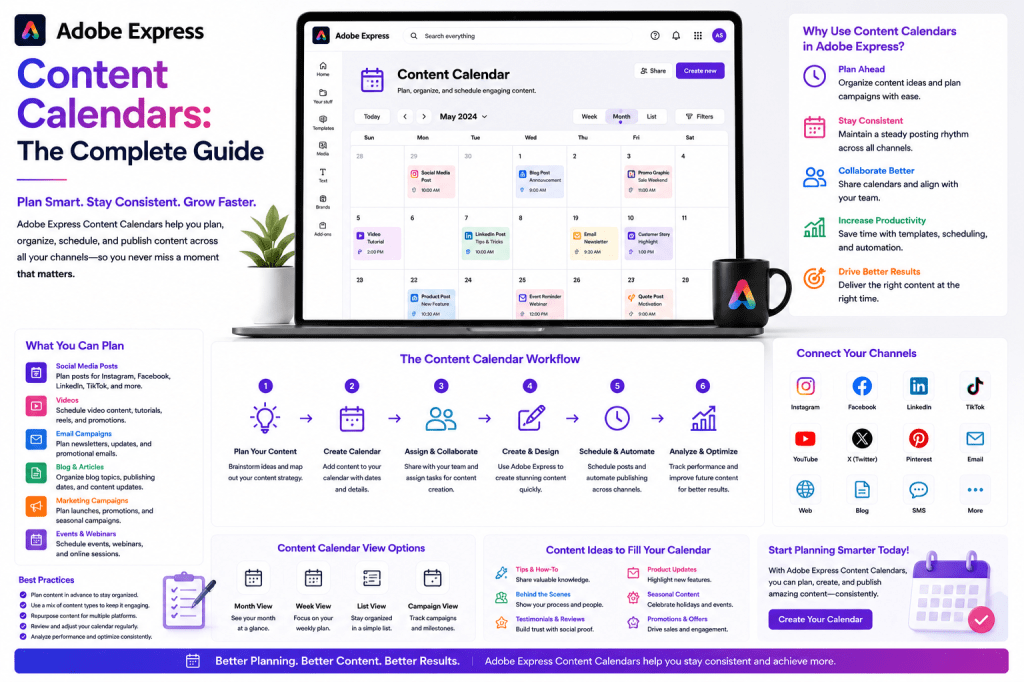
What Is a Content Calendar?
A content calendar is a structured plan that organizes content creation and publishing activities over a specific period.
It answers questions such as:
- What content will be published?
- When will it be published?
- Who is responsible?
- Which channels will be used?
- What objectives will the content support?
Instead of creating content at the last minute, teams work from a planned schedule.
Why Content Calendars Matter
Without a content calendar, organizations often experience:
Inconsistent Publishing
Weeks of activity followed by silence.
Repeated Topics
Publishing the same ideas repeatedly.
Missed Opportunities
Failing to align content with campaigns and events.
Team Confusion
Unclear responsibilities and deadlines.
Reactive Marketing
Constantly scrambling for content ideas.
A content calendar introduces structure and predictability.
Why Adobe Express Supports Content Calendar Workflows
Adobe Express combines:
- AI-powered content creation
- Templates
- Brand Kits
- Video tools
- Content repurposing
- Publishing workflows
This makes it an excellent platform for executing a content calendar.
Instead of simply planning content, teams can also create and distribute it within the same ecosystem.
Benefits of a Content Calendar
Consistency
Regular publishing builds audience trust.
Consistency is often more important than volume.
Better Planning
Campaigns can be prepared in advance.
This reduces stress and improves quality.
Improved Collaboration
Team members understand:
- Responsibilities
- Deadlines
- Priorities
This reduces confusion.
Strategic Alignment
Content can support:
- Product launches
- Events
- Seasonal campaigns
- Business objectives
rather than being created randomly.
Types of Content Calendars
Different organizations require different approaches.
Weekly Content Calendar
Suitable for:
- Small businesses
- Solo creators
- Consultants
Typical planning horizon:
1–4 weeks.
Monthly Content Calendar
Common among:
- Marketing teams
- Agencies
- Growing businesses
Provides better visibility across campaigns.
Quarterly Content Calendar
Useful for:
- Larger organizations
- Strategic planning
- Product launches
Allows long-term coordination.
Building a Content Calendar
A successful content calendar starts with planning.
Step 1: Define Goals
Examples:
Lead Generation
Attract potential customers.
Brand Awareness
Increase visibility.
Customer Education
Teach valuable concepts.
Recruiting
Support talent acquisition.
Every content item should support a goal.
Step 2: Define Content Pillars
Content pillars provide structure.
Examples include:
Educational Content
How-to guides and tutorials.
Industry Insights
Trends and observations.
Customer Stories
Case studies and testimonials.
Product Content
Features and updates.
Company Culture
Behind-the-scenes content.
Most organizations benefit from 3–5 content pillars.
Step 3: Choose Publishing Channels
Examples:
- YouTube
- Blog
- Email newsletter
Each channel serves different audiences.
Step 4: Establish Publishing Frequency
Example:
Blog
1 article per week.
5 posts per week.
YouTube
1 video per week.
Newsletter
2 per month.
Consistency is more important than aggressive publishing schedules.
Using Adobe Express AI for Content Planning
Adobe Express AI can help generate ideas.
Example prompts:
Generate 20 content ideas for a cybersecurity consultancy.
Create a month of LinkedIn content for a SaaS startup.
Suggest educational content for project managers.
This accelerates planning.
Creating a Monthly Content Calendar
A simple monthly framework might include:
Week 1
Educational content.
Week 2
Industry trends.
Week 3
Customer success stories.
Week 4
Product and service promotion.
This creates balance and variety.
Content Calendar for LinkedIn
A common LinkedIn schedule:
Monday
Industry insight.
Tuesday
Educational tip.
Wednesday
Carousel post.
Thursday
Case study.
Friday
Personal reflection.
Adobe Express templates help create assets efficiently.
Content Calendar for YouTube
Many creators follow:
Week 1
Tutorial.
Week 2
Industry analysis.
Week 3
Case study.
Week 4
Q&A or update.
Supporting graphics and promotional assets can be created with Adobe Express.
Content Calendar for Small Businesses
Small businesses often need simple systems.
Example:
Monday
Educational content.
Wednesday
Promotion.
Friday
Customer success story.
This schedule remains manageable while maintaining visibility.
Content Calendar for Agencies
Agencies frequently manage multiple clients.
A structured calendar helps track:
- Deliverables
- Campaigns
- Approvals
- Publishing dates
Adobe Express templates and Brand Kits improve efficiency across accounts.
Content Calendar for Marketing Teams
Marketing departments often coordinate:
- Product launches
- Campaigns
- Events
- Content marketing
A calendar ensures activities remain aligned.
Integrating Content Repurposing
One of the most effective strategies is planning repurposing in advance.
Example:
Core Asset
Blog article.
Repurposed Assets
- LinkedIn posts
- Carousel
- Infographic
- Video
- Newsletter
A calendar should schedule both original and repurposed content.
Seasonal Content Planning
Content calendars help organizations prepare for:
Industry Events
Conferences and trade shows.
Holidays
Seasonal campaigns.
Product Launches
Coordinated promotions.
Annual Activities
Budget cycles, hiring seasons, reporting periods.
Planning ahead improves execution.
AI-Powered Content Calendar Workflow
A modern workflow might look like:
Step 1
Generate ideas using AI.
Step 2
Assign ideas to content pillars.
Step 3
Create assets using Adobe Express.
Step 4
Apply Brand Kits.
Step 5
Schedule publishing.
Step 6
Measure results.
This creates a repeatable content engine.
Content Calendar Templates
Many organizations use recurring templates.
Examples include:
Weekly Educational Series
Teach a specific topic.
Monthly Case Study
Show customer outcomes.
Industry Trend Update
Discuss developments.
Product Feature Spotlight
Highlight capabilities.
Templates simplify planning.
Measuring Calendar Performance
Monitor:
Publishing Consistency
Did content go live as planned?
Engagement
Audience interaction.
Reach
Content visibility.
Leads
Business opportunities generated.
Traffic
Website visitors from content.
These metrics help refine future calendars.
Common Content Calendar Mistakes
Planning Too Much Content
Ambitious schedules often fail.
Start realistically.
Ignoring Repurposing
Existing content should support multiple assets.
No Content Pillars
Random topics weaken consistency.
Lack of Flexibility
Calendars should allow room for timely content.
Forgetting Measurement
Performance data should influence future planning.
Example Annual Content Calendar Framework
Q1
Education and awareness.
Q2
Growth and lead generation.
Q3
Case studies and proof.
Q4
Planning, trends, and forecasts.
This structure supports long-term consistency.
Adobe Express vs Traditional Content Planning
| Feature | Adobe Express Workflow | Traditional Workflow |
|---|---|---|
| Idea Generation | AI-Assisted | Manual |
| Asset Creation | Integrated | Multiple Tools |
| Branding | Brand Kits | Manual |
| Repurposing | Efficient | Time-Consuming |
| Collaboration | Streamlined | Fragmented |
| Publishing Preparation | Faster | Slower |
Adobe Express helps transform content calendars from planning documents into production systems.
Future of Content Calendars
Several trends are emerging:
- AI-generated content schedules
- Predictive content planning
- Automated repurposing
- Intelligent publishing recommendations
- Workflow orchestration
Adobe Express is increasingly positioned to support these advanced workflows.
Conclusion
A content calendar is one of the most important tools for maintaining consistency, improving efficiency, and supporting long-term marketing success.
Adobe Express enhances content calendar workflows through AI-assisted planning, templates, Brand Kits, content repurposing capabilities, and streamlined asset creation.
Organizations that combine structured planning with efficient production systems often outperform those relying on reactive content creation.
Whether you are a solo creator, small business, agency, or enterprise marketing team, a well-designed content calendar can become the foundation of a scalable content operation.
Related Guides
- Adobe Express AI Assistant
- Adobe Express Automation
- Adobe Express Productivity Workflows
- Adobe Express Content Repurposing
- Adobe Express Templates
- Adobe Express for Marketing Teams
- Adobe Express for Agencies
- Adobe Express for LinkedIn Marketing
- Adobe Express for YouTube Creators
- Building an AI Content Publishing System with Adobe Express








