Education has changed dramatically over the past decade.
Teachers, trainers, professors, instructional designers, online course creators, and corporate learning teams are expected to create increasingly engaging learning experiences while managing limited time and resources.
Today’s educators often need to produce:
- Lesson materials
- Presentation slides
- Infographics
- Videos
- Worksheets
- Social media content
- Student communications
- Learning resources
The challenge is creating all of these materials efficiently while maintaining quality and consistency.
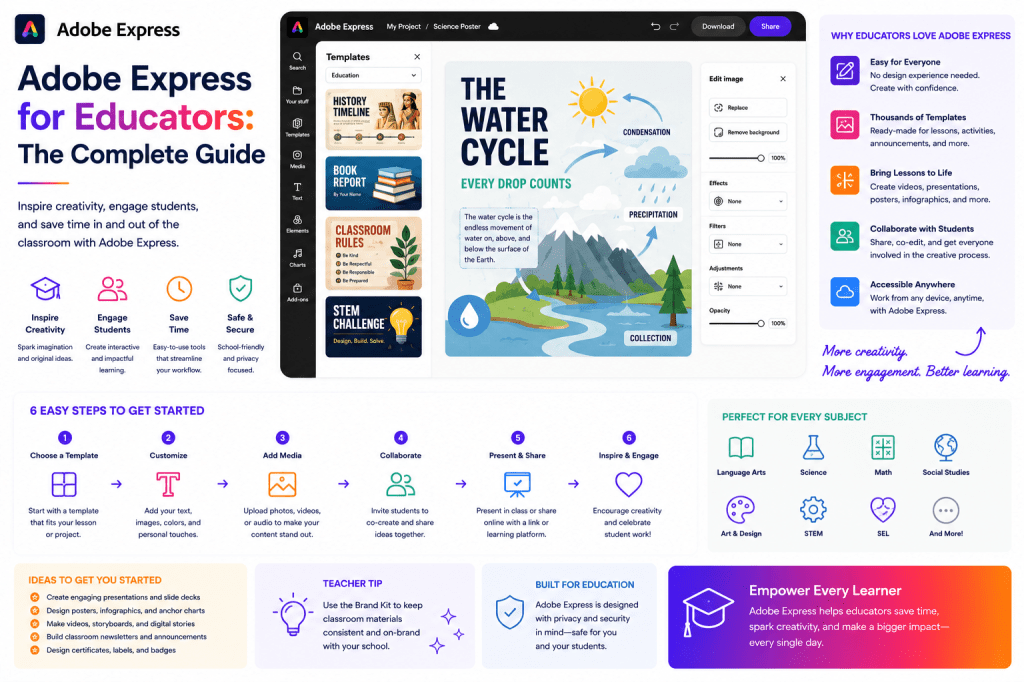
Adobe Express helps educators simplify content creation through templates, AI-powered tools, video creation features, Brand Kits, and visual design capabilities.
This guide explores how Adobe Express can support modern educational workflows.
Why Visual Learning Matters
Research consistently shows that visual content can improve understanding and retention.
Students often absorb information more effectively when concepts are presented through:
- Images
- Diagrams
- Videos
- Infographics
- Visual summaries
Visual learning can help simplify complex topics and improve engagement.
Adobe Express provides tools that allow educators to create these resources without requiring advanced design skills.
Who Can Use Adobe Express?
Adobe Express is useful for many educational roles.
Teachers
Create classroom materials.
University Lecturers
Develop presentations and visual content.
Online Course Creators
Produce educational assets.
Corporate Trainers
Build professional learning materials.
Instructional Designers
Develop scalable training content.
Educational Institutions
Maintain consistent branding across communications.
Key Benefits for Educators
Faster Content Creation
Templates eliminate the need to start from scratch.
Educators can focus on teaching rather than design.
Better Student Engagement
Visual content often increases participation and attention.
Professional Appearance
Educational materials look polished and consistent.
AI Assistance
Adobe Express AI helps generate ideas, summaries, and supporting content.
Multi-Format Learning Resources
Create:
- Graphics
- Videos
- Presentations
- Infographics
from a single platform.
Creating Classroom Presentations
Presentations remain one of the most common educational tools.
Adobe Express can help educators create:
- Lecture slides
- Training presentations
- Workshop materials
- Course introductions
Templates accelerate production while maintaining quality.
Educational Infographics
Infographics help explain concepts visually.
Examples include:
Historical Timelines
Show chronological events.
Scientific Processes
Explain systems and workflows.
Mathematical Concepts
Visualize relationships.
Business Frameworks
Summarize key ideas.
Adobe Express simplifies infographic creation.
Creating Educational Videos
Video is increasingly important in education.
Examples include:
- Lesson recordings
- Concept explanations
- Course introductions
- Demonstrations
- Tutorials
Adobe Express provides accessible video creation tools for educators.
Creating Course Graphics
Online courses often require:
- Module graphics
- Course banners
- Promotional visuals
- Student resources
Adobe Express templates make it easier to maintain a consistent visual identity throughout a course.
AI-Powered Educational Content
Adobe Express AI can support educational workflows.
Examples include:
Lesson Ideas
Example prompt:
Generate lesson topics about cybersecurity awareness for beginners.
Content Summaries
Convert long text into concise summaries.
Presentation Outlines
Create structured learning materials.
Learning Activity Ideas
Generate exercises and discussion topics.
AI helps educators spend less time on preparation.
Adobe Express for K–12 Education
Teachers frequently need:
Classroom Posters
Support learning environments.
Lesson Materials
Provide visual explanations.
Worksheets
Enhance student engagement.
Parent Communications
Share information professionally.
Adobe Express helps create these assets quickly.
Adobe Express for Higher Education
Universities and colleges often require:
- Research presentations
- Course materials
- Department communications
- Student recruitment content
Adobe Express supports both academic and administrative needs.
Adobe Express for Online Course Creators
Online education continues to grow.
Course creators often need:
Course Thumbnails
Professional branding.
Module Graphics
Visual organization.
Marketing Assets
Promote courses.
Educational Videos
Deliver learning content.
Adobe Express supports the entire course lifecycle.
Adobe Express for Corporate Training
Businesses increasingly invest in employee education.
Corporate trainers can create:
- Onboarding materials
- Compliance training
- Skill development programs
- Internal learning resources
Adobe Express helps standardize training materials across departments.
Creating Educational Social Media Content
Many educators share knowledge publicly.
Examples include:
- Teaching tips
- Educational facts
- Learning resources
- Professional development content
Adobe Express supports content creation for:
- YouTube
This helps educators extend their reach beyond the classroom.
Content Repurposing for Educators
One of the most valuable productivity strategies is repurposing.
Example:
Original asset:
One lesson plan.
Repurposed into:
- Presentation slides
- Infographic
- Video
- Social media posts
- Student handout
Adobe Express helps maximize the value of educational content.
Educational Branding
Schools, universities, and training organizations often require consistent branding.
Adobe Express Brand Kits help standardize:
- Logos
- Colors
- Fonts
- Visual identity
This improves professionalism across educational materials.
Building an Educational Content System
A simple workflow might include:
Step 1
Plan learning objectives.
Step 2
Create lesson content.
Step 3
Develop visuals.
Step 4
Create supporting videos.
Step 5
Repurpose content.
Step 6
Publish and distribute.
Adobe Express supports each stage.
Accessibility Considerations
Educational content should be accessible.
Best practices include:
Clear Typography
Improve readability.
Strong Contrast
Support visibility.
Captions for Videos
Improve accessibility.
Simple Layouts
Reduce cognitive load.
Adobe Express templates can help educators implement these principles.
Collaboration in Educational Teams
Educational organizations often involve:
- Teachers
- Instructional designers
- Administrators
- Trainers
Adobe Express supports collaboration through shared templates and branding resources.
Measuring Educational Content Success
Metrics may include:
Student Engagement
Participation and interaction.
Completion Rates
Course progression.
Content Usage
Resource utilization.
Feedback
Student satisfaction.
Learning Outcomes
Knowledge acquisition.
These indicators help improve future materials.
Common Educational Content Mistakes
Text-Heavy Slides
Visuals improve engagement.
Inconsistent Design
Professional appearance matters.
Overcomplicated Graphics
Simplicity improves understanding.
Ignoring Accessibility
Content should be inclusive.
Reinventing Materials
Templates and repurposing save time.
Example Educational Workflow
Imagine a trainer delivering a cybersecurity course.
Create:
Presentation Slides
Core teaching materials.
Infographic
Key concepts summary.
Video
Lesson introduction.
Social Posts
Promote the course.
Student Handout
Reference material.
Adobe Express supports every asset.
Adobe Express vs Traditional Educational Content Creation
| Feature | Adobe Express | Traditional Workflow |
|---|---|---|
| Templates | Extensive | Limited |
| Visual Design | Easy | More Manual |
| Video Creation | Built-In | Separate Tools |
| AI Assistance | Available | Limited |
| Content Repurposing | Efficient | Time-Consuming |
| Branding | Centralized | Variable |
Adobe Express helps educators create more engaging content with less effort.
Future of Educational Content Creation
Several trends are shaping education:
- AI-assisted learning materials
- Personalized content
- Microlearning
- Video-based instruction
- Interactive educational resources
Adobe Express is increasingly aligned with these developments.
Conclusion
Educators face growing demands to create engaging, professional, and accessible learning materials.
Adobe Express provides a practical solution through templates, AI tools, video creation capabilities, Brand Kits, and visual design features.
Whether teaching in a classroom, delivering online courses, conducting corporate training, or developing educational content, Adobe Express can help educators create high-quality materials more efficiently.
As education continues to become more visual and digital, platforms like Adobe Express will play an increasingly important role in supporting effective teaching and learning.
Related Guides
- Adobe Express AI Assistant
- Adobe Express Video Creation
- Adobe Express Templates
- Adobe Express Brand Kits
- Adobe Express Content Repurposing
- Adobe Express Productivity Workflows
- Adobe Express Content Calendars
- Adobe Express Creative Operations
- Building an AI Content Publishing System with Adobe Express
- Adobe Express for Marketing Teams







 Acrobat Express Pro