Creating content is no longer the biggest challenge for many businesses.
The real challenge is producing content consistently, maintaining brand standards, publishing across multiple channels, and doing it all without consuming entire workdays.
This is where automation becomes valuable.
Modern content teams are increasingly using automation to eliminate repetitive tasks and focus on strategy, creativity, and growth. Adobe Express has evolved beyond a simple graphic design tool into a productivity platform that helps automate content creation, branding, publishing, and collaboration.
This guide explores how Adobe Express automation works, which tasks can be automated, and how businesses can build scalable content production systems.
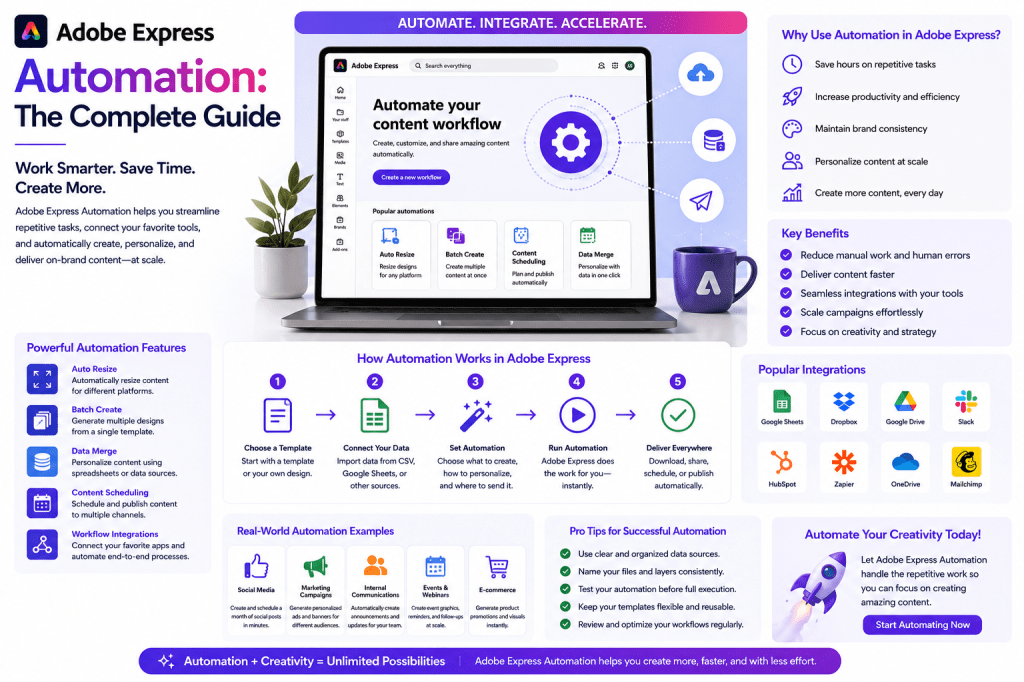
What Is Adobe Express Automation?
Adobe Express automation refers to using built-in tools, AI capabilities, templates, brand assets, and publishing features to reduce manual work during content creation.
Instead of repeatedly creating assets from scratch, users can:
- Reuse templates
- Apply brand standards automatically
- Generate content with AI
- Resize assets instantly
- Schedule posts
- Repurpose content across channels
The objective is straightforward:
Create more content while spending less time on repetitive production tasks.
Why Automation Matters
Many organizations spend most of their content creation time on repetitive activities.
Common examples include:
- Resizing social graphics
- Rewriting content for different platforms
- Updating brand colors
- Creating multiple post variations
- Building recurring presentations
- Publishing content manually
These activities provide little strategic value but consume significant time.
Automation helps eliminate these bottlenecks.
The Adobe Express Automation Framework
Adobe Express automation can be divided into five major areas:
1. Content Creation Automation
Generate content faster using AI-powered tools.
Examples:
- Social media captions
- Marketing copy
- Headlines
- Product descriptions
- Presentation content
Instead of writing everything manually, AI generates a first draft that can be refined.
2. Design Automation
Design automation reduces repetitive design work.
Examples include:
- Template-based design
- Automated layouts
- Brand kit application
- Quick visual generation
This allows teams to create consistent visuals without rebuilding assets repeatedly.
3. Brand Automation
Maintaining brand consistency is difficult when multiple people create content.
Adobe Express Brand Kits help automate:
- Logos
- Fonts
- Color palettes
- Brand styles
Once configured, these assets can be applied automatically across projects.
4. Publishing Automation
Publishing content manually becomes difficult as content volume grows.
Adobe Express includes scheduling capabilities that help users:
- Plan content
- Schedule publication
- Manage multiple channels
This reduces the need for daily manual posting.
5. Repurposing Automation
One of the most valuable productivity gains comes from content repurposing.
A single piece of content can become:
- LinkedIn posts
- Instagram graphics
- Presentation slides
- Infographics
- Email content
Adobe Express makes this process significantly faster.
Automating Social Media Content
Social media teams often face the challenge of producing large amounts of content every week.
Adobe Express helps automate:
Content Creation
Generate post drafts using AI.
Example:
Create five LinkedIn posts about cybersecurity awareness.
Graphic Creation
Apply existing templates to new content.
Benefits include:
- Faster creation
- Consistent branding
- Reduced design effort
Resizing
One graphic can automatically become:
- LinkedIn format
- Instagram format
- Facebook format
- X format
Without redesigning each version.
Scheduling
Users can prepare content batches and schedule them in advance.
Benefits:
- Fewer interruptions
- More consistent posting
- Better content planning
Automating Marketing Workflows
Marketing teams create numerous assets:
- Campaign graphics
- Advertisements
- Landing page visuals
- Product announcements
- Promotional content
Adobe Express simplifies production through:
Reusable Templates
Instead of rebuilding campaigns repeatedly, teams can reuse branded templates.
AI-Assisted Copy
Generate:
- Headlines
- Descriptions
- Calls-to-action
- Campaign concepts
Brand Consistency
Apply approved visual standards automatically.
Automating Presentation Creation
Presentations often require:
- Research
- Slide design
- Visual creation
- Formatting
Adobe Express helps accelerate this process.
Teams can automate:
- Slide creation
- Design formatting
- Visual generation
- Brand application
This is particularly useful for:
- Sales presentations
- Internal meetings
- Client proposals
- Educational content
Using Brand Kits for Automation
Brand Kits are one of the most important automation features in Adobe Express.
A Brand Kit typically contains:
- Logos
- Primary colors
- Secondary colors
- Fonts
- Brand imagery
Benefits include:
Consistency
Every asset follows the same standards.
Speed
Designers spend less time applying brand elements.
Scalability
Large teams can create content without constantly checking brand guidelines.
Building a Weekly Content Production System
Many businesses follow a weekly content workflow.
Monday
Create long-form content.
Examples:
- Blog posts
- Articles
- Newsletters
Tuesday
Generate social media content.
Wednesday
Create supporting visuals.
Thursday
Schedule posts.
Friday
Review analytics and optimize.
Adobe Express can support each stage of this workflow.
AI-Powered Workflow Automation
AI is becoming the foundation of content automation.
Adobe Express AI tools can assist with:
Idea Generation
Example:
Give me ten content ideas for a cybersecurity company.
Content Expansion
Example:
Expand this paragraph into a LinkedIn article.
Content Summarization
Example:
Summarize this blog post into five social media posts.
Content Transformation
Example:
Convert this article into presentation slides.
These capabilities dramatically reduce manual effort.
Content Repurposing Workflow Example
Suppose you publish:
How AI Is Transforming Customer Support
Without automation:
You manually create:
- LinkedIn posts
- Social graphics
- Presentation slides
- Email snippets
With Adobe Express:
- Generate post summaries.
- Create graphics.
- Resize automatically.
- Build slides.
- Schedule content.
One article can generate an entire week’s worth of content.
Common Automation Mistakes
Over-Automation
Not everything should be automated.
Human review remains important.
Ignoring Brand Standards
AI-generated content should still follow company branding.
Publishing Without Review
Always verify:
- Facts
- Grammar
- Compliance requirements
Using Generic Prompts
Specific prompts generate better results.
Example:
Instead of:
Write a post.
Use:
Write a LinkedIn post for IT managers about cybersecurity awareness using a professional tone.
Adobe Express Automation for Small Businesses
Small businesses often benefit the most from automation.
Reasons include:
- Limited staff
- Limited design resources
- Limited marketing budgets
Adobe Express enables small teams to produce content at a level previously requiring multiple specialists.
Adobe Express Automation vs Manual Content Creation
| Activity | Manual Workflow | Automated Workflow |
|---|---|---|
| Social Posts | Create individually | AI-generated drafts |
| Graphics | Build from scratch | Templates |
| Branding | Manual updates | Brand Kits |
| Resizing | Multiple designs | One-click resize |
| Publishing | Manual posting | Scheduled content |
| Repurposing | Recreate assets | Automated adaptation |
Automation does not eliminate creativity.
Instead, it removes repetitive production work.
Future of Adobe Express Automation
Automation capabilities continue expanding.
Future developments may include:
- Fully automated campaign creation
- AI-powered content calendars
- Advanced workflow orchestration
- Team productivity assistants
- Cross-platform content generation
As AI becomes more capable, Adobe Express is likely to evolve into a complete content operations platform rather than just a design tool.
Conclusion
Adobe Express automation helps businesses streamline content creation, branding, publishing, and collaboration.
By combining templates, AI tools, brand kits, scheduling capabilities, and content repurposing workflows, teams can dramatically reduce production time while maintaining quality and consistency.
Organizations that embrace automation are often able to create more content, respond faster to market opportunities, and focus more energy on strategy rather than repetitive execution.
For modern marketing teams, creators, consultants, educators, and small businesses, Adobe Express automation offers a practical path toward scalable content production.
Related Guides
- Adobe Express AI Assistant
- Adobe Express Productivity Workflows
- Adobe Express AI Tools
- Adobe Express Templates
- Adobe Express Content Repurposing
- Adobe Express Brand Kits Explained
- Building a LinkedIn Content System with Adobe Express
- Adobe Express for Marketing Teams
- Adobe Express for Small Businesses
- Adobe Express vs Canva for Automated Content Creation







 Acrobat Express Pro