LinkedIn carousel posts have become one of the highest-performing content formats on the platform.
Unlike standard image posts, carousel posts allow users to swipe through multiple slides, making them ideal for storytelling, tutorials, frameworks, case studies, reports, and educational content.
Many of the most successful creators, consultants, marketers, recruiters, and B2B companies use carousel posts to generate engagement, grow followers, and establish thought leadership.
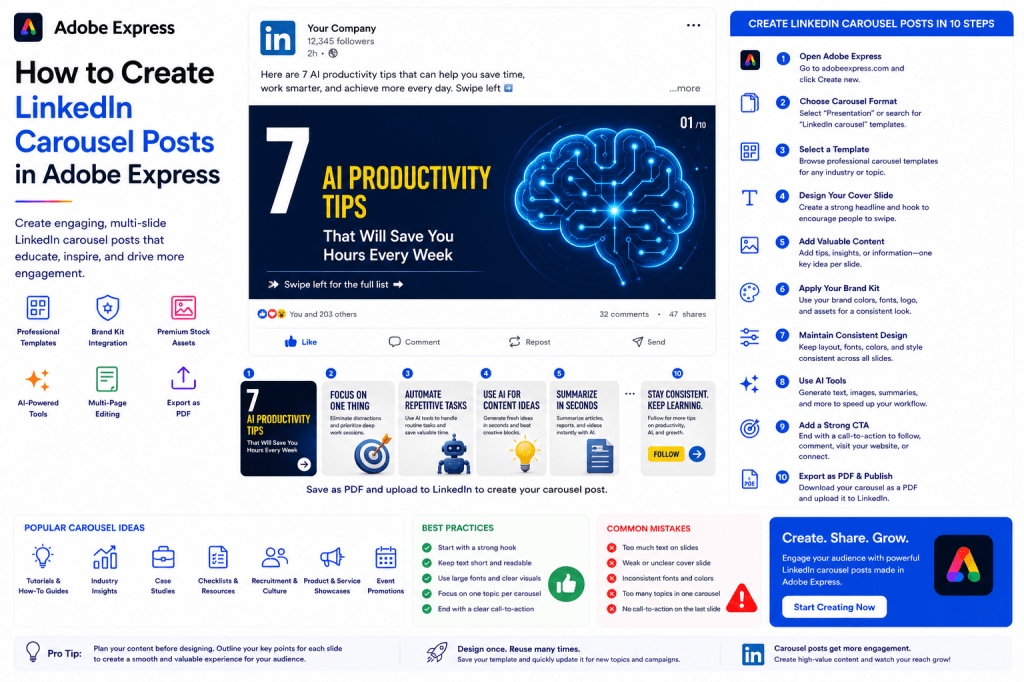
Adobe Express makes it easy to create professional LinkedIn carousels using:
- Carousel-ready templates
- Brand Kits
- AI-powered design tools
- Professional typography
- Adobe Stock assets
- Easy multi-page editing
In this guide, you’ll learn how to create LinkedIn carousel posts using Adobe Express.
Why LinkedIn Carousel Posts Work
Carousel posts encourage users to spend more time engaging with content.
Benefits include:
Higher Engagement
More interaction than standard posts.
Increased Dwell Time
Users spend longer viewing content.
Better Storytelling
Information can be broken into slides.
Educational Value
Perfect for tutorials and frameworks.
Improved Reach
LinkedIn often rewards engaging content.
Carousels are one of the best formats for professional content marketing.
What Is a LinkedIn Carousel?
A carousel is a multi-slide document that users swipe through.
Common formats include:
Step-by-Step Tutorials
Industry Insights
Business Frameworks
Case Studies
Checklists
Reports
Recruitment Campaigns
Product Walkthroughs
Each slide builds upon the previous one.
Carousel Post Structure
Most successful LinkedIn carousels follow a simple structure.
Slide 1
Hook
Slides 2–8
Main Content
Final Slide
Call-to-Action
This format encourages completion.
Step 1: Open Adobe Express
Sign in to Adobe Express.
From the dashboard:
Click Create New
or
Search Carousel Templates
Adobe Express offers numerous multi-page designs.
Step 2: Create a Multi-Page Project
Select:
Presentation
or
LinkedIn Carousel Layout
Adobe Express supports multiple pages within a single project.
Each page becomes a carousel slide.
Step 3: Design Your Cover Slide
The first slide is the most important.
Examples:
7 AI Trends Every Business Should Watch
How We Increased Revenue by 250%
The Ultimate SEO Checklist
10 Lessons from Building a Startup
A strong cover determines whether users swipe.
Step 4: Create a Consistent Layout
Use:
Same Colors
Same Fonts
Same Header Style
Consistent Branding
Consistency improves readability.
Step 5: Add Educational Content
LinkedIn users value practical information.
Examples:
Tips
Frameworks
Processes
Lessons Learned
Industry Insights
Case Studies
Focus on delivering value.
Step 6: Apply Your Brand Kit
Adobe Express Brand Kits make branding easy.
Apply:
Brand Colors
Brand Fonts
Logos
Graphic Elements
Consistent branding improves recognition.
Step 7: Use Visual Hierarchy
Every slide should have:
Main Headline
Supporting Content
Visual Element
White Space
Keep slides clean and easy to scan.
Step 8: Use Adobe Express AI Features
Adobe Express AI tools can accelerate creation.
Examples:
Generate Headlines
Generate Slide Content
Generate Images
Remove Backgrounds
Expand Images
AI can dramatically reduce production time.
Step 9: Add a Strong Final CTA
The final slide should encourage action.
Examples:
Follow for More Insights
Visit Our Website
Download the Full Guide
Leave a Comment
Connect with Me
A CTA helps convert engagement into results.
Step 10: Export as PDF
LinkedIn carousels are typically uploaded as PDFs.
Adobe Express allows you to:
Download as PDF
Preserve Slide Order
Maintain High Quality
Upload the PDF directly to LinkedIn.
Your carousel is ready.
Popular LinkedIn Carousel Ideas
Educational Tutorials
Examples:
How to Build an AI Workflow
SEO Checklist
Project Management Guide
These often perform exceptionally well.
Industry Insights
Examples:
AI Trends
Marketing Predictions
Technology Forecasts
Hiring Trends
Professional audiences value industry knowledge.
Case Studies
Examples:
How We Grew Revenue
Customer Success Story
Project Breakdown
Case studies provide credibility.
Business Frameworks
Examples:
SWOT Analysis
Marketing Funnels
Customer Journey Maps
Decision Frameworks
Frameworks are highly shareable.
Recruitment Carousels
Examples:
Join Our Team
Meet Our Culture
Benefits Overview
These help attract talent.
Example LinkedIn Carousel Structure
Topic:
10 AI Productivity Tips
Slide 1
Cover
10 AI Productivity Tips
Slide 2
Tip #1
Slide 3
Tip #2
Slide 4
Tip #3
Slide 5
Tip #4
Slide 6
Tip #Slide 7
Tip #Slide 8
Tip #7
Slide 9
Tip #8
Slide 10
CTA
Follow for More AI Insights
This format is widely used on LinkedIn.
Best Practices for LinkedIn Carousels
Start with a Strong Hook
Encourage users to swipe.
Keep Slides Simple
Avoid overcrowding.
Use Large Typography
Improve readability.
Focus on One Topic
Stay organized.
Include a CTA
Drive engagement.
These practices improve performance.
Common Carousel Mistakes
Too Much Text
Reduces readability.
Weak Cover Slide
Lowers swipe rates.
Inconsistent Design
Appears unprofessional.
No CTA
Misses engagement opportunities.
Too Many Topics
Creates confusion.
Avoiding these mistakes improves results.
Example Workflow
Imagine creating a carousel titled:
7 AI Tools Every Marketer Should Know
Step 1
Create cover slide.
Step 2
Add one tool per slide.
Step 3
Apply Brand Kit.
Step 4
Insert visuals.
Step 5
Add CTA.
Step 6
Export PDF.
Step 7
Upload to LinkedIn.
The entire process often takes less than 20 minutes.
Why Adobe Express Is Ideal for LinkedIn Carousels
Adobe Express combines:
Multi-Page Editing
Professional Templates
Brand Kits
AI Tools
Easy PDF Export
This makes it one of the easiest tools for creating LinkedIn carousel content.
Conclusion
LinkedIn carousel posts are among the most effective formats for educating audiences, building authority, generating engagement, and growing a professional brand.
By combining templates, Brand Kits, AI-powered tools, and streamlined workflows, Adobe Express allows professionals and organizations to create polished carousel content quickly and consistently.
Whether you’re sharing tutorials, case studies, frameworks, or industry insights, Adobe Express provides everything needed to build engaging LinkedIn carousel posts.
Continue Learning Adobe Express
To learn more about LinkedIn content creation, explore these guides:
- How to Create LinkedIn Posts in Adobe Express
- Adobe Express for LinkedIn Marketing: The Complete Guide
- Adobe Express Content Calendars: The Complete Guide
For advanced workflows, also read:
- Adobe Express Marketing Automation: The Complete Guide
- Building an AI Content Publishing System with Adobe Express
- Adobe Express Workflow Automation: The Complete Guide








