Introduction
Ebooks remain one of the most effective digital assets for generating leads, building authority, educating audiences, and promoting products or services.
However, even the best ebook will struggle to gain traction if people never discover it.
That’s where Pinterest comes in.
Pinterest functions as a visual search engine where users actively search for educational resources, guides, business tools, templates, and learning materials. This makes it an ideal platform for promoting ebooks.
Whether you’re promoting:
- Free ebooks
- Lead generation ebooks
- Premium ebooks
- Business guides
- AI handbooks
- Marketing playbooks
- Educational resources
- Industry reports
Pinterest Ebook Promotion Pins can help generate traffic, downloads, subscribers, and sales.
Adobe Express makes it easy to create professional ebook promotion graphics using:
- Pinterest templates
- Brand Kits
- AI-powered design tools
- Adobe Stock assets
- Ebook mockups
- Fast export workflows
In this guide, you’ll learn how to create Pinterest Ebook Promotion Pins using Adobe Express.
What Are Pinterest Ebook Promotion Pins?
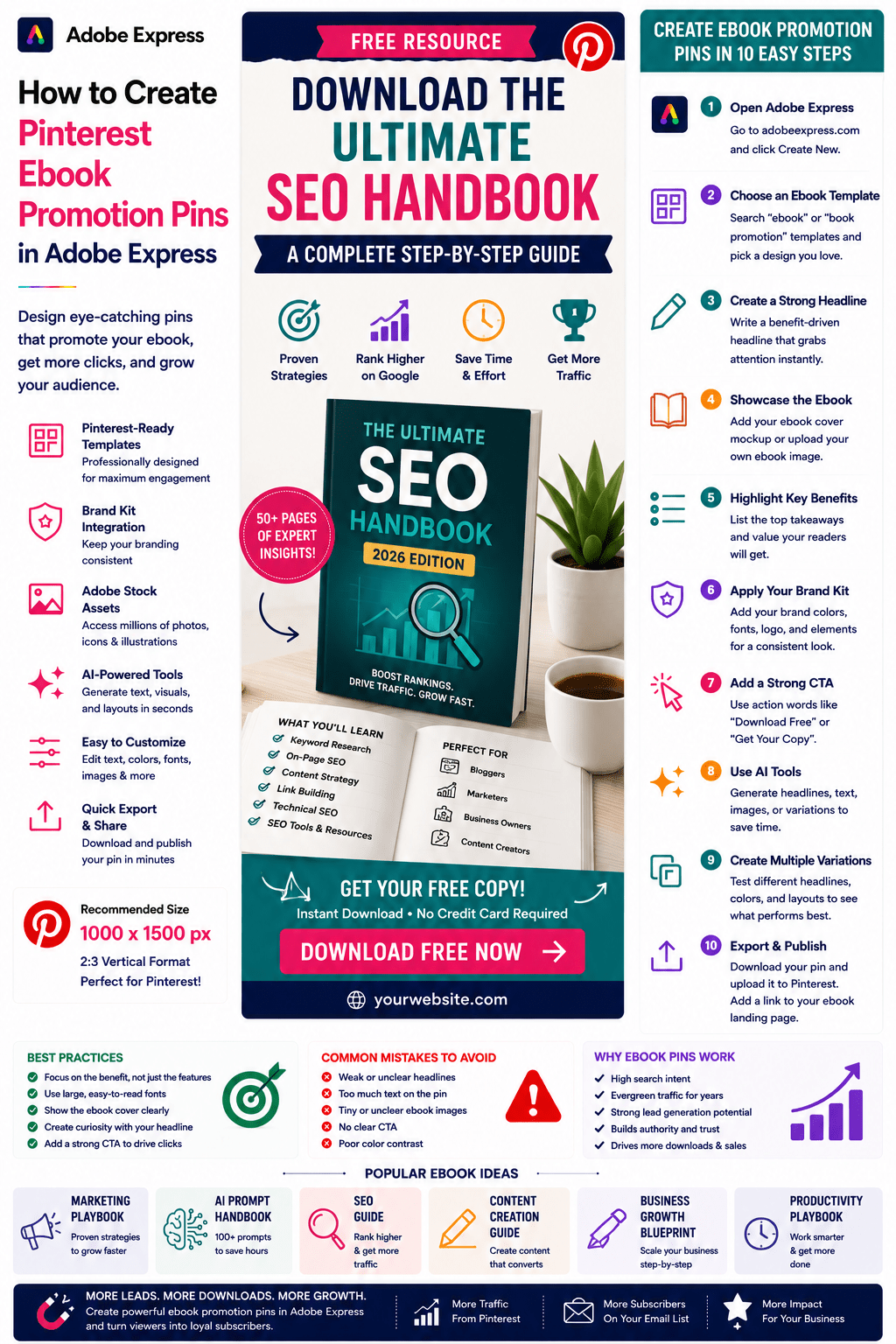
Ebook Promotion Pins are Pinterest graphics specifically designed to encourage users to download, access, or purchase an ebook.
Typical elements include:
Ebook Cover
Headline
Benefits
Visual Mockup
Call-to-Action
Branding
The objective is to generate interest and clicks.
Why Ebook Pins Work on Pinterest
Pinterest users actively seek educational content.
Benefits include:
High Search Intent
Users want solutions.
Strong Click-Through Rates
Educational content attracts attention.
Long-Term Visibility
Pins can remain active for years.
Better Lead Generation
Free ebooks grow email lists.
Increased Authority
Educational resources build trust.
Ebook pins often perform exceptionally well because they offer tangible value.
Best Ebook Topics for Pinterest
Popular ebook categories include:
Marketing
AI
Blogging
SEO
Small Business
Productivity
Personal Finance
Health and Wellness
Design
Education
Career Development
Choose topics that solve specific problems.
Recommended Pinterest Pin Size
Pinterest recommends:
1000 × 1500 Pixels
2:3 Vertical Format
Adobe Express provides templates optimized for Pinterest.
Step 1: Open Adobe Express
Sign in to Adobe Express.
From the dashboard:
Click Create New
or
Search Pinterest Templates
Adobe Express includes many ebook-friendly layouts.
Step 2: Choose an Ebook Promotion Template
Browse categories such as:
Marketing
Business
Education
Lead Generation
Product Promotion
Downloads
Choose a clean design that emphasizes the ebook.
Step 3: Create a Strong Headline
Examples:
Free AI Strategy Guide
Download the Ultimate SEO Handbook
The Complete Pinterest Marketing Playbook
AI Prompt Engineering for Beginners
Small Business Growth Blueprint
Your headline should communicate value immediately.
Step 4: Showcase the Ebook Cover
The ebook cover should be prominently displayed.
Options include:
Flat Cover Designs
3D Ebook Mockups
Tablet Mockups
Book Display Graphics
Resource Bundle Displays
Visualizing the ebook increases perceived value.
Step 5: Highlight Key Benefits
Examples:
Learn Proven Strategies
Save Time
Avoid Common Mistakes
Increase Results
Step-by-Step Framework Included
Benefits help users understand the value.
Step 6: Apply Your Brand Kit
Adobe Express Brand Kits simplify branding.
Apply:
Brand Colors
Brand Fonts
Logos
Design Assets
Consistent branding builds trust.
Step 7: Add Trust Indicators
Examples:
Free Download
50+ Pages
Expert Guide
Updated for 2026
Proven Framework
Trust indicators improve conversions.
Step 8: Use Adobe Express AI Features
Adobe Express AI tools can generate:
Headlines
Ebook Promotion Graphics
Marketing Copy
Design Variations
Visual Concepts
AI speeds up content creation significantly.
Step 9: Add a Strong Call-to-Action
Examples:
Download Free
Get Your Copy
Read the Guide
Access the Ebook
Download Today
Get Instant Access
A strong CTA encourages clicks.
Step 10: Export and Publish
When complete:
Save Project
Download Pin
Create Variations
Upload to Pinterest
Your Ebook Promotion Pin is ready.
Creating Free Ebook Pins
Examples:
AI Prompt Handbook
SEO Starter Guide
Content Marketing Playbook
Business Growth Guide
Free ebooks are excellent lead magnets.
Creating Premium Ebook Pins
Examples:
Industry Reports
Business Framework Guides
Specialized Training Materials
Research-Based Publications
Premium resources require strong value communication.
Creating Educational Ebook Pins
Examples:
Beginner Guides
Tutorials
Learning Resources
Industry Introductions
Educational content performs well on Pinterest.
Creating Business Ebook Pins
Examples:
Startup Playbooks
Sales Guides
Marketing Frameworks
Productivity Systems
Business-focused ebooks attract professional audiences.
Creating AI Ebook Pins
Examples:
AI Prompt Engineering Guide
AI Agent Handbook
Generative AI Playbook
AI for Small Business
AI-related content continues to grow rapidly.
Best Practices for Ebook Promotion Pins
Showcase the Cover
Help users visualize the resource.
Focus on Benefits
Highlight outcomes.
Use Large Headlines
Improve readability.
Create Curiosity
Encourage clicks.
Include a Strong CTA
Drive downloads.
These practices improve performance.
Common Ebook Promotion Pin Mistakes
Weak Headlines
Reduce click-through rates.
Tiny Ebook Covers
Reduce perceived value.
No Benefits Listed
Makes the offer unclear.
Too Much Text
Creates clutter.
Missing CTA
Misses conversion opportunities.
Avoiding these mistakes improves results.
Example Workflow
Imagine promoting an ebook.
Ebook
AI Prompt Engineering for Beginners
Headline
Free AI Prompt Engineering Guide
Benefits
- Learn Faster
- Save Time
- Improve Results
CTA
Download Free
Visual
3D Ebook Mockup
This structure consistently performs well on Pinterest.
Why Adobe Express Is Ideal for Ebook Promotion Pins
Adobe Express combines:
Professional Templates
Brand Management
AI Design Tools
Easy Editing
Ebook Mockups
Fast Export
Pinterest-Friendly Layouts
This makes it one of the easiest tools for ebook marketing.
Conclusion
Pinterest Ebook Promotion Pins are a highly effective way to generate downloads, build authority, grow email lists, and drive traffic.
By combining templates, Brand Kits, AI-powered tools, and streamlined workflows, Adobe Express enables creators and businesses to create professional ebook promotion graphics quickly and consistently.
Whether you’re promoting free lead magnets, premium ebooks, educational resources, or industry reports, Adobe Express provides everything needed to create high-converting Pinterest Ebook Promotion Pins.
Continue Learning Adobe Express
To learn more about Pinterest marketing, explore these guides:
- How to Create Pinterest Lead Magnet Pins in Adobe Express
- How to Create Pinterest Product Comparison Pins in Adobe Express
- How to Create Pinterest Affiliate Marketing Pins in Adobe Express
For advanced content workflows, also read:
- Adobe Express Marketing Automation: The Complete Guide
- Adobe Express Content Calendars: The Complete Guide
- Adobe Express Workflow Automation: The Complete Guide








