Introduction
Adobe Express makes it easy to create social media graphics, presentations, videos, flyers, marketing materials, and other visual content without requiring advanced design skills.
Before you can start creating content, you’ll need an Adobe Express account.
The good news is that creating an account only takes a few minutes, and Adobe offers both free and premium options depending on your needs.
In this guide, you’ll learn how to create an Adobe Express account, choose the right plan, and get started with your first project.
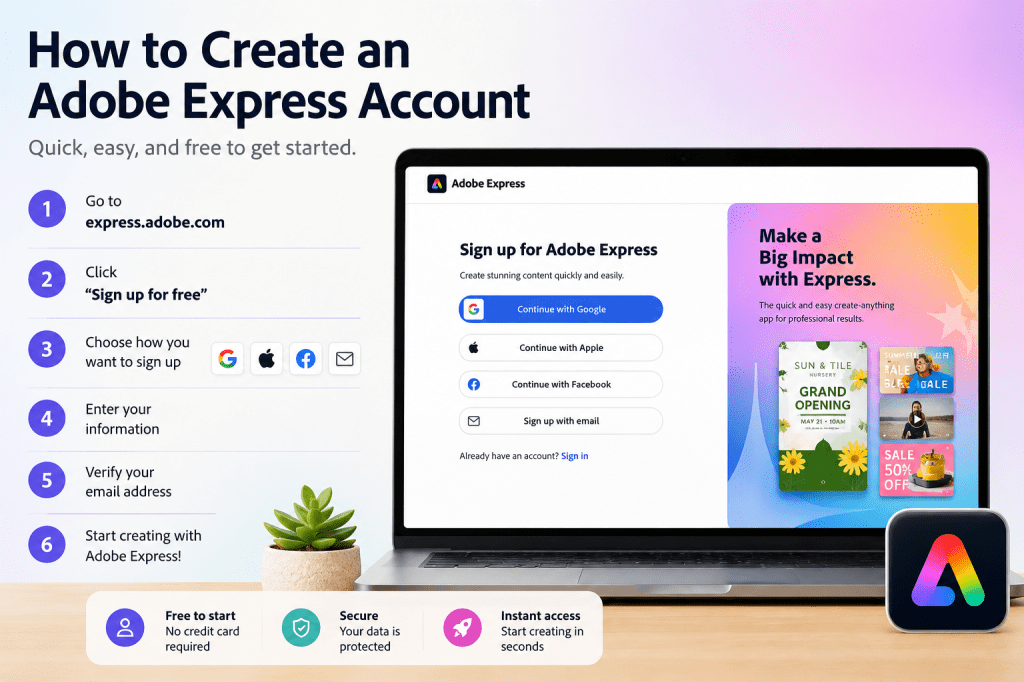
What Is Adobe Express?
Adobe Express is a web-based design and content creation platform from Adobe.
It helps users create:
- Social media graphics
- Marketing materials
- Videos
- Presentations
- Posters
- Flyers
- Educational content
- Business communications
Adobe Express combines templates, AI-powered tools, and easy-to-use design features to help individuals and teams create professional content quickly.
Step 1: Visit the Adobe Express Website
Open your web browser and navigate to the Adobe Express homepage.
You will typically see options to:
- Start for free
- Sign in
- Explore templates
- Learn more about Adobe Express features
Look for the Get Started or Start for Free button.
Click it to begin the registration process.
Step 2: Choose How You Want to Sign Up
Adobe provides several ways to create an account.
Common options include:
Email Address
Create an Adobe account using your email.
Google Account
Sign in using your Google credentials.
Apple Account
Use your Apple ID.
Facebook Account
Connect through Facebook.
Existing Adobe Account
If you already use Adobe products, you may already have an Adobe account.
Choose the method that works best for you.
Step 3: Enter Your Information
If you choose email registration, Adobe will ask for:
Email Address
Use an email address you actively monitor.
Password
Create a strong password.
Name
Enter your first and last name.
Country or Region
Select your location.
After entering your information, continue to the next step.
Step 4: Verify Your Email Address
Adobe may send a verification email.
Open your inbox and look for the Adobe verification message.
If you do not see it:
- Check your spam folder
- Check your promotions folder
- Wait a few minutes
Click the verification link to activate your account.
Step 5: Sign In to Adobe Express
Once your account is verified:
- Return to Adobe Express.
- Click Sign In.
- Enter your credentials.
- Access your dashboard.
You now have access to Adobe Express.
Step 6: Choose a Plan
Adobe Express typically offers:
Free Plan
Suitable for:
- Beginners
- Personal projects
- Basic content creation
Premium Plan
Provides additional capabilities such as:
- Premium templates
- More AI features
- Expanded content libraries
- Brand management tools
Many users start with the free version and upgrade later.
Step 7: Complete Your Profile
Although optional, completing your profile can improve your experience.
You may wish to:
- Add a profile image
- Configure preferences
- Connect your Adobe account with other Adobe services
This step only takes a few minutes.
Step 8: Explore the Dashboard
After logging in, spend a few minutes exploring the interface.
Common sections include:
Home
Access recent projects.
Templates
Browse ready-made designs.
Brand
Manage branding assets.
Projects
View saved work.
AI Features
Access Adobe’s AI-powered tools.
Understanding the dashboard will help you work more efficiently later.
Step 9: Create Your First Project
The best way to learn Adobe Express is by creating something.
Try making:
- A social media post
- A flyer
- A presentation slide
- A simple graphic
Select a template and begin experimenting with the editor.
Adobe Express is designed to be beginner-friendly.
Step 10: Save Your Work
As you create projects, Adobe Express automatically saves many changes.
However, it’s still a good idea to:
- Name projects clearly
- Organize related assets
- Keep designs grouped by campaign or topic
Good organization becomes increasingly important as your content library grows.
Common Account Creation Problems
I Didn’t Receive the Verification Email
Check:
- Spam folder
- Promotions folder
- Junk folder
You can also request a new verification email.
I Already Have an Adobe Account
If you use products such as:
- Adobe Acrobat
- Photoshop
- Illustrator
- Creative Cloud
You likely already have an Adobe account.
Simply sign in with your existing credentials.
I Forgot My Password
Use Adobe’s password recovery option on the sign-in page.
Follow the reset instructions sent to your email.
Should I Start with the Free Plan?
For most beginners, yes.
The free version allows you to explore the platform and understand its capabilities before deciding whether premium features are necessary.
Tips for New Adobe Express Users
Once your account is created:
Start with Templates
Templates dramatically reduce design time.
Learn Brand Kits Early
They help maintain consistency.
Experiment with AI Features
Adobe Express includes powerful productivity tools.
Create Small Projects First
Build confidence before tackling larger campaigns.
Organize Your Projects
Good habits save time later.
Conclusion
Creating an Adobe Express account is a quick and straightforward process.
Within minutes, you can access a powerful content creation platform capable of producing social media graphics, videos, presentations, marketing materials, educational content, and more.
Whether you’re a marketer, business owner, educator, student, or content creator, Adobe Express provides an accessible starting point for professional content creation.
Once your account is ready, the next step is learning how to navigate the dashboard and create your first project.
Continue Learning Adobe Express
To learn more about building efficient content creation systems with Adobe Express, explore these guides:
- Adobe Express Content Creation: The Complete Guide
- Adobe Express AI Productivity: The Complete Guide
- Adobe Express Business Productivity: The Complete Guide
If you’re working with teams, also read:
- Adobe Express Team Collaboration: The Complete Guide
- Adobe Express Workflow Automation: The Complete Guide
- Adobe Express Content Operations: The Complete Guide








