Instagram remains one of the most important platforms for businesses, creators, nonprofits, educators, and personal brands.
However, consistently creating professional-looking Instagram content can be challenging without the right tools.
Adobe Express simplifies the process by providing:
- Ready-made Instagram templates
- AI-powered design tools
- Brand Kit integration
- Stock photos and graphics
- One-click resizing
- Content scheduling capabilities
Whether you’re creating content for a business account, creator profile, nonprofit organization, or marketing campaign, Adobe Express makes it possible to design Instagram posts quickly and professionally.
In this guide, you’ll learn how to create Instagram posts using Adobe Express from start to finish.
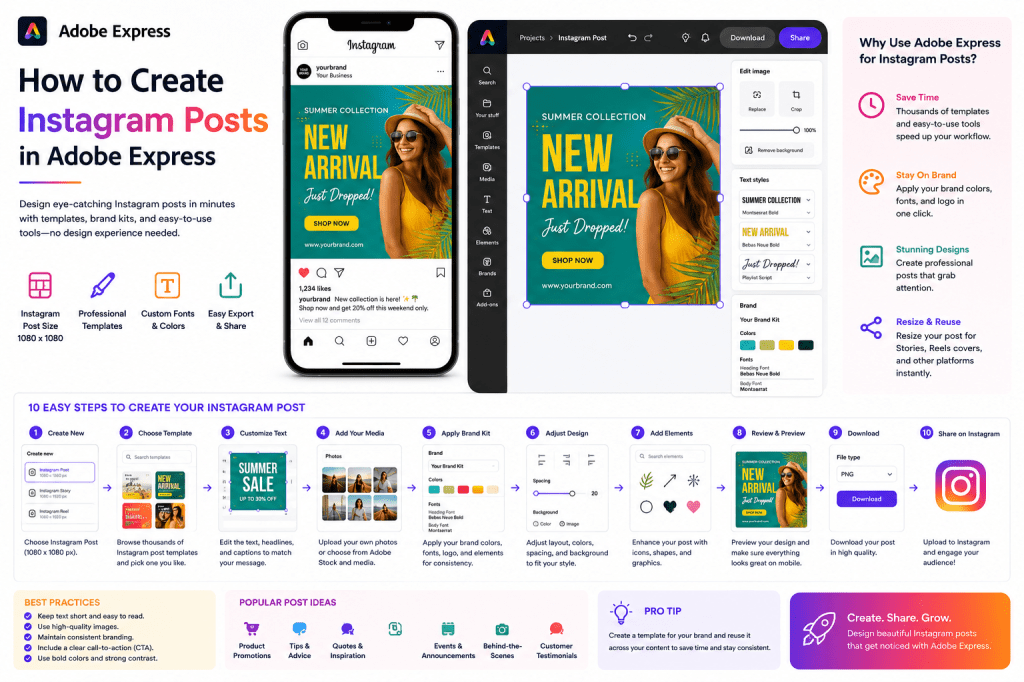
Why Use Adobe Express for Instagram?
Instagram is a highly visual platform.
Adobe Express helps users create content that stands out.
Benefits include:
Fast Design Creation
Professional templates reduce setup time.
Consistent Branding
Brand Kits maintain visual identity.
AI-Powered Features
Accelerate content creation.
Easy Customization
No advanced design experience required.
Mobile-Friendly Workflow
Create from desktop or mobile devices.
These advantages make Adobe Express ideal for Instagram marketing.
What Types of Instagram Content Can You Create?
Adobe Express supports all major Instagram formats.
Examples include:
Feed Posts
Traditional square graphics.
Carousel Posts
Multi-slide educational content.
Stories
Vertical full-screen content.
Promotional Graphics
Sales and offers.
Event Announcements
Webinars and launches.
Quote Graphics
Thought leadership content.
Product Promotions
E-commerce marketing.
Educational Content
Tips, tutorials, and guides.
A single platform can support an entire Instagram strategy.
Step 1: Open Adobe Express
Sign in to Adobe Express.
From the dashboard:
Click Create New
or
Browse Templates
Both methods work well.
Step 2: Select Instagram Post Format
Adobe Express offers Instagram-specific dimensions.
Common options include:
Instagram Post
1080 × 1080 pixels.
Instagram Story
1080 × 1920 pixels.
Instagram Carousel
Multiple slides.
Instagram Reel Cover
Optimized cover image.
Choosing the correct format ensures proper display on Instagram.
Step 3: Choose a Template
Templates dramatically speed up the design process.
Browse by:
Industry
Style
Campaign Type
Business Category
Content Goal
Thousands of professionally designed templates are available.
Step 4: Replace Placeholder Text
Templates often include sample text.
Replace it with your own message.
Examples:
Product Promotion
Introduce a new product.
Educational Tip
Share expertise.
Event Announcement
Promote a webinar.
Inspirational Quote
Build engagement.
Brand Story
Strengthen relationships.
Keep text concise and easy to scan.
Step 5: Add Images
Visuals are the foundation of Instagram content.
Options include:
Upload Your Own Images
Original photography.
Use Adobe Stock
Professional stock imagery.
Create AI Images
Generate unique visuals.
Add Product Photos
Showcase offerings.
Strong visuals improve engagement rates.
Step 6: Apply Your Brand Kit
If you use Adobe Express Brand Kits:
Apply Brand Colors
Apply Brand Fonts
Add Logos
Insert Brand Graphics
This ensures consistency across all Instagram content.
Step 7: Customize the Design
Adjust the layout to fit your content.
Examples:
Resize Headlines
Improve readability.
Move Elements
Optimize composition.
Add Icons
Increase visual interest.
Add Shapes
Create hierarchy.
Good design supports the message.
Step 8: Use Adobe Express AI Features
Adobe Express includes AI-powered tools that simplify creation.
Examples:
Generate Marketing Text
Create captions and headlines.
Generate Images
Create custom graphics.
Remove Backgrounds
Improve product photos.
Expand Images
Adjust image dimensions.
AI tools help reduce production time.
Step 9: Optimize for Mobile Viewing
Most Instagram users browse on smartphones.
Review:
Text Size
Must remain readable.
Visual Balance
Avoid clutter.
Image Quality
Use high-resolution assets.
Contrast
Ensure text stands out.
Mobile-first design improves engagement.
Step 10: Export Your Post
Once complete:
Save the Project
Store for future updates.
Download the Image
Export at high quality.
Duplicate the Design
Reuse for future content.
Schedule Publishing
If supported in your workflow.
Your Instagram post is now ready to publish.
Creating Promotional Instagram Posts
Businesses often create posts for:
Product Launches
Sales Campaigns
Discounts
New Services
Seasonal Promotions
Adobe Express provides numerous promotional templates.
Creating Educational Instagram Posts
Educational content performs particularly well.
Examples include:
Tips
Tutorials
Industry Insights
Checklists
Step-by-Step Guides
Carousel posts are especially effective for educational content.
Creating Instagram Quote Graphics
Quote posts remain popular because they are:
Easy to Consume
Highly Shareable
Visually Attractive
Effective for Personal Branding
Adobe Express includes many quote-focused templates.
Creating Instagram Carousel Posts
Carousels allow multiple slides within a single post.
Popular uses include:
Tutorials
Product Features
Educational Content
Case Studies
Storytelling
Adobe Express simplifies multi-slide design workflows.
Creating Instagram Stories
Stories use a vertical format.
Popular content includes:
Polls
Announcements
Event Promotions
Product Launches
Behind-the-Scenes Content
Adobe Express provides optimized Story templates.
Building an Instagram Content System
Successful creators often develop repeatable workflows.
Examples:
Template Library
Reusable designs.
Brand Kit
Consistent branding.
Content Calendar
Scheduled publishing.
Asset Library
Images and graphics.
Design Standards
Visual consistency.
Systems improve productivity significantly.
Best Practices for Instagram Posts
Use High-Quality Visuals
Professional imagery performs better.
Keep Text Minimal
Focus on clarity.
Maintain Brand Consistency
Use the same colors and fonts.
Create Strong Headlines
Capture attention quickly.
Include a Call-to-Action
Encourage engagement.
These practices improve performance.
Common Instagram Design Mistakes
Too Much Text
Hard to read on mobile devices.
Weak Visual Hierarchy
Important information gets lost.
Inconsistent Branding
Reduces recognition.
Poor Image Quality
Appears unprofessional.
Ignoring Mobile Design
Hurts user experience.
Avoiding these mistakes improves content quality.
Example Workflow
Imagine a business promoting a webinar.
Step 1
Select an Instagram template.
Step 2
Apply Brand Kit.
Step 3
Upload speaker photo.
Step 4
Add webinar details.
Step 5
Insert registration CTA.
Step 6
Review mobile layout.
Step 7
Export.
Step 8
Publish.
The entire process can often take less than 15 minutes.
Why Adobe Express Is Ideal for Instagram
Adobe Express combines:
Professional Templates
AI Tools
Brand Management
Easy Editing
Fast Publishing Workflows
These features help creators produce more content while maintaining quality and consistency.
Conclusion
Creating Instagram posts with Adobe Express is one of the fastest ways to build professional, engaging content for one of the world’s most popular social platforms.
By combining templates, Brand Kits, AI-powered tools, and mobile-friendly workflows, Adobe Express enables businesses and creators to produce high-quality Instagram content without needing advanced design skills.
Whether you’re promoting products, educating followers, building a personal brand, or growing a business, Adobe Express provides everything needed to create attractive and effective Instagram posts.
The more templates and branding assets you develop, the faster your Instagram content production becomes.
Continue Learning Adobe Express
To learn more about social media content creation, explore these guides:
- Adobe Express for Social Media: The Complete Guide
- Adobe Express Content Creation: The Complete Guide
- Adobe Express Templates: The Complete Guide
If you’re building a complete social media workflow, also read:
- Adobe Express Content Calendars: The Complete Guide
- Adobe Express Marketing Automation: The Complete Guide
- Adobe Express Content Operations: The Complete Guide







 Acrobat Express Pro