Introduction
Instagram Stories have become one of the most powerful ways to engage audiences on social media.
With over a billion Instagram users and millions of Stories viewed every day, Stories provide a fast, interactive, and highly visible way to connect with followers.
Businesses, creators, nonprofits, educators, and marketers use Stories to:
- Promote products
- Share announcements
- Drive website traffic
- Build brand awareness
- Increase engagement
- Showcase behind-the-scenes content
Adobe Express makes creating professional Instagram Stories fast and easy through templates, AI-powered tools, Brand Kits, and mobile-friendly design features.
In this guide, you’ll learn how to create Instagram Stories using Adobe Express from start to finish.
What Are Instagram Stories?
Instagram Stories are temporary pieces of content that appear at the top of the Instagram app.
Stories typically disappear after 24 hours unless saved as Highlights.
Unlike traditional Instagram posts, Stories are designed for:
Quick Updates
Short, timely content.
Audience Interaction
Polls, questions, and engagement.
Promotions
Special offers and announcements.
Brand Visibility
Frequent audience touchpoints.
Traffic Generation
Links and calls-to-action.
Stories are often viewed more frequently than regular feed posts.
Why Use Adobe Express for Instagram Stories?
Adobe Express is particularly well-suited for Story creation because it provides:
Story-Specific Templates
Ready-made vertical designs.
AI Design Tools
Accelerated content creation.
Brand Kit Integration
Consistent branding.
Easy Image Editing
Quick customization.
Mobile-Friendly Workflow
Designed for social platforms.
These features reduce design time significantly.
Understanding Instagram Story Dimensions
Before creating a Story, it’s important to use the correct format.
Instagram Stories use:
1080 × 1920 Pixels
Vertical format.
9:16 Aspect Ratio
Full-screen mobile experience.
Adobe Express automatically provides the correct dimensions when creating Story projects.
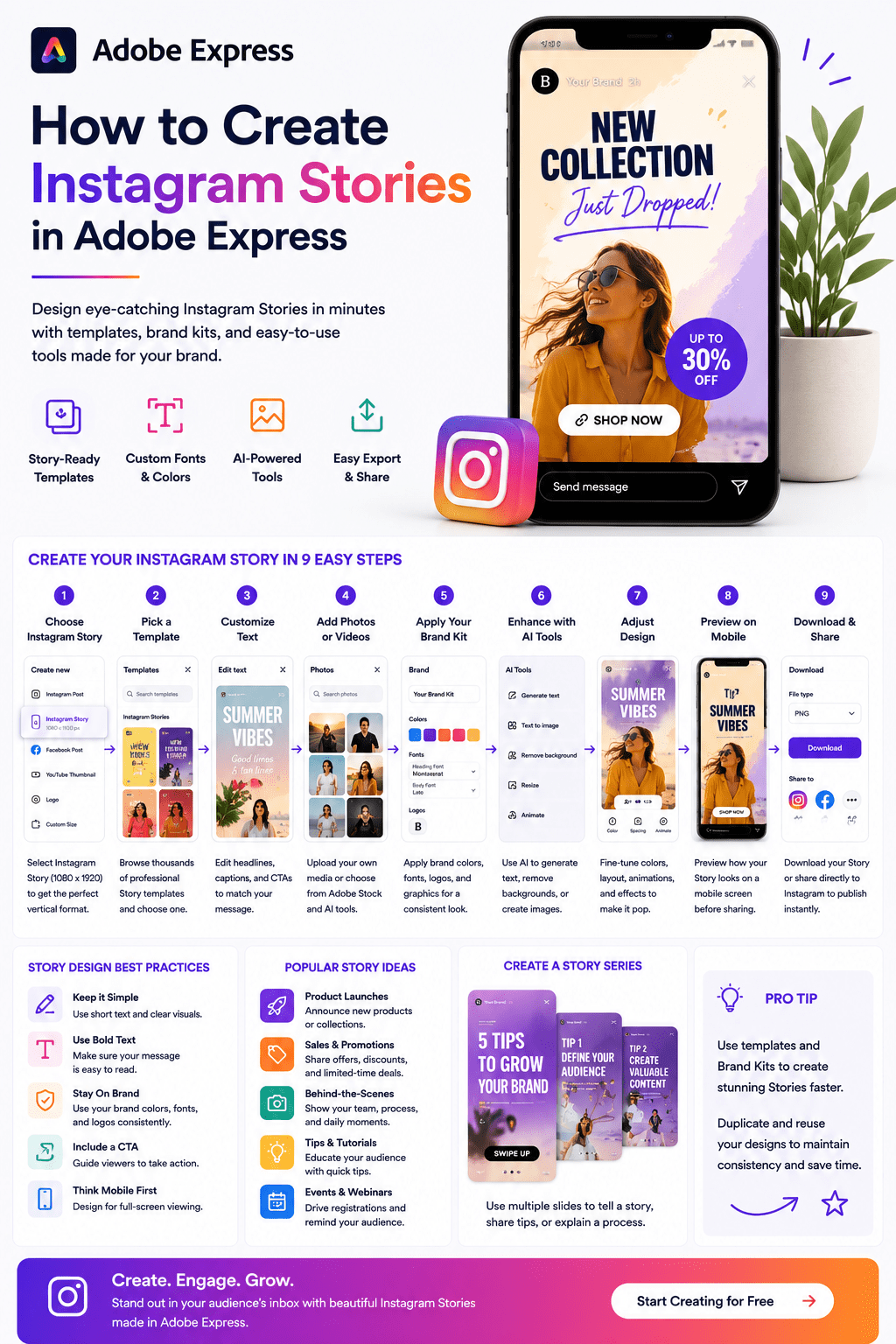
Step 1: Open Adobe Express
Sign in to Adobe Express.
From the dashboard:
Click Create New
or
Search for Instagram Story Templates
Both methods work well.
Step 2: Select Instagram Story Format
Choose:
Instagram Story
Adobe Express automatically loads the proper dimensions.
This prevents formatting problems later.
Step 3: Browse Story Templates
Templates provide an excellent starting point.
Search by:
Industry
Business Type
Promotion Style
Event Type
Visual Theme
Thousands of Story templates are available.
Step 4: Choose a Template
Select a design that matches your objective.
Examples:
Product Promotion
Drive sales.
Webinar Announcement
Increase registrations.
Event Countdown
Build anticipation.
Educational Content
Share expertise.
Brand Awareness
Increase visibility.
The template serves as your starting framework.
Step 5: Customize the Text
Replace placeholder content with your own message.
Examples:
Flash Sale
Limited-time offer.
New Product Launch
Announce availability.
Registration Reminder
Encourage signups.
Daily Tip
Provide value.
Behind-the-Scenes Update
Humanize your brand.
Keep text concise because Stories are viewed quickly.
Step 6: Add Images or Video
Visuals are the foundation of Story performance.
Options include:
Upload Photos
Original content.
Upload Videos
Dynamic storytelling.
Use Adobe Stock
Professional imagery.
Generate AI Images
Unique visual content.
Add Product Photos
Showcase offerings.
Strong visuals increase engagement.
Step 7: Apply Your Brand Kit
If you’ve configured a Brand Kit:
Apply Brand Colors
Apply Brand Fonts
Insert Logos
Add Brand Elements
This ensures visual consistency.
Step 8: Optimize for Mobile Viewing
Stories are consumed almost entirely on mobile devices.
Review:
Text Size
Readable on small screens.
Safe Zones
Avoid edges of the screen.
Visual Hierarchy
Most important information first.
Contrast
Ensure readability.
Mobile-first design is essential.
Step 9: Use Adobe Express AI Features
Adobe Express includes AI-powered tools that help streamline Story creation.
Examples:
Generate Headlines
Create engaging messaging.
Generate Visuals
Create custom imagery.
Remove Backgrounds
Improve product photography.
Expand Images
Fit vertical layouts.
AI can significantly reduce production time.
Creating Promotional Instagram Stories
Many businesses use Stories for marketing.
Examples include:
Product Launches
Sales Promotions
Coupon Codes
Event Announcements
New Service Offers
Stories create urgency because of their temporary nature.
Creating Educational Instagram Stories
Educational content often performs extremely well.
Examples:
Quick Tips
Tutorials
Industry Facts
Checklists
Learning Content
Educational Stories help build authority.
Creating Event Promotion Stories
Stories are highly effective for event marketing.
Examples:
Webinar Registration
Conference Promotion
Product Launch Events
Live Sessions
Workshops
Use countdown graphics and reminders whenever possible.
Creating Behind-the-Scenes Stories
Audiences enjoy authentic content.
Examples:
Office Life
Team Activities
Production Process
Event Preparation
Daily Operations
This type of content helps humanize a brand.
Creating Polls and Interactive Stories
Engagement features can improve reach.
Examples include:
Polls
Gather opinions.
Questions
Invite interaction.
Quizzes
Educate and entertain.
Feedback Requests
Increase participation.
Interactive Stories often outperform static content.
Building a Story Content Workflow
Successful brands often create Stories consistently.
Workflow example:
Monday
Educational Story.
Tuesday
Product Feature.
Wednesday
Customer Testimonial.
Thursday
Behind-the-Scenes.
Friday
Promotion.
Adobe Express makes recurring Story creation much easier.
Story Design Best Practices
Use Large Text
Improve readability.
Focus on One Message
Avoid clutter.
Use High-Quality Visuals
Increase engagement.
Maintain Branding
Use consistent colors and fonts.
Include a Call-to-Action
Encourage action.
These practices improve Story performance.
Common Instagram Story Mistakes
Too Much Text
Hard to consume quickly.
Poor Contrast
Difficult to read.
Weak Visual Hierarchy
Important information gets lost.
Ignoring Safe Zones
Content becomes obscured.
No Call-to-Action
Missed opportunities.
Avoiding these mistakes improves engagement.
Example Workflow
Imagine a business promoting a webinar.
Step 1
Select an Instagram Story template.
Step 2
Apply Brand Kit.
Step 3
Upload speaker photo.
Step 4
Add event details.
Step 5
Insert registration CTA.
Step 6
Review mobile layout.
Step 7
Export.
Step 8
Publish to Stories.
The process can often be completed in less than 10 minutes.
Why Adobe Express Is Ideal for Instagram Stories
Adobe Express combines:
Story Templates
AI-Powered Design
Brand Management
Easy Editing
Social Media Workflows
This combination allows users to create professional Stories quickly and consistently.
Conclusion
Creating Instagram Stories in Adobe Express is one of the fastest ways to produce engaging, professional content for one of Instagram’s most visible formats.
By combining templates, Brand Kits, AI-powered tools, and mobile-first design capabilities, Adobe Express enables businesses and creators to publish high-quality Stories without requiring advanced design skills.
Whether you’re promoting products, driving registrations, educating followers, or building brand awareness, Adobe Express provides everything needed to create effective Instagram Stories at scale.
The more templates and workflows you build, the easier Story creation becomes.
Continue Learning Adobe Express
To learn more about social media workflows, explore these guides:
- Adobe Express for Social Media: The Complete Guide
- Adobe Express Content Creation: The Complete Guide
- Adobe Express Templates: The Complete Guide
If you’re building a complete Instagram content system, also read:
- Adobe Express Content Calendars: The Complete Guide
- Adobe Express Marketing Automation: The Complete Guide
- Adobe Express Content Operations: The Complete Guide








