As you create more content in Adobe Express, your project library can quickly become crowded.
A few projects are easy to manage.
A few hundred projects are not.
Without a proper organization system, you may spend more time searching for content than creating it.
Whether you’re managing:
- Social media campaigns
- Marketing assets
- Business presentations
- Training materials
- Customer success content
- Internal communications
- Educational resources
a structured project organization system can significantly improve productivity.
In this guide, you’ll learn how to organize projects effectively in Adobe Express and build a content library that remains easy to manage as it grows.
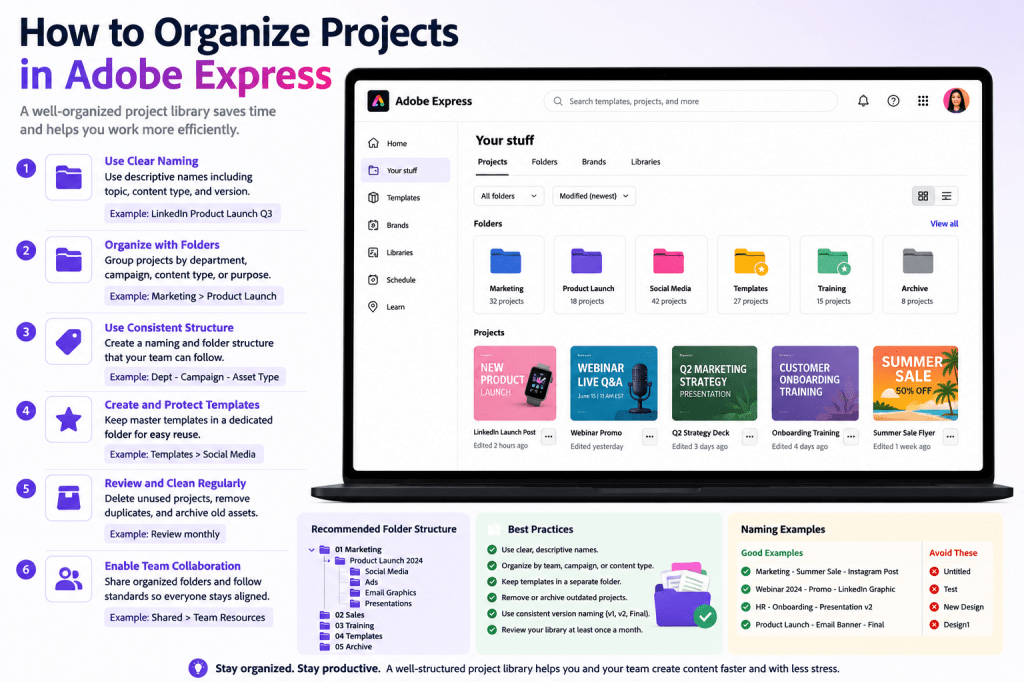
Why Project Organization Matters
Project organization helps you:
Find Content Faster
Reduce search time.
Improve Productivity
Spend more time creating.
Support Collaboration
Help team members locate assets.
Maintain Consistency
Keep related content together.
Scale Content Operations
Manage large content libraries efficiently.
Good organization becomes increasingly important as your content volume grows.
Signs Your Project Library Needs Organization
You may need a better system if:
Projects Are Difficult to Find
Search becomes necessary for everything.
Duplicate Files Exist Everywhere
Multiple versions create confusion.
Team Members Use Different Naming Styles
Consistency disappears.
Campaign Assets Are Scattered
Resources become fragmented.
Old Projects Clutter Your Workspace
Important content becomes harder to locate.
These are common challenges for growing teams.
The Adobe Express Project Library
Adobe Express stores projects in your account.
Typical content includes:
Social Media Graphics
Marketing and engagement assets.
Presentations
Business and educational content.
Videos
Promotional and training materials.
Flyers and Posters
Marketing campaigns.
Templates
Reusable designs.
Understanding how your library functions is the first step toward better organization.
Step 1: Create a Naming Convention
One of the most important organizational practices is consistent naming.
Poor Examples
- Untitled
- Test
- Project1
- New Design
Better Examples
- LinkedIn Product Launch Q3
- Employee Onboarding Presentation
- Webinar Registration Campaign
- Customer Success Training Module
Meaningful names improve searchability.
Step 2: Organize by Content Type
Many organizations group projects according to purpose.
Examples include:
Social Media
Posts and campaigns.
Presentations
Business communications.
Videos
Training and marketing assets.
Flyers
Promotional materials.
Templates
Reusable designs.
Grouping similar content simplifies management.
Step 3: Organize by Department
Businesses often organize content by team.
Examples include:
Marketing
Campaign assets.
Sales
Customer-facing materials.
HR
Recruitment and onboarding content.
Customer Success
Training resources.
Leadership
Executive communications.
Department-based organization improves collaboration.
Step 4: Organize by Campaign
Campaign-focused structures work well for marketing teams.
Example:
Product Launch 2026
Contains:
- Social posts
- Videos
- Presentations
- Flyers
- Landing page graphics
Keeping campaign assets together reduces confusion.
Step 5: Create Master Templates
Templates are among your most valuable assets.
Examples include:
LinkedIn Templates
Recurring social content.
Webinar Templates
Event promotion.
Presentation Templates
Business communications.
Internal Communication Templates
Company announcements.
Protect these templates and reuse them consistently.
Step 6: Use Consistent Version Naming
Version management becomes important as projects evolve.
Examples:
Version 1
Initial draft.
Version 2
Internal review.
Version 3
Final approval.
Version 4
Published version.
Clear version naming reduces mistakes.
Recommended Naming Structures
A simple naming convention might look like:
Department + Project Name
Marketing – Product Launch
Content Type + Topic
Presentation – Quarterly Results
Campaign + Asset Type
Webinar 2026 – LinkedIn Graphic
Choose a system and apply it consistently.
Organizing Social Media Projects
Social media content often grows quickly.
Examples:
Thought leadership content.
Visual campaigns.
Community content.
Visual discovery assets.
YouTube
Thumbnail and channel graphics.
Keeping platforms organized separately improves efficiency.
Organizing Marketing Campaigns
Marketing teams frequently create:
- Advertisements
- Flyers
- Videos
- Social graphics
- Presentations
Create campaign-focused structures.
Example:
Summer Promotion
Contains all related assets.
This makes updates easier.
Organizing Educational Content
Educators often create:
Lesson Materials
Instructional resources.
Presentations
Teaching content.
Worksheets
Learning exercises.
Training Videos
Educational assets.
Group content by course or subject whenever possible.
Organizing Business Content
Examples include:
Sales Presentations
Customer-facing materials.
Executive Reports
Leadership communication.
Internal Announcements
Employee engagement.
Training Resources
Staff development.
Business-focused structures improve discoverability.
Building a Content Library
Think beyond individual projects.
Create a reusable content ecosystem.
Examples include:
Brand Assets
Logos and visual standards.
Templates
Reusable designs.
Campaign Resources
Marketing materials.
Training Materials
Educational content.
A strong content library becomes a long-term business asset.
Project Organization for Teams
Collaboration introduces additional requirements.
Establish Naming Standards
Ensure consistency.
Define Ownership
Clarify responsibility.
Protect Master Templates
Prevent accidental edits.
Maintain Shared Resources
Keep assets accessible.
Schedule Reviews
Clean up old projects regularly.
These practices support team productivity.
Common Organization Mistakes
No Naming System
Projects become difficult to locate.
Too Many Duplicates
Creates confusion.
Inconsistent Structures
Reduces efficiency.
Mixing Campaigns Together
Makes content harder to manage.
Ignoring Cleanup
Libraries become cluttered.
Avoiding these mistakes improves long-term usability.
Monthly Project Maintenance
A simple monthly review can help.
Tasks include:
Delete Unnecessary Projects
Remove clutter.
Rename Poorly Named Files
Improve discoverability.
Review Duplicates
Consolidate content.
Update Templates
Keep assets current.
Archive Completed Campaigns
Maintain organization.
Small maintenance efforts prevent major cleanup projects later.
Example Organization System
Imagine a marketing department.
Marketing
- Product Launches
- Webinars
- Events
Sales
- Presentations
- Customer Resources
HR
- Recruitment
- Onboarding
Customer Success
- Training
- Product Education
This structure scales well as content grows.
Benefits of Organized Projects
A well-organized Adobe Express library provides:
Faster Content Creation
Reuse assets easily.
Better Collaboration
Teams find resources quickly.
Reduced Errors
Clear project ownership.
Stronger Consistency
Templates remain accessible.
Higher Productivity
Less searching, more creating.
These benefits become significant over time.
Conclusion
Project organization is one of the most valuable skills Adobe Express users can develop.
By implementing clear naming conventions, organizing by department or campaign, protecting templates, and maintaining a clean content library, you can dramatically improve productivity and collaboration.
Whether you’re an individual creator, educator, marketer, or enterprise team, a well-organized Adobe Express workspace helps you create content faster, find assets more easily, and scale content operations more effectively.
The next step is learning how to share projects with colleagues and stakeholders.
Continue Learning Adobe Express
To learn more about scalable content management, explore these guides:
- Adobe Express Content Creation: The Complete Guide
- Adobe Express Business Productivity: The Complete Guide
- Adobe Express Digital Asset Management: The Complete Guide
If you’re managing content across teams, also read:
- Adobe Express Team Collaboration: The Complete Guide
- Adobe Express Workflow Automation: The Complete Guide
- Adobe Express Content Operations: The Complete Guide








