A Brand Kit becomes far more valuable when it is shared across your organization.
Instead of every employee searching for logos, choosing fonts, or guessing brand colors, Adobe Express allows teams to work from a centralized set of approved brand assets.
Whether you’re managing:
- A marketing team
- A sales department
- A nonprofit organization
- A small business
- A remote workforce
- An enterprise content operation
sharing a Brand Kit helps ensure that everyone creates content that is consistent, professional, and aligned with your organization’s visual identity.
In this guide, you’ll learn how to share a Brand Kit with your team in Adobe Express and establish a scalable branding workflow.
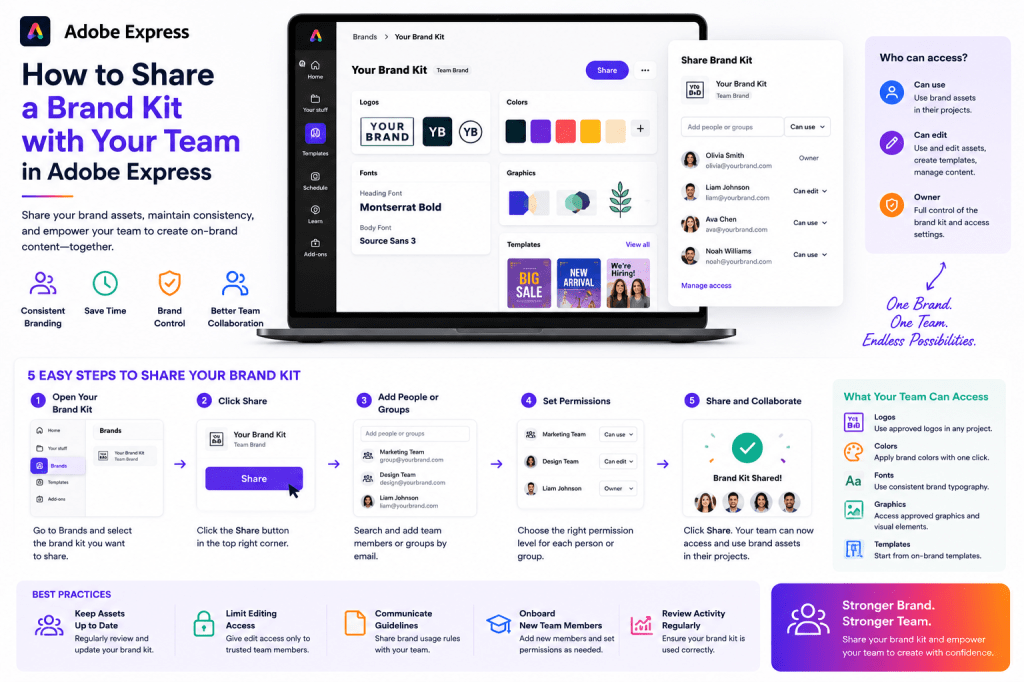
What Is a Shared Brand Kit?
A shared Brand Kit serves as a centralized branding hub.
It typically contains:
Logos
Official logo files.
Brand Colors
Approved color palettes.
Brand Fonts
Typography standards.
Graphics
Reusable visual elements.
Templates
Pre-approved layouts.
Instead of storing these assets in multiple locations, Adobe Express allows teams to access them from one place.
Why Share a Brand Kit?
Organizations that don’t share branding assets often experience:
Inconsistent Designs
Different visual styles emerge.
Outdated Logos
Employees use old files.
Color Variations
Brand standards become diluted.
Typography Problems
Unapproved fonts appear in content.
Reduced Efficiency
Time is wasted searching for assets.
A shared Brand Kit solves these challenges.
Benefits of Sharing a Brand Kit
Faster Content Creation
Employees can start creating immediately.
Stronger Brand Consistency
Everyone uses approved assets.
Easier Onboarding
New employees learn faster.
Better Collaboration
Teams work from the same resources.
Reduced Errors
Brand compliance becomes easier.
These benefits become more significant as organizations grow.
When Should You Share a Brand Kit?
Shared Brand Kits are especially useful for:
Marketing Teams
Campaign creation.
Sales Teams
Customer-facing presentations.
HR Departments
Employee communications.
Customer Success Teams
Training materials.
Leadership Teams
Executive communications.
Remote Teams
Distributed content creation.
Any group producing branded content can benefit.
Step 1: Complete Your Brand Kit
Before sharing, ensure the Brand Kit is fully configured.
Verify:
Logos
Current versions only.
Colors
Official palette.
Fonts
Approved typography.
Graphics
Updated assets.
Templates
Reusable content.
Sharing incomplete assets creates confusion.
Step 2: Open Adobe Express
Sign in to Adobe Express.
Navigate to:
Brand
or
Brand Kits
depending on your workspace.
Select the Brand Kit you want to share.
Step 3: Review Brand Assets
Perform a final quality review.
Check:
Branding Accuracy
Asset Quality
Naming Conventions
Organization
A clean Brand Kit is easier for teams to use.
Step 4: Locate Sharing Options
Adobe Express provides collaboration features that allow teams to access shared resources.
Look for:
Share
Invite
Team Access
Collaboration Settings
These controls determine who can use the Brand Kit.
Step 5: Add Team Members
Invite users who need access.
Examples:
Marketing Staff
Campaign creation.
Designers
Content production.
Sales Representatives
Presentations and proposals.
HR Personnel
Internal communications.
Leadership Teams
Corporate content.
Provide access based on actual business needs
Step 6: Configure Permissions
Permissions help protect brand assets.
Common permission types include:
View Access
Users can see assets.
Use Access
Users can apply branding.
Edit Access
Users can modify Brand Kits.
Admin Access
Full control.
Most organizations restrict editing rights to a small group.
Step 7: Share Usage Guidelines
A Brand Kit is most effective when accompanied by clear instructions.
Examples:
Approved Logo Usage
Where logos should appear.
Color Rules
When colors should be used.
Font Standards
Typography guidelines.
Template Policies
Approved content structures.
Documentation improves consistency.
Building a Brand Governance Structure
Successful organizations define ownership.
Examples:
Brand Manager
Maintains standards.
Marketing Team
Updates assets.
Designers
Create visual resources.
Content Creators
Use approved materials.
Clear ownership reduces confusion.
Sharing Brand Kits Across Departments
Different teams often use the same branding system.
Examples:
Marketing Department
Uses:
- Campaign templates
- Social media assets
- Advertisements
Sales Department
Uses:
- Pitch decks
- Proposals
- Product sheets
Human Resources
Uses:
- Recruitment materials
- Employee communications
- Training content
Customer Success
Uses:
- Educational resources
- Customer guides
- Presentations
A shared Brand Kit creates consistency across all departments.
Sharing Brand Kits with Remote Teams
Remote organizations often face branding challenges.
Employees may work from:
- Different cities
- Different countries
- Different time zones
A shared Brand Kit helps maintain consistency regardless of location.
Benefits include:
Centralized Resources
Faster Collaboration
Reduced Asset Duplication
Better Governance
Adobe Express makes remote collaboration significantly easier.
Training Your Team
Sharing access alone is not enough.
Employees should understand:
How to Apply Brand Kits
Where Assets Are Located
Which Templates to Use
Brand Compliance Expectations
Short training sessions often improve adoption dramatically.
Best Practices for Shared Brand Kits
Keep Assets Updated
Review regularly.
Limit Editing Permissions
Protect standards.
Use Consistent Naming
Improve usability.=
Remove Obsolete Assets
Reduce confusion.
Maintain Documentation
Support users.
These practices improve long-term success.
Common Sharing Mistakes
Too Many Administrators
Can create inconsistency.
Outdated Assets
Cause branding problems
Poor Organization
Makes resources difficult to find.
No Usage Guidelines
Creates confusion.
Lack of Training
Reduces adoption.
Avoiding these mistakes improves efficiency.
Example Workflow
Imagine a company with a marketing team of ten people.
Step 1
Create a complete Brand Kit.
Step 2
Upload logos, colors, and fonts.
Step 3
Share with the marketing department.
Step 4
Provide templates.
Step 5
Define usage rules.
Step 6
Review content regularly.
The result is faster content production with greater consistency.
Why Shared Brand Kits Improve Productivity
Without a shared Brand Kit:
Search for Assets
Repeated effort.
Upload Logos
Every project.
Verify Colors
Manual process.
Check Fonts
Time-consuming.
With a shared Brand Kit:
One Source of Truth
Approved assets only.
Faster Creation
Less setup work.
Better Collaboration
Shared standards.
Reduced Errors
Consistent branding.
The productivity gains grow as content volume increases.
Scaling Brand Management
As organizations expand, shared Brand Kits become increasingly important.
Benefits include:
Consistent Customer Experience
Across all channels.
Faster Team Onboarding
New employees become productive quickly.
Reduced Design Bottlenecks
Self-service branding.
Improved Governance
Stronger control over brand usage.
Brand Kits help transform branding from a manual process into a scalable system.
Conclusion
Sharing a Brand Kit with your team in Adobe Express is one of the most effective ways to improve branding consistency, collaboration, and productivity.
By centralizing logos, colors, fonts, graphics, and templates, organizations can create a single source of truth that empowers employees to produce professional content quickly and confidently.
Whether you’re supporting marketing, sales, HR, customer success, or enterprise-wide content operations, a shared Brand Kit provides the foundation for scalable and consistent content creation.
The more your team relies on a shared Brand Kit, the easier it becomes to maintain a strong and recognizable brand identity.
Continue Learning Adobe Express
To learn more about branding and collaboration, explore these guides:
- Adobe Express Brand Management: The Complete Guide
- Adobe Express Brand Kits: The Complete Guide
- Adobe Express Team Collaboration: The Complete Guide
If you’re building enterprise content systems, also read:
- Adobe Express Workflow Automation: The Complete Guide
- Adobe Express Content Operations: The Complete Guide
- Adobe Express Business Productivity: The Complete Guide







 Acrobat Express Pro