Your brand is not static.
Over time, organizations update logos, colors, typography, messaging, and visual assets to stay current and reflect business growth.
Because of this, your Adobe Express Brand Kit should be reviewed and updated regularly.
Keeping your Brand Kit current ensures that every new project uses the latest approved branding assets and that your team remains aligned around a single source of truth.
In this guide, you’ll learn how to update your Brand Kit in Adobe Express and maintain a consistent, professional brand presence across all content.
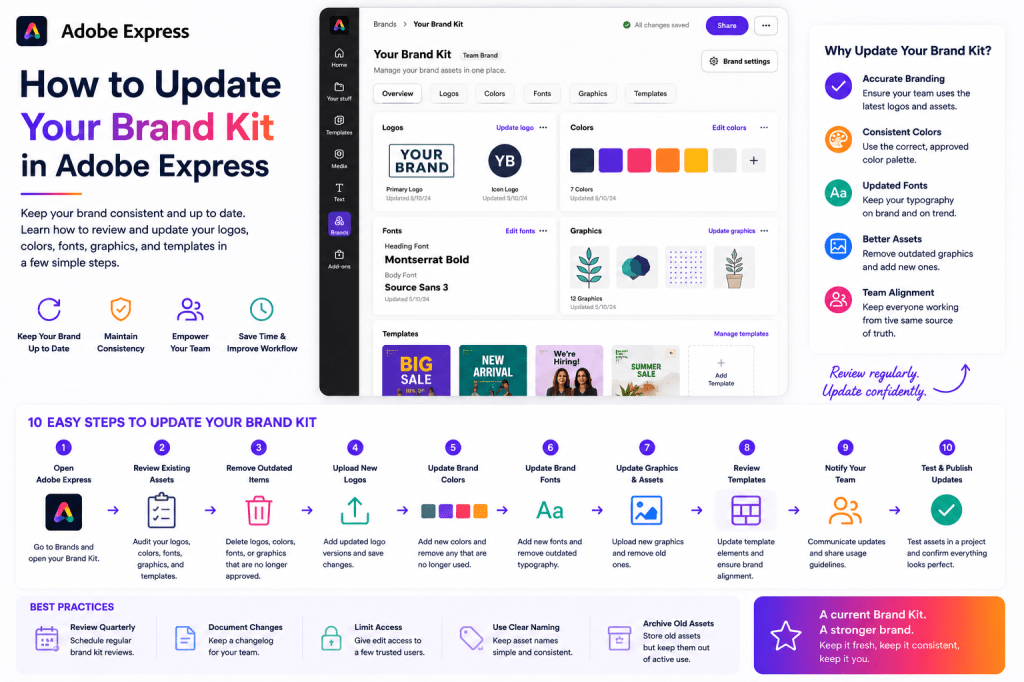
Why Updating Your Brand Kit Matters
Many organizations create a Brand Kit once and never revisit it.
This can lead to problems such as:
Outdated Logos
Old branding continues to appear in content.
Inconsistent Colors
Different teams use different palettes.
Typography Drift
Employees choose unapproved fonts.
Asset Confusion
Multiple versions of graphics circulate internally.
Regular Brand Kit updates help prevent these issues.
Signs Your Brand Kit Needs Updating
You should review your Brand Kit if:
Your Logo Has Changed
A new logo should immediately replace old versions.
Colors Have Been Updated
Brand refreshes often include new palettes.
New Fonts Have Been Approved
Typography systems evolve over time.
Marketing Assets Have Changed
New visual elements should be included.
Teams Report Confusion
Brand Kits should simplify workflows, not complicate them.
What Can Be Updated in a Brand Kit?
Adobe Express Brand Kits typically contain:
Logos
Primary and secondary logos.
Brand Colors
Approved color palettes.
Fonts
Typography systems.
Graphics
Reusable visual elements.
Templates
Brand-approved layouts.
Each of these areas should be reviewed periodically.
Step 1: Open Adobe Express
Sign in to Adobe Express.
Navigate to:
Brand
or
Brand Kits
depending on your workspace.
This area contains all branding resources.
Step 2: Select the Brand Kit
If multiple Brand Kits exist, select the one you want to update.
Examples:
Corporate Brand Kit
Company-wide branding.
Marketing Brand Kit
Campaign assets.
Product Brand Kit
Product-specific branding.
Department Brand Kit
Team-specific assets.
Open the Brand Kit editor
Step 3: Review Existing Assets
Before making changes, perform an audit.
Review:
Logos
Are they current?
Colors
Do they match brand guidelines?
Fonts
Are approved fonts being used?
Graphics
Are supporting assets up to date?
This review helps identify outdated materials.
Updating Logos
Logos are often the first branding element to change.
Step 4: Remove Outdated Logos
Delete versions that are no longer approved.
Examples:
Old Corporate Logo
Retired Product Logo
Legacy Campaign Branding
Keeping outdated logos creates confusion
Step 5: Upload New Logos
Add updated versions.
Examples:
Primary Logo
Current brand identity.
White Logo
Dark backgrounds.
Icon Logo
Small-format branding.
Horizontal Logo
Wide layouts.
Verify image quality before saving.
Updating Brand Colors
Colors are another common area of change.
Step 6: Review Existing Color Palette
Compare current colors against official brand guidelines.
Check:
Primary Colors
Secondary Colors
Accent Colors
Neutral Colors
Remove any obsolete colors.
Step 7: Add New Colors
Enter updated color values.
Use:
HEX Codes
Most common format.
Official Brand Specifications
Provided by marketing or design teams.
Consistency is essential.
Updating Brand Fonts
Typography should also be reviewed.
Step 8: Evaluate Current Fonts
Check whether the fonts still align with brand standards.
Examples:
Heading Fonts
Body Fonts
Accent Fonts
Campaign Fonts
Remove deprecated fonts.
Step 9: Add Updated Typography
Upload or select approved replacements.
Verify:
Readability
Consistency
Licensing Requirements
Brand Alignment
Updated typography improves visual cohesion.
Updating Brand Assets
Brand Kits often contain supporting graphics.
Examples include:
Icons
Illustrations
Background Graphics
Product Visuals
Marketing Elements
Review these assets periodically.
Step 10: Remove Outdated Graphics
Retired assets should be archived or deleted.
Benefits include:
Less Confusion
Cleaner Workflows
Easier Asset Selection
Improved Brand Consistency
Keep only approved materials
Step 11: Upload New Assets
Add:
Updated Illustrations
New Icons
Marketing Graphics
Campaign Assets
This ensures future projects use current resources.
Updating Shared Team Resources
Many organizations share Brand Kits across departments.
When making updates:
Notify Team Members
Explain changes.
Document Updates
Create a change log.
Provide Training
If major branding changes occur.
Communication improves adoption.
Testing the Updated Brand Kit
Before rolling changes out widely:
Create Test Projects
Apply the updated kit.
Verify Colors
Check visual accuracy.
Review Fonts
Confirm readability.
Test Logos
Verify quality and sizing.
Testing helps identify issues early.
Best Practices for Brand Kit Maintenance
Schedule Quarterly Reviews
Review branding every few months.
Keep One Source of Truth
Avoid duplicate asset libraries.
Archive Old Assets
Preserve history without creating confusion.
Document Changes
Maintain transparency.
Train Teams
Ensure everyone understands updates.
These practices improve long-term governance.
Common Brand Kit Update Mistake
Leaving Old Logos Active
Creates inconsistency.
Mixing Old and New Colors
Weakens braKeeping Too Many Fonts
Creates confusion.
Skipping Team Communication
Leads to mistakes.
Ignoring Brand Guidelines
Reduces professionalism.
Avoiding these mistakes helps maintain consistency.
Example Brand Refresh Workflow
Imagine a company undergoing a rebrand.
Step 1
Update the primary logo.
Step 2
Replace old color palette.
Step 3
Add new typography.
Step 4
Upload revised graphics.
Step 5
Test sample projects.
Step 6
Notify teams.
Step 7
Archive old assets.
Step 8
Launch updated branding.
This structured approach reduces risk.
Why Regular Updates Improve Productivity
A current Brand Kit provides:
Faster Content Creation
Teams use approved assets immediately.
Better Consistency
One branding standard.
Fewer Errors
Outdated assets removed.
Easier Collaboration
Everyone works from the same resources.
Stronger Governance
Brand integrity remains protected.
The benefits compound as content production scales.
Building a Brand Kit Governance Process
Successful organizations establish ownership.
Examples:
Brand Manager
Approves changes.
Marketing Team
Maintains assets.
Designers
Provide visual updates.
Employees
Use approved resources.
Defined ownership improves long-term management.
Conclusion
Updating your Brand Kit in Adobe Express is essential for maintaining a strong and consistent brand identity.
By regularly reviewing logos, colors, fonts, graphics, and supporting assets, you can ensure that every project reflects current brand standards while improving productivity and collaboration across teams.
Whether you’re managing a small business, marketing department, nonprofit organization, or enterprise content operation, a well-maintained Brand Kit becomes one of the most valuable assets in your Adobe Express workflow.
The stronger your Brand Kit governance, the easier it becomes to create professional, on-brand content at scale.
Continue Learning Adobe Express
To learn more about branding and workflow management, explore these guides:
- Adobe Express Brand Management: The Complete Guide
- Adobe Express Brand Kits: The Complete Guide
- Adobe Express Content Operations: The Complete Guide
If you’re building scalable content systems, also read:
- Adobe Express Team Collaboration: The Complete Guide
- Adobe Express Workflow Automation: The Complete Guide
- Adobe Express Business Productivity: The Complete Guide







 Acrobat Express Pro