Facebook Stories are one of the fastest ways to connect with your audience through short, engaging, mobile-first content.
Appearing at the top of the Facebook app, Stories allow businesses, creators, nonprofits, educators, and marketers to share updates that feel timely, personal, and highly visible.
Because Stories disappear after 24 hours, they create a sense of urgency that encourages users to view and engage with content quickly.
Adobe Express makes Facebook Story creation simple by providing:
- Facebook Story templates
- AI-powered design tools
- Brand Kit integration
- Professional stock photos
- Easy mobile-friendly editing
- Fast export workflows
In this guide, you’ll learn how to create Facebook Stories using Adobe Express.
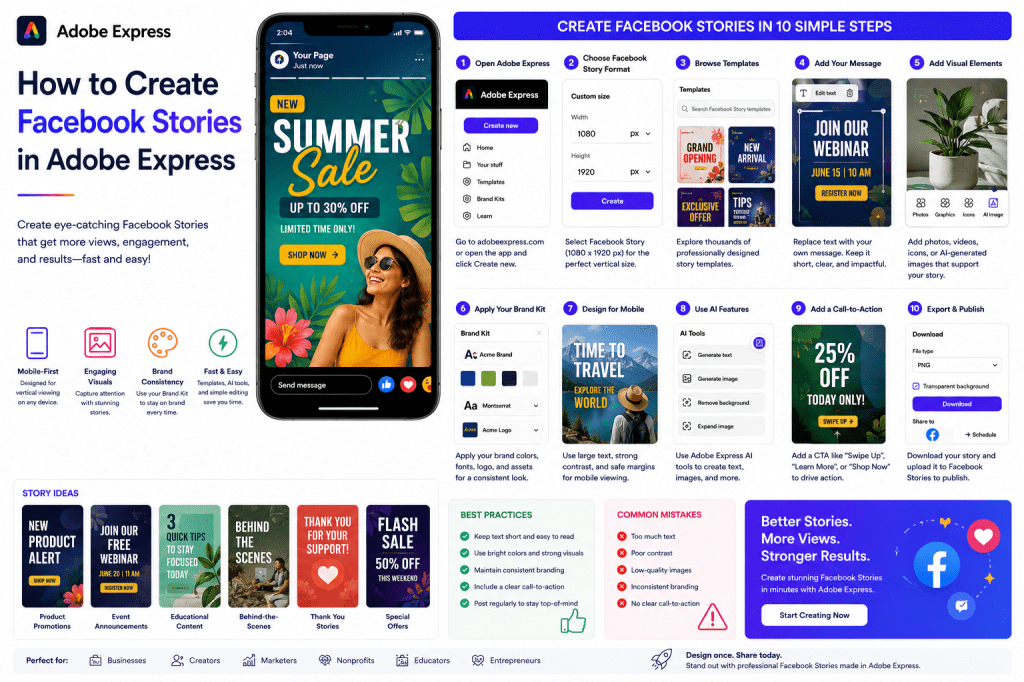
Why Use Facebook Stories?
Stories are often one of the most-viewed content formats on Facebook.
Benefits include:
Increased Visibility
Stories appear prominently at the top of the app.
Mobile-First Experience
Designed specifically for smartphones.
Higher Engagement
Users frequently interact with Story content.
Quick Content Creation
Perfect for timely updates.
Brand Awareness
Keeps your business visible daily.
Stories are ideal for maintaining regular audience engagement.
Types of Facebook Stories You Can Create
Adobe Express supports a variety of Story formats.
Examples include:
Product Promotions
Highlight products and services.
Event Announcements
Promote webinars and launches.
Limited-Time Offers
Create urgency.
Behind-the-Scenes Content
Show your business in action.
Educational Tips
Share valuable insights.
Customer Testimonials
Build trust and credibility.
Daily Updates
Keep followers informed.
Stories work well for both promotional and relationship-building content.
Step 1: Open Adobe Express
Sign in to Adobe Express.
From the dashboard:
Click Create New
or
Search Facebook Story Templates
Adobe Express offers templates specifically designed for Story content.
Step 2: Select Facebook Story Format
Facebook Stories use a vertical layout.
Recommended dimensions:
1080 × 1920 Pixels
9:16 Aspect Ratio
Adobe Express automatically applies the correct sizing when using Facebook Story templates.
Step 3: Choose a Template
Templates dramatically reduce design time.
Browse by:
Business
Retail
Marketing
Education
Nonprofit
Events
Personal Branding
Choose a template that matches your objective.
Step 4: Add Your Message
Replace placeholder text with your own content.
Examples:
Product Promotion
New Collection Available Today
Event Promotion
Register for Our Webinar
Educational Content
3 Productivity Tips You Need
Special Offer
20% Off This Week Only
Keep text concise and easy to read.
Step 5: Add Visual Elements
Stories rely heavily on visual communication.
Options include:
Upload Photos
Upload Videos
Adobe Stock Images
Icons and Graphics
AI-Generated Visuals
Choose visuals that support your message.
Step 6: Apply Your Brand Kit
Adobe Express Brand Kits help maintain consistency.
Apply:
Brand Colors
Brand Fonts
Logos
Brand Graphics
Consistent branding improves recognition.
Step 7: Design for Mobile Viewing
Most Story viewers use smartphones.
Ensure:
Large Text
Easy readability.
Strong Contrast
Text stands out.
Clear Visual Hierarchy
Most important information first.
Safe Margins
Avoid placing text near edges.
Mobile optimization is critical.
Step 8: Use Adobe Express AI Features
Adobe Express includes AI-powered tools that speed up content creation.
Examples include:
Generate Headlines
Create engaging messaging.
Generate Images
Create unique visuals.
Remove Backgrounds
Improve product photography.
Expand Images
Fit Story dimensions easily.
AI tools can significantly reduce design time.
Step 9: Add a Call-to-Action
Every Story should encourage action.
Examples:
Learn More
Register Now
Shop Today
Visit Our Website
Follow for More
Send Us a Message
Strong calls-to-action improve results.
Step 10: Export and Publish
Once your Story is complete:
Save the Project
Download the Design
Duplicate for Future Stories
Upload to Facebook
Publish
Your Facebook Story is now ready.
Creating Promotional Stories
Promotional Stories are ideal for:
Product Launches
Sales Events
Special Offers
Seasonal Campaigns
New Services
Temporary content creates urgency.
Creating Educational Stories
Educational Stories often generate excellent engagement.
Examples:
Tips
Tutorials
Quick Lessons
Industry Facts
Best Practices
Educational content helps build authority.
Creating Event Stories
Facebook Stories are effective for event marketing.
Examples include:
Webinar Invitations
Conference Promotions
Product Launch Events
Community Events
Live Sessions
Use countdown-style visuals when possible.
Creating Behind-the-Scenes Stories
Authentic content often performs well.
Examples:
Team Activities
Office Life
Production Process
Event Preparation
Daily Operations
Behind-the-scenes content builds trust.
Building a Facebook Story Workflow
Many businesses create Stories daily.
Example schedule:
Monday
Educational Tip
Tuesday
Product Highlight
Wednesday
Customer Story
Thursday
Behind-the-Scenes
Friday
Special Offer
Adobe Express makes recurring Story creation easy.
Best Practices for Facebook Stories
Keep Text Minimal
Stories are consumed quickly.
Use Strong Visuals
Capture attention immediately.
Maintain Branding
Use consistent colors and fonts.
Include a CTA
Guide user actions.
Design Mobile First
Optimize for smartphones.
These practices improve Story performance.
Common Facebook Story Mistakes
Too Much Text
Reduces readabilityPoor Contrast
Makes content difficult to view.
Weak Visuals
Fails to attract attention.
Inconsistent Branding
Reduces recognition.
No Clear Goal
Limits effectiveness.
Avoiding these mistakes improves engagement.
Example Workflow
Imagine a business promoting a webinar.
Step 1
Choose a Facebook Story template.
Step 2
Apply Brand Kit.
Step 3
Upload speaker image.
Step 4
Add event details.
Step 5
Insert registration CTA.
Step 6
Review mobile layout.
Step 7
Export.
Step 8
Publish to Facebook Stories.
The entire process often takes less than 10 minutes.
Why Adobe Express Is Ideal for Facebook Stories
Adobe Express combines:
Professional Templates
AI Tools
Brand Kits
Easy Editing
Fast Publishing Workflows
This makes it an excellent platform for Story creation.
Conclusion
Facebook Stories are one of the fastest ways to engage audiences with mobile-first content that feels immediate and personal.
By combining templates, Brand Kits, AI-powered tools, and streamlined workflows, Adobe Express helps businesses and creators create professional Story content quickly and consistently.
Whether you’re promoting products, growing a community, sharing updates, or increasing brand awareness, Adobe Express provides everything needed to create effective Facebook Stories.
Continue Learning Adobe Express
To learn more about Facebook and social media content creation, explore these guides:
- How to Create Facebook Posts in Adobe Express
- How to Create Instagram Posts in Adobe Express
- How to Create Instagram Stories in Adobe Express
For advanced workflows, also read:
- Adobe Express for Social Media: The Complete Guide
- Adobe Express Content Calendars: The Complete Guide
- Adobe Express Marketing Automation: The Complete Guide







 Acrobat Express Pro