Your Facebook cover image is one of the first things visitors notice when they arrive on your Facebook page.
A professional cover image helps communicate your brand, showcase promotions, highlight services, announce events, and create a strong first impression.
Whether you’re running a business page, nonprofit organization, personal brand, educational institution, or community group, an effective cover image can significantly improve your Facebook presence.
Adobe Express makes it easy to design professional Facebook cover images using:
- Facebook cover templates
- Brand Kits
- AI-powered design tools
- Adobe Stock images
- Custom graphics and icons
- Fast export workflows
In this guide, you’ll learn how to create Facebook cover images using Adobe Express.
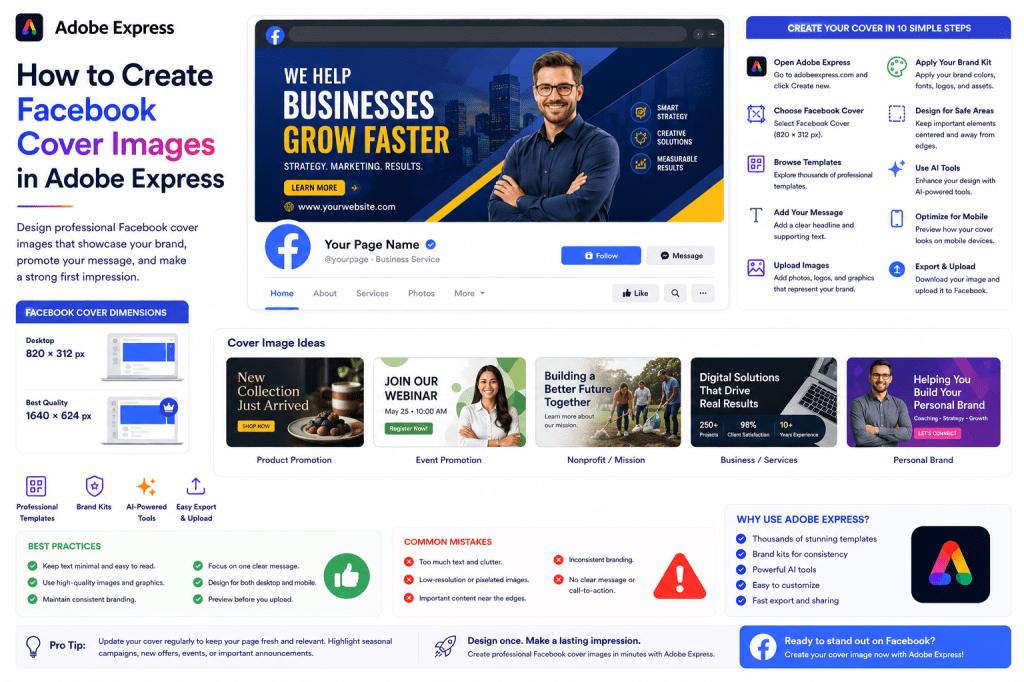
Why Facebook Cover Images Matter
A cover image functions like a digital billboard for your Facebook page.
Benefits include:
Strong First Impression
Visitors immediately see your branding.
Increased Brand Recognition
Reinforces visual identity.
Promotion Opportunities
Highlight products, events, or campaigns.
Professional Appearance
Builds credibility.
Improved Engagement
Encourages users to explore your page.
An optimized cover image helps visitors understand your brand instantly.
Facebook Cover Image Dimensions
Facebook recommends:
820 × 312 Pixels
For desktop viewing.
For best quality:
1640 × 624 Pixels
Higher-resolution version.
Adobe Express automatically provides Facebook Cover templates sized correctly.
Types of Facebook Cover Images
Different goals require different cover designs.
Common examples include:
Business Covers
Promote products or services.
Personal Brand Covers
Highlight expertise.
Event Covers
Promote upcoming events.
Nonprofit Covers
Showcase mission and impact.
Educational Covers
Promote courses and training.
Seasonal Covers
Support campaigns and promotions.
Choose a design that supports your objective.
Step 1: Open Adobe Express
Sign in to Adobe Express.
From the dashboard:
Click Create New
or
Search Facebook Cover Templates
Adobe Express offers dedicated Facebook cover designs.
Step 2: Select a Facebook Cover Template
Browse categories such as:
Business
Marketing
Retail
Education
Nonprofit
Events
Personal Branding
Templates provide a professional starting point.
Step 3: Add Your Main Message
Determine the primary purpose of the cover.
Examples:
Product Promotion
Introducing Our New Collection
Service Promotion
Helping Businesses Grow Faster
Event Promotion
Join Our Webinar Series
Brand Positioning
Creative Solutions for Modern Teams
Keep messaging clear and concise.
Step 4: Upload Images
Visuals often determine whether a cover looks professional.
Options include:
Company Photography
Team Photos
Product Images
Adobe Stock Photos
AI-Generated Images
Custom Graphics
Use high-quality visuals whenever possible.
Step 5: Apply Your Brand Kit
Adobe Express Brand Kits help maintain consistency.
Apply:
Brand Colors
Brand Fonts
Logos
Brand Graphics
Consistent branding improves recognition and trust.
Step 6: Design Around Safe Areas
Facebook displays cover images differently on desktop and mobile.
Important elements should remain:
Centered
Away From Edges
Visible on Smaller Screens
Always preview before publishing.
Step 7: Customize Layout Elements
Adjust:
Text
Backgrounds
Shapes
Icons
Graphics
Visual Hierarchy
The goal is clarity and professionalism.
Step 8: Use Adobe Express AI Tools
Adobe Express includes several AI features.
Examples:
Generate Marketing Headlines
Generate Images
Remove Backgrounds
Expand Images
Enhance Visuals
AI tools can dramatically speed up the design process.
Step 9: Optimize for Mobile Devices
Many Facebook users browse from smartphones.
Check:
Text Readability
Logo Visibility
Image Cropping
Visual Balance
Mobile optimization is essential.
Step 10: Export and Upload
When your design is complete:
Save Project
Download Image
Duplicate for Future Campaigns
Upload to Facebook
Your Facebook cover image is ready.
Facebook Cover Design Ideas
Business Cover
Include:
- Company logo
- Tagline
- Website
- Core service
Simple and professional.
Product Promotion Cover
Include:
- Product image
- Key benefits
- Call-to-action
Great for launches.
Event Cover
Include:
- Event title
- Date
- Speaker information
- Registration details
Ideal for webinars and conferences.
Personal Brand Cover
Include:
- Professional photo
- Expertise statement
- Website or contact information
Builds authority.
Seasonal Campaign Cover
Include:
- Promotional graphics
- Limited-time offers
- Holiday themes
Creates urgency.
Best Practices for Facebook Covers
Keep Text Minimal
Avoid overcrowding.
Use High-Quality Images
Professional visuals create trust.
Maintain Brand Consistency
Use your established visual identity.
Focus on One Message
Avoid multiple competing ideas.
Test Mobile Layouts
Ensure visibility across devices.
These practices improve effectiveness.
Common Facebook Cover Mistakes
Too Much Text
Creates visual clutter.
Poor Image Quality
Looks unprofessional.
Important Content Near Edges
May be cropped.
Weak Branding
Reduces recognition.
No Clear Purpose
Confuses visitors.
Avoiding these mistakes improves results.
Example Workflow
Imagine a consulting business promoting a webinar.
Step 1
Choose a Facebook Cover template.
Step 2
Apply Brand Kit.
Step 3
Upload speaker photo.
Step 4
Add webinar headline.
Step 5
Include registration URL.
Step 6
Review desktop and mobile layouts.
Step 7
Export.
Step 8
Upload to Facebook.
The entire process often takes less than 15 minutes.
Why Adobe Express Is Ideal for Facebook Covers
Adobe Express combines:
Professional Templates
Brand Management
AI Design Tools
Easy Editing
Fast Publishing
This makes it one of the easiest platforms for creating professional Facebook cover graphics.
Conclusion
A well-designed Facebook cover image helps create a strong first impression, reinforce branding, promote key messages, and encourage engagement.
By combining templates, Brand Kits, AI-powered tools, and streamlined workflows, Adobe Express enables businesses and creators to build professional cover graphics quickly and consistently.
Whether you’re promoting products, services, events, or your personal brand, Adobe Express provides everything needed to create effective Facebook cover images.
Continue Learning Adobe Express
To learn more about Facebook content creation, explore these guides:
- How to Create Facebook Posts in Adobe Express
- How to Create Facebook Stories in Adobe Express
- How to Create Instagram Posts in Adobe Express
For advanced marketing workflows, also read:
- Adobe Express for Social Media: The Complete Guide
- Adobe Express Brand Management: The Complete Guide
- Adobe Express Marketing Automation: The Complete Guide








