Introduction
Instagram Reels have become one of the most effective ways to reach new audiences on Instagram. However, many creators focus entirely on the video itself and overlook one important element: the Reel cover.
A strong Reel cover can dramatically increase clicks, profile visits, and overall engagement because it acts as the thumbnail people see before deciding whether to watch your content.
Adobe Express makes it easy to create professional Reel covers using templates, Brand Kits, AI-powered design tools, and customizable graphics.
In this guide, you’ll learn how to create eye-catching Instagram Reel covers using Adobe Express.
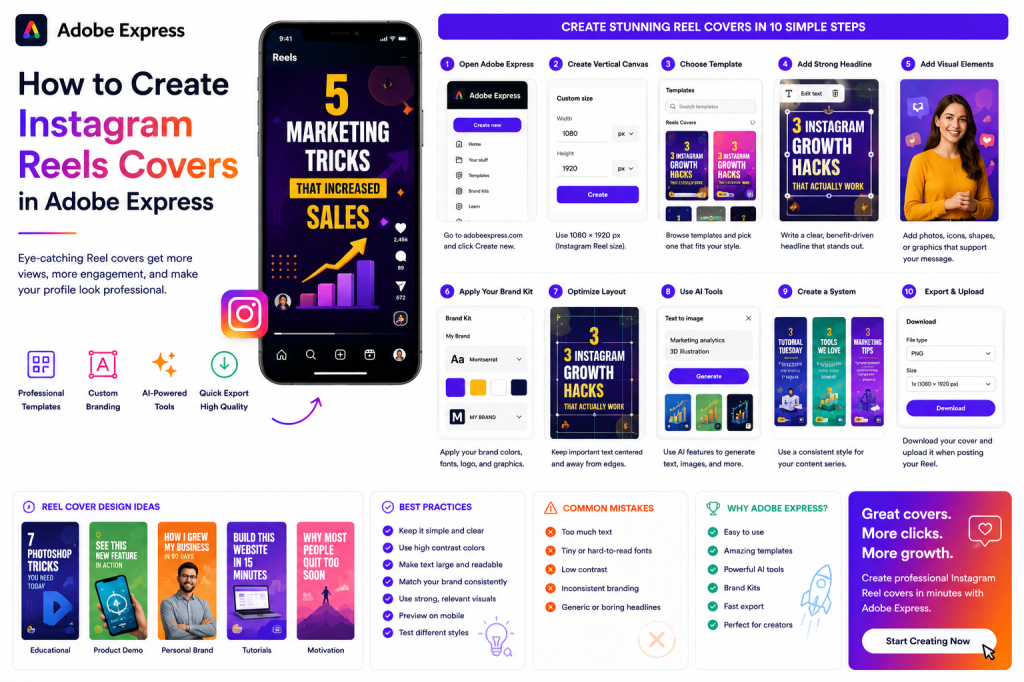
Why Reel Covers Matter
Many users discover Reels through:
- Your Instagram profile
- Explore pages
- Shared content
- Search results
- Hashtag pages
Before viewers watch the Reel, they often see the cover image first.
A strong cover can:
Increase Click-Through Rates
More users tap to watch.
Improve Profile Appearance
Creates a professional-looking feed.
Strengthen Branding
Maintains visual consistency.
Improve Content Organization
Makes topics easier to identify.
Encourage Binge Watching
Viewers can quickly browse your content.
The cover is often the first impression of your Reel.
What Makes a Good Reel Cover?
Successful Reel covers typically include:
Clear Headline
Easy to read.
Strong Visual
Relevant image or graphic.
Consistent Branding
Colors and fonts that match your brand.
High Contrast
Improves visibility.
Simple Layout
Avoid clutter.
The goal is immediate recognition.
Step 1: Open Adobe Express
Sign in to Adobe Express.
From the dashboard:
Click Create New
or
Search for Instagram Reel Cover Templates
Adobe Express provides templates specifically designed for social media content.
Step 2: Create a Vertical Canvas
Instagram Reels use a vertical format.
Recommended dimensions:
1080 × 1920 Pixels
This matches the Reel aspect ratio.
Adobe Express automatically provides the correct size when using Reel templates.
Step 3: Choose a Reel Cover Template
Browse available templates.
Categories include:
Business
Education
Fitness
Marketing
Lifestyle
Personal Branding
Coaching
Nonprofits
Choose a design that fits your content style.
Step 4: Create a Strong Headline
The title should immediately communicate the Reel’s value.
Examples:
Bad Example
Marketing Tips
Better Example
5 Marketing Tricks That Increased Sales
Bad Example
Instagram Advice
Better Example
3 Instagram Growth Hacks That Actually Work
Specificity attracts attention.
Step 5: Add Visual Elements
Strong visuals increase engagement.
Options include:
Personal Photos
Great for personal brands.
Product Images
Perfect for businesses.
Adobe Stock Images
Professional appearance.
Icons
Improve visual communication.
AI-Generated Images
Unique creative assets.
Choose visuals that support the Reel topic.
Step 6: Apply Your Brand Kit
Adobe Express Brand Kits help maintain consistency.
Apply:
Brand Colors
Brand Fonts
Logos
Brand Graphics
Consistent branding builds recognition over time.
Step 7: Optimize Text Placement
Instagram may crop portions of cover images in profile grids.
Keep important text:
Centered
Away From Edges
Large and Readable
Always preview before publishing.
Step 8: Use Adobe Express AI Features
Adobe Express AI tools can accelerate cover creation.
Examples:
Generate Headlines
Create engaging titles.
Generate Images
Produce unique visuals.
Remove Backgrounds
Create cleaner designs.
Expand Images
Adjust compositions easily.
AI can significantly reduce design time.
Step 9: Create a Consistent Cover System
Many successful creators use repeatable designs.
Examples:
Educational Series
Blue covers.
Tutorials
Green covers.
Product Demos
Orange covers.
Case Studies
Purple covers.
Announcements
Red covers.
Color coding helps viewers identify content quickly.
Step 10: Export Your Reel Cover
Once complete:
Save Project
Store for future editing.
Download Image
Export at high quality.
Duplicate Design
Reuse for future Reels.
Upload to Instagram
Select the cover when publishing the Reel.
Your custom Reel cover is now ready.
Reel Cover Design Ideas
Educational Content
Use:
- Bold numbers
- Clear headlines
- Bright colors
Example:
“7 Photoshop Tricks You Need Today”
Product Demonstrations
Use:
- Product images
- Feature callouts
- Branding elements
Example:
“See This New Feature in Action”
Personal Branding
Use:
- Professional photo
- Consistent colors
- Signature style
Example:
“How I Grew My Business in 90 Days”
Tutorials
Use:
- Step-by-step visuals
- Action-oriented titles
Example:
“Build This Website in 15 Minutes”
Motivational Content
Use:
- Strong imagery
- Inspiring text
Example:
“Why Most People Quit Too Soon”
Common Reel Cover Mistakes
Too Much Text
Viewers won’t read paragraphs.
Tiny Fonts
Unreadable on mobile devices.
Poor Contrast
Text blends into background.
Inconsistent Branding
Creates confusion.
Generic Headlines
Reduce curiosity.
Avoiding these mistakes improves click-through rates.
Example Workflow
Imagine a creator publishing marketing tutorials.
Step 1
Choose a Reel cover template.
Step 2
Apply Brand Kit.
Step 3
Upload profile photo.
Step 4
Add headline:
“3 AI Marketing Tools You Should Try”
Step 5
Adjust colors.
Step 6
Preview mobile layout.
Step 7
Export.
Step 8
Upload to Instagram.
The process can often be completed in under 10 minutes.
Why Adobe Express Is Ideal for Reel Covers
Adobe Express combines:
Social Media Templates
Brand Kits
AI Tools
Easy Editing
Fast Content Creation
This makes it one of the easiest platforms for creating professional Reel covers.
Conclusion
Instagram Reel covers play a major role in attracting viewers and improving engagement.
By combining strong headlines, compelling visuals, consistent branding, and Adobe Express templates, creators can build professional-looking Reel covers that encourage more people to watch their content.
Whether you’re a creator, business owner, marketer, educator, or nonprofit organization, Adobe Express provides everything needed to create attention-grabbing Reel covers quickly and consistently.
Continue Learning Adobe Express
To learn more about Instagram content creation, explore these guides:
- How to Create Instagram Posts in Adobe Express
- How to Create Instagram Stories in Adobe Express
- Adobe Express for Social Media: The Complete Guide
For advanced content workflows, also read:
- Adobe Express Content Calendars: The Complete Guide
- Adobe Express Marketing Automation: The Complete Guide
- Building an AI Content Publishing System with Adobe Express: The Complete Guide







 Acrobat Express Pro