Introduction
Case studies are among the most powerful forms of marketing content because they provide proof.
While testimonials tell people that something works, case studies show exactly how it worked, what was done, and what results were achieved.
Pinterest users actively search for:
- Success stories
- Marketing examples
- Business growth examples
- AI implementation examples
- SEO case studies
- Productivity improvements
- Real-world results
- Before-and-after transformations
This makes Pinterest an excellent platform for promoting case studies.
Adobe Express makes it easy to create professional Case Study Promotion Pins using:
- Pinterest templates
- Brand Kits
- AI-powered design tools
- Adobe Stock assets
- Business-focused layouts
- Fast export workflows
In this guide, you’ll learn how to create Pinterest Case Study Promotion Pins using Adobe Express.
What Are Pinterest Case Study Promotion Pins?
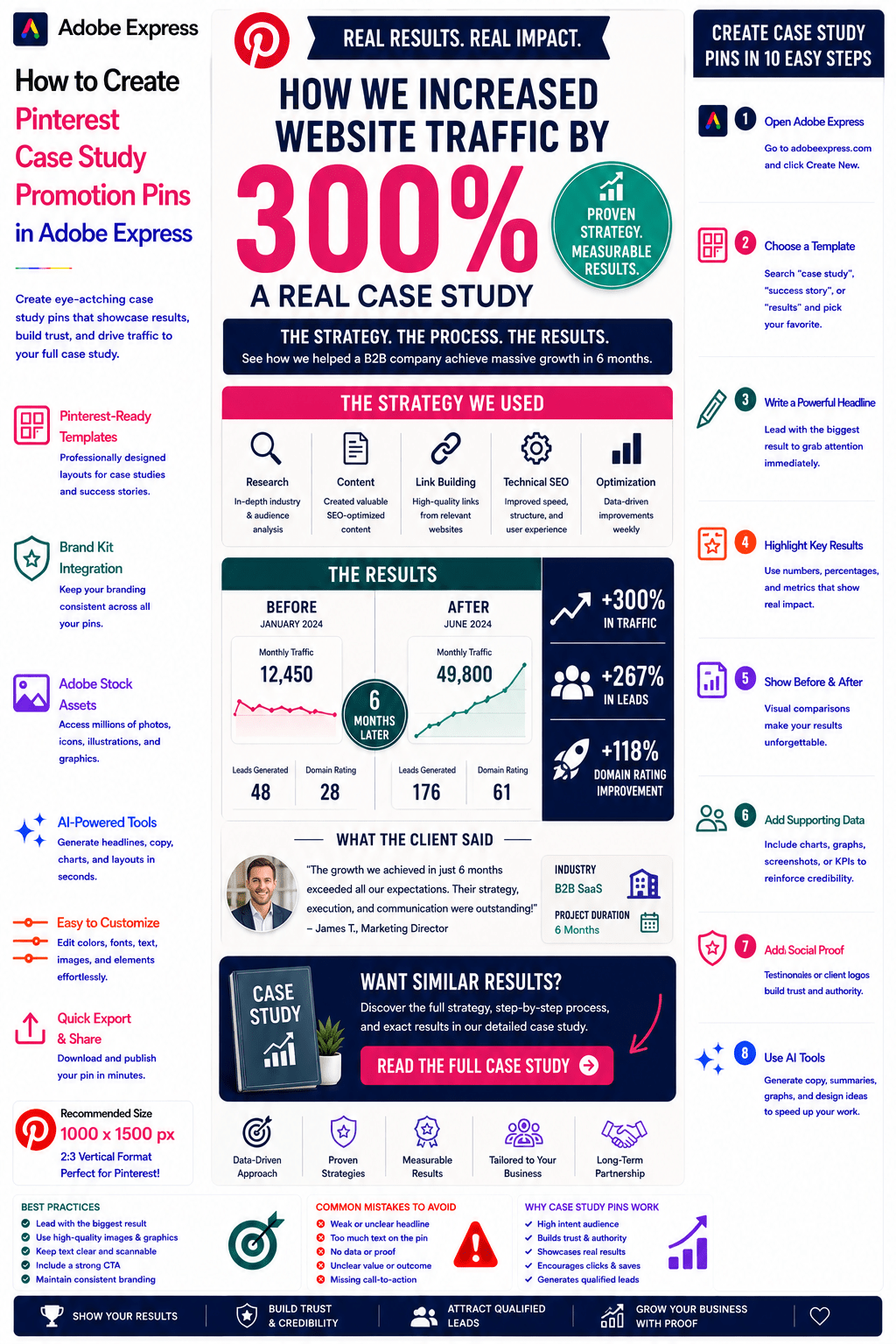
Case Study Promotion Pins are Pinterest graphics designed to showcase real results, success stories, and measurable outcomes.
Examples include:
How We Increased Traffic by 300%
AI Automation Case Study
SEO Growth Success Story
Business Transformation Example
Lead Generation Results
Website Redesign Case Study
Productivity Improvement Story
Marketing Campaign Success
The objective is to attract clicks and build trust through evidence.
Why Case Study Pins Perform Well
Pinterest users are often researching solutions.
Benefits include:
Builds Trust
Real examples create credibility.
Demonstrates Expertise
Shows your capabilities.
Provides Proof
Results are more persuasive than claims.
Generates Qualified Leads
People interested in results become prospects.
Encourages Shares and Saves
Success stories are highly engaging.
Case studies are among the strongest trust-building assets available.
Best Case Study Niches for Pinterest
Popular categories include:
Artificial Intelligence
Marketing
SEO
Business Growth
Productivity
E-Commerce
Content Marketing
Design
Consulting
Coaching
Focus on measurable outcomes whenever possible.
Recommended Pinterest Pin Size
Pinterest recommends:
1000 × 1500 Pixels
2:3 Vertical Format
Adobe Express includes Pinterest-ready templates optimized for storytelling and results.
Step 1: Open Adobe Express
Sign in to Adobe Express.
From the dashboard:
Click Create New
or
Search Pinterest Templates
Adobe Express provides numerous layouts suitable for business success stories.
Step 2: Choose a Case Study Template
Browse categories such as:
Business
Marketing
Reports
Success Stories
Data Visualization
Results-Based Promotions
Choose a layout that emphasizes outcomes.
Step 3: Create a Strong Headline
Examples:
How We Increased Leads by 250%
AI Automation Saved 20 Hours Per Week
SEO Case Study: 400% Traffic Growth
From 0 to 10,000 Subscribers
Marketing Results That Matter
Numbers attract attention.
Step 4: Highlight the Key Result
Examples:
+300% Website Traffic
+250% Lead Generation
20 Hours Saved Weekly
50% Cost Reduction
5x Revenue Growth
The result should be the focal point.
Step 5: Show Before-and-After Comparisons
Examples:
Traffic Before vs After
Revenue Before vs After
Process Before vs After
Time Savings Comparison
Productivity Improvements
Visual comparisons increase engagement.
Step 6: Apply Your Brand Kit
Adobe Express Brand Kits simplify branding.
Apply:
Brand Colors
Brand Fonts
Logos
Design Elements
Consistent branding strengthens authority.
Step 7: Add Supporting Data
Examples:
Charts
Graphs
Performance Metrics
KPIs
Screenshots
Dashboards
Data reinforces credibility.
Step 8: Use Adobe Express AI Features
Adobe Express AI tools can generate:
Headlines
Data Visualizations
Marketing Copy
Layout Variations
CTA Suggestions
AI can accelerate design and content creation.
Step 9: Add a Strong Call-to-Action
Examples:
Read the Full Case Study
Discover the Strategy
See How We Did It
Learn More
Get the Framework
View the Results
A CTA drives traffic to your website.
Step 10: Export and Publish
When complete:
Save Project
Download Pin
Create Multiple Variations
Upload to Pinterest
Your Case Study Promotion Pin is ready.
Creating AI Case Study Pins
Examples:
AI Agent Implementation
Prompt Engineering Success
AI Workflow Automation
AI Productivity Gains
AI-related results attract significant interest.
Creating Marketing Case Study Pins
Examples:
Lead Generation Growth
Conversion Improvements
Content Marketing Results
Email Campaign Performance
Marketing case studies perform exceptionally well.
Creating SEO Case Study Pins
Examples:
Traffic Growth
Ranking Improvements
Keyword Success Stories
Organic Search Wins
SEO case studies are highly shareable.
Creating Consulting Case Study Pins
Examples:
Business Transformation
Operational Efficiency Gains
Strategic Planning Results
Cost Reduction Projects
Consulting case studies build credibility quickly.
Creating Coaching Case Study Pins
Examples:
Client Success Stories
Career Advancement Results
Productivity Improvements
Leadership Development Outcomes
Coaching businesses benefit greatly from proof-based content.
Best Practices for Case Study Promotion Pins
Lead With the Result
The outcome should be instantly visible.
Use Real Data
Authenticity matters.
Include Numbers
Specific results attract attention.
Keep the Story Simple
Focus on the key transformation.
Use a Strong CTA
Encourage users to learn more.
These practices improve click-through rates.
Common Case Study Promotion Mistakes
Vague Results
Weakens credibility.
No Data
Makes claims less convincing.
Too Much Detail
Overwhelms readers.
Weak Headline
Fails to attract attention.
Missing CTA
Reduces traffic potential.
Avoiding these mistakes improves performance.
Example Workflow
Imagine promoting a case study.
Case Study
AI Automation Implementation
Result
Saved 25 Hours Per Week
Before
Manual Data Processing
After
Automated AI Workflow
CTA
Read the Full Case Study
This structure performs exceptionally well on Pinterest.
Why Adobe Express Is Ideal for Case Study Promotion Pins
Adobe Express combines:
Professional Templates
Brand Management
AI Design Tools
Data Visualization Features
Easy Editing
Fast Export
Pinterest-Friendly Formats
This makes it one of the easiest tools for promoting success stories and business results.
Conclusion
Pinterest Case Study Promotion Pins are highly effective for building trust, demonstrating expertise, attracting qualified leads, and generating website traffic.
By combining templates, Brand Kits, AI-powered tools, and streamlined workflows, Adobe Express enables businesses, consultants, agencies, and creators to create professional Case Study Promotion Pins quickly and consistently.
Whether you’re showcasing AI implementations, marketing results, SEO growth, coaching success stories, or consulting outcomes, Adobe Express provides everything needed to create high-converting Pinterest Case Study Promotion Pins.
Continue Learning Adobe Express
To learn more about Pinterest marketing, explore these guides:
- How to Create Pinterest Consulting Service Pins in Adobe Express
- How to Create Pinterest Coaching Program Pins in Adobe Express
- How to Create Pinterest Community Promotion Pins in Adobe Express
For advanced marketing workflows, also read:
- Adobe Express Marketing Automation: The Complete Guide
- Adobe Express Content Calendars: The Complete Guide
- Adobe Express Workflow Automation: The Complete Guide








