Introduction
Success stories are one of the most persuasive forms of content you can share on Pinterest.
People are naturally drawn to stories of transformation. Whether it’s a business growing revenue, a client achieving a major goal, a student completing a course, or a creator reaching a milestone, success stories inspire action and build trust.
Pinterest users actively search for:
- Business success stories
- Marketing wins
- Client transformations
- AI success stories
- Career growth examples
- Productivity improvements
- Personal development journeys
- Entrepreneurial achievements
Success Story Pins allow you to showcase real-world outcomes while promoting your products, services, courses, coaching programs, or community.
Adobe Express makes it easy to create professional Success Story Pins using:
- Pinterest templates
- Brand Kits
- AI-powered design tools
- Adobe Stock assets
- Storytelling layouts
- Fast export workflows
In this guide, you’ll learn how to create Pinterest Success Story Pins using Adobe Express.
What Are Pinterest Success Story Pins?
Success Story Pins are Pinterest graphics that highlight a positive outcome achieved by a customer, client, student, community member, or business.
Examples include:
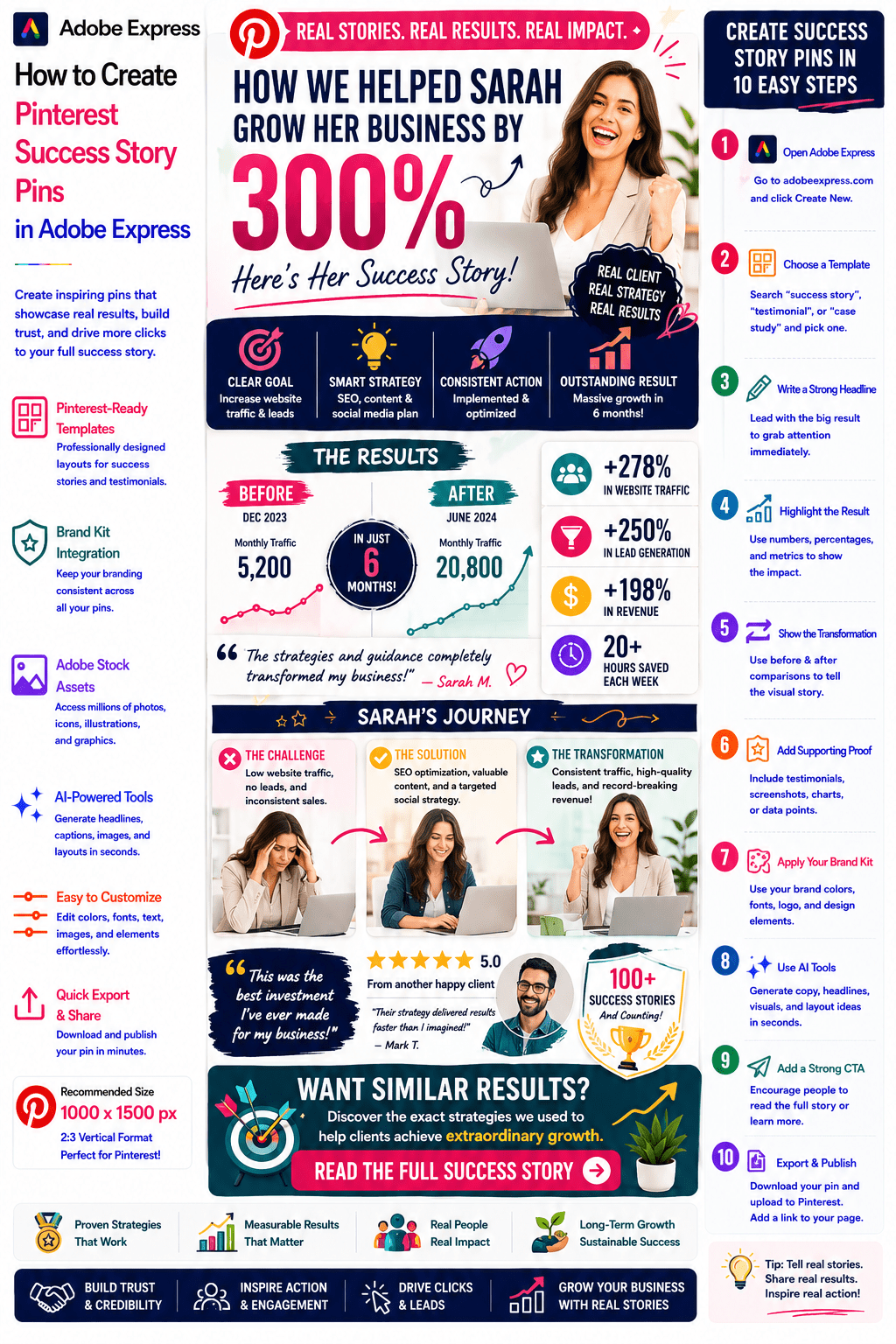
How Sarah Grew Her Business by 300%
From Beginner to AI Consultant in 6 Months
Client Success Story: 10,000 New Visitors
How a Startup Saved 20 Hours Per Week
From Side Hustle to Full-Time Business
How Our Student Landed a New Job
The objective is to inspire trust through real-world results.
Why Success Story Pins Perform Well
Pinterest users love aspirational content.
Benefits include:
Builds Trust
People believe real stories.
Demonstrates Results
Shows proof instead of promises.
Creates Emotional Connection
Stories are memorable.
Encourages Clicks
Users want the full story.
Generates Qualified Leads
Success attracts people seeking similar outcomes.
Success stories combine inspiration with credibility.
Best Success Story Niches for Pinterest
Popular categories include:
Artificial Intelligence
Marketing
Business Growth
Entrepreneurship
Coaching
Education
Productivity
Career Development
Personal Development
Health and Wellness
Choose stories with clear transformations.
Recommended Pinterest Pin Size
Pinterest recommends:
1000 × 1500 Pixels
2:3 Vertical Format
Adobe Express includes Pinterest-ready templates optimized for storytelling.
Step 1: Open Adobe Express
Sign in to Adobe Express.
From the dashboard:
Click Create New
or
Search Pinterest Templates
Adobe Express offers numerous story-focused layouts.
Step 2: Choose a Success Story Template
Browse categories such as:
Testimonials
Case Studies
Success Stories
Business
Coaching
Personal Development
Select a layout that highlights transformation.
Step 3: Create a Strong Headline
Examples:
How Sarah Doubled Her Revenue
From Zero to 10,000 Subscribers
AI Automation Saved 20 Hours Weekly
Client Success Story
The Strategy That Changed Everything
Headlines should focus on the result.
Step 4: Showcase the Transformation
Examples:
Before vs After
Problem vs Solution
Starting Point vs Outcome
Challenge vs Success
Visual transformation creates impact.
Step 5: Tell the Story Briefly
A simple structure:
Challenge
What problem existed?
Action
What solution was implemented?
Result
What changed?
Keep the story concise.
Step 6: Apply Your Brand Kit
Adobe Express Brand Kits simplify branding.
Apply:
Brand Colors
Brand Fonts
Logos
Design Elements
Consistent branding builds recognition.
Step 7: Add Supporting Proof
Examples:
Statistics
Screenshots
Revenue Numbers
Traffic Growth
Testimonials
Milestones
Proof strengthens credibility.
Step 8: Use Adobe Express AI Features
Adobe Express AI tools can generate:
Headlines
Story Summaries
Visual Concepts
Layout Variations
CTA Suggestions
AI can accelerate content creation.
Step 9: Add a Strong Call-to-Action
Examples:
Read the Full Story
Discover the Strategy
Learn How We Did It
Get Started Today
Join the Program
See the Results
The CTA should encourage deeper engagement.
Step 10: Export and Publish
When complete:
Save Project
Download Pin
Create Variations
Upload to Pinterest
Your Success Story Pin is ready.
Creating Business Success Story Pins
Examples:
Revenue Growth Stories
Startup Success Stories
Business Scaling Examples
Operational Improvements
Business transformations perform exceptionally well.
Creating AI Success Story Pins
Examples:
AI Adoption Success
AI Automation Results
Prompt Engineering Wins
AI Productivity Improvements
AI-related stories attract strong engagement.
Creating Coaching Success Story Pins
Examples:
Client Transformations
Career Success Stories
Goal Achievement Journeys
Leadership Development Results
Coaching businesses benefit significantly from storytelling.
Creating Educational Success Story Pins
Examples:
Student Achievements
Certification Success
Learning Outcomes
Career Advancement Stories
Educational audiences enjoy aspirational content.
Creating Marketing Success Story Pins
Examples:
Lead Generation Wins
Traffic Growth Stories
Conversion Improvements
Campaign Results
Marketing examples provide strong social proof.
Best Practices for Success Story Pins
Lead With the Result
Highlight the outcome immediately.
Make the Story Relatable
Help readers see themselves in the story.
Use Real Numbers
Specific results increase credibility.
Keep the Story Simple
Avoid overwhelming details.
Include a Strong CTA
Drive traffic and engagement.
These practices improve performance.
Common Success Story Promotion Mistakes
Vague Results
Reduces credibility.
No Supporting Proof
Weakens trust.
Too Much Story
Loses attention.
Weak Headline
Fails to attract interest.
Missing CTA
Reduces clicks.
Avoiding these mistakes improves results.
Example Workflow
Imagine promoting a success story.
Story
AI Automation Project
Challenge
Manual reporting consumed 25 hours weekly.
Solution
Implemented AI workflow automation.
Result
Reduced workload by 80%.
CTA
Read the Full Story
This structure performs exceptionally well on Pinterest.
Why Adobe Express Is Ideal for Success Story Pins
Adobe Express combines:
Professional Templates
Brand Management
AI Design Tools
Storytelling Layouts
Easy Editing
Fast Export
Pinterest-Friendly Formats
This makes it one of the easiest tools for promoting success stories and customer results.
Conclusion
Pinterest Success Story Pins are highly effective for building trust, demonstrating expertise, generating leads, and attracting highly engaged audiences.
By combining templates, Brand Kits, AI-powered tools, and streamlined workflows, Adobe Express enables creators, coaches, consultants, educators, and businesses to create professional Success Story Pins quickly and consistently.
Whether you’re showcasing client wins, student achievements, business growth, AI success stories, or personal transformations, Adobe Express provides everything needed to create high-converting Pinterest Success Story Pins.
Continue Learning Adobe Express
To learn more about Pinterest marketing, explore these guides:
- How to Create Pinterest Case Study Promotion Pins in Adobe Express
- How to Create Pinterest Consulting Service Pins in Adobe Express
- How to Create Pinterest Coaching Program Pins in Adobe Express
For advanced marketing workflows, also read:
- Adobe Express Marketing Automation: The Complete Guide
- Adobe Express Content Calendars: The Complete Guide
- Adobe Express Workflow Automation: The Complete Guide








