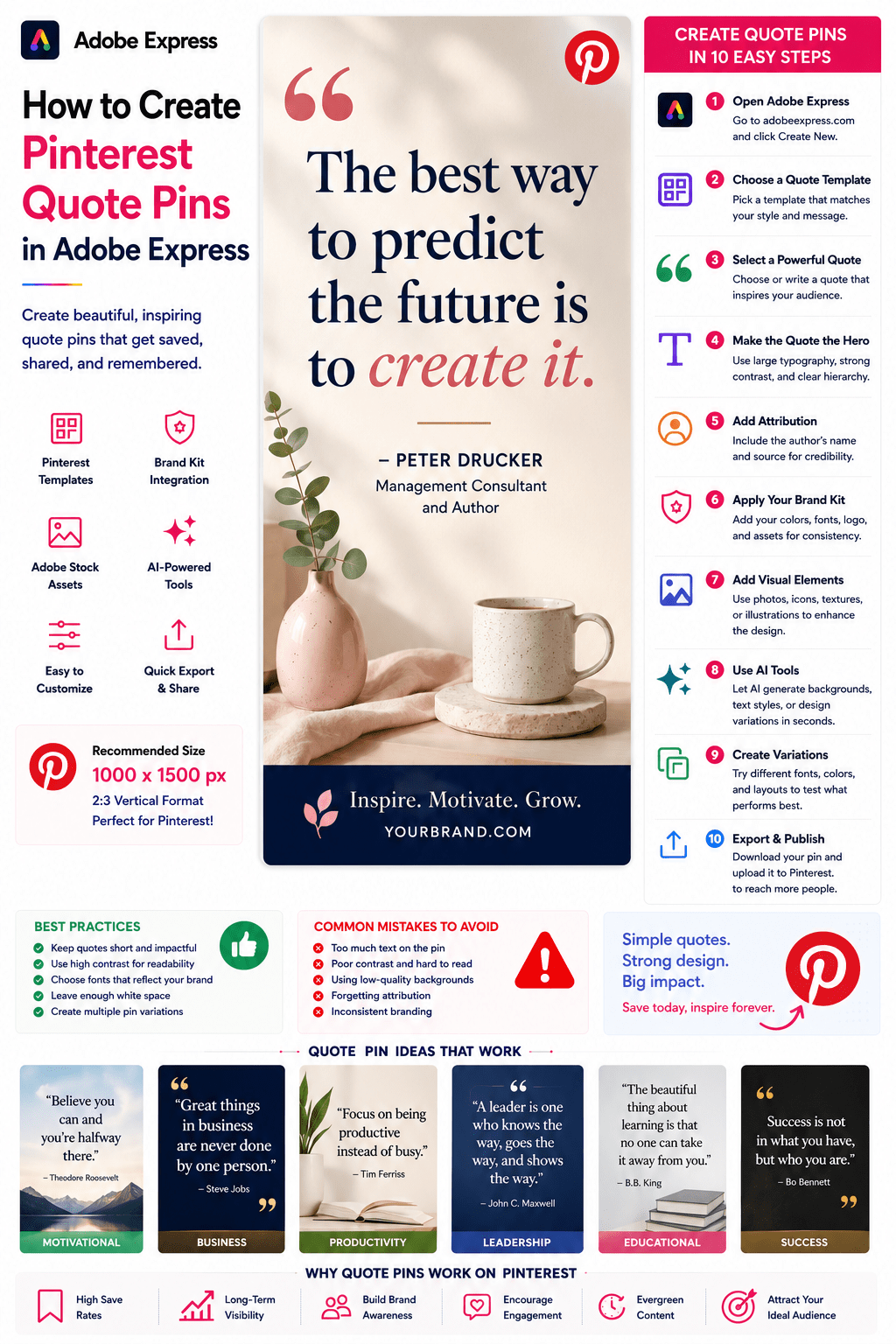
Quote Pins are among the simplest yet most effective content formats on Pinterest.
They combine inspiring, educational, motivational, or thought-provoking quotes with eye-catching visuals to create highly shareable content that can generate saves, clicks, followers, and long-term brand awareness.
Whether you’re a blogger, coach, entrepreneur, educator, marketer, author, consultant, or business owner, Pinterest Quote Pins can become a valuable part of your content strategy.
Adobe Express makes it easy to create professional Quote Pins using:
- Pinterest-ready templates
- Brand Kits
- AI-powered design tools
- Adobe Stock assets
- Professional typography
- Fast export workflows
In this guide, you’ll learn how to create Pinterest Quote Pins using Adobe Express.
What Are Pinterest Quote Pins?
Quote Pins are Pinterest graphics built around a central quote.
They typically include:
Quote Text
Attribution
Visual Background
Branding
Supporting Design Elements
The goal is to inspire, educate, motivate, or engage viewers.
Why Quote Pins Perform Well on Pinterest
Pinterest users frequently save content they find meaningful.
Benefits include:
High Save Rates
People often save quotes for future reference.
Easy Content Creation
Quick to produce.
Strong Brand Awareness
Consistent visuals improve recognition.
Increased Engagement
Quotes encourage sharing.
Evergreen Performance
Popular quotes can drive traffic for years.
Quote Pins are excellent for maintaining a consistent posting schedule.
Types of Quote Pins
Different quote categories serve different audiences.
Examples include:
Motivational Quotes
Business Quotes
Leadership Quotes
Productivity Quotes
Marketing Quotes
Educational Quotes
Success Quotes
Personal Development Quotes
Choose a category that aligns with your audience.
Recommended Pinterest Quote Pin Size
Pinterest recommends:
1000 × 1500 Pixels
2:3 Vertical Format
Adobe Express provides templates optimized for Pinterest.
Step 1: Open Adobe Express
Sign in to Adobe Express.
From the dashboard:
Click Create New
or
Search Quote Templates
Adobe Express includes many quote-focused layouts.
Step 2: Choose a Quote Pin Template
Browse categories such as:
Motivation
Business
Leadership
Education
Personal Development
Templates provide a professional starting point.
Step 3: Select a Powerful Quote
Examples:
Success
“Success is the result of consistent effort.”
Business
“Systems scale. Hustle doesn’t.”
Leadership
“Great leaders create more leaders.”
Productivity
“Focus creates progress.”
Choose quotes that resonate with your audience.
Step 4: Make the Quote the Hero
The quote should dominate the design.
Focus on:
Large Typography
Strong Contrast
Clear Hierarchy
Ample White Space
The quote should be instantly readable.
Step 5: Add Attribution
Include:
Author Name
Job Title
Source
Brand Name
Proper attribution builds trust and credibility
Step 6: Apply Your Brand Kit
Adobe Express Brand Kits simplify branding.
Apply:
Brand Colors
Brand Fonts
Logos
Design Assets
Consistency strengthens brand recognition.
Step 7: Add Visual Elements
Options include:
Photography
Adobe Stock Images
Textured Backgrounds
Icons
Illustrations
AI-Generated Visuals
Keep visuals supportive rather than distracting.
Step 8: Use Adobe Express AI Features
Adobe Express AI tools can generate:
Quote Variations
Background Images
Design Concepts
Visual Themes
Supporting Copy
AI helps accelerate content production.
Step 9: Create Multiple Variations
Pinterest rewards fresh content.
Consider testing:
Different Fonts
Different Backgrounds
Different Color Schemes
Alternative Layouts
Multiple versions can improve performance.
Step 10: Export and Publish
When complete:
Save Project
Download Pin
Create Variations
Upload to Pinterest
Your Quote Pin is ready.
Creating Motivational Quote Pins
Examples:
Goal Setting
Persistence
Growth
Learning
Success
Motivational content often receives high save rates.
Creating Business Quote Pins
Examples:
Entrepreneurship
Marketing
Leadership
Productivity
Innovation
Business quotes help establish authority.
Creating Educational Quote Pins
Examples:
Industry Insights
Expert Advice
Research Findings
Framework Summaries
Educational content performs well with professional audiences.
Creating Branded Quote Pins
Many businesses use original quotes.
Examples:
Company Values
Founder Insights
Team Philosophy
Product Principles
Branded quotes strengthen identity.
Creating Testimonial Quote Pins
Highlight:
Customer Feedback
Success Stories
Client Results
Reviews
Case Study Quotes
Testimonials can support conversions.
Best Practices for Quote Pins
Keep Quotes Short
Improve readability.
Use Large Typography
Ensure visibility.
Maintain Brand Consistency
Build recognition.
Use High-Quality Backgrounds
Enhance visual appeal.
Create Multiple Variations
Increase reach opportunities.
These practices improve performance.
Common Quote Pin Mistakes
Too Much Text
Makes pins difficult to consume.
Poor Contrast
Reduces readability.
Weak Typography
Lowers visual impact.
Missing Attribution
Can reduce credibility.
Inconsistent Branding
Weakens recognition.
Avoiding these mistakes improves results.
Example Workflow
Imagine promoting a productivity quote.
Quote
“Focus creates progress.”
Background
Minimal workspace photo.
Branding
Company colors and logo.
CTA
Follow for more productivity tips.
Simple designs often perform best.
Why Adobe Express Is Ideal for Quote Pins
Adobe Express combines:
Professional Templates
Brand Management
AI Design Tools
Easy Editing
Fast Export
Pinterest-Friendly Layouts
This makes it one of the easiest platforms for creating Quote Pins.
Conclusion
Pinterest Quote Pins are a simple yet powerful way to increase engagement, grow followers, strengthen branding, and maintain a consistent publishing schedule.
By combining templates, Brand Kits, AI-powered tools, and streamlined workflows, Adobe Express enables creators and businesses to create professional Quote Pins quickly and consistently.
Whether you’re sharing motivation, business insights, leadership advice, or customer testimonials, Adobe Express provides everything needed to create effective Pinterest Quote Pins.
Continue Learning Adobe Express
To learn more about Pinterest content creation, explore these guides:
- How to Create Pinterest Pins in Adobe Express
- How to Create Pinterest Idea Pins in Adobe Express
- How to Create Pinterest Blog Promotion Pins in Adobe Express
For advanced marketing workflows, also read:
- Adobe Express Content Calendars: The Complete Guide
- Adobe Express Marketing Automation: The Complete Guide
- Adobe Express Content Creation: The Complete Guide








