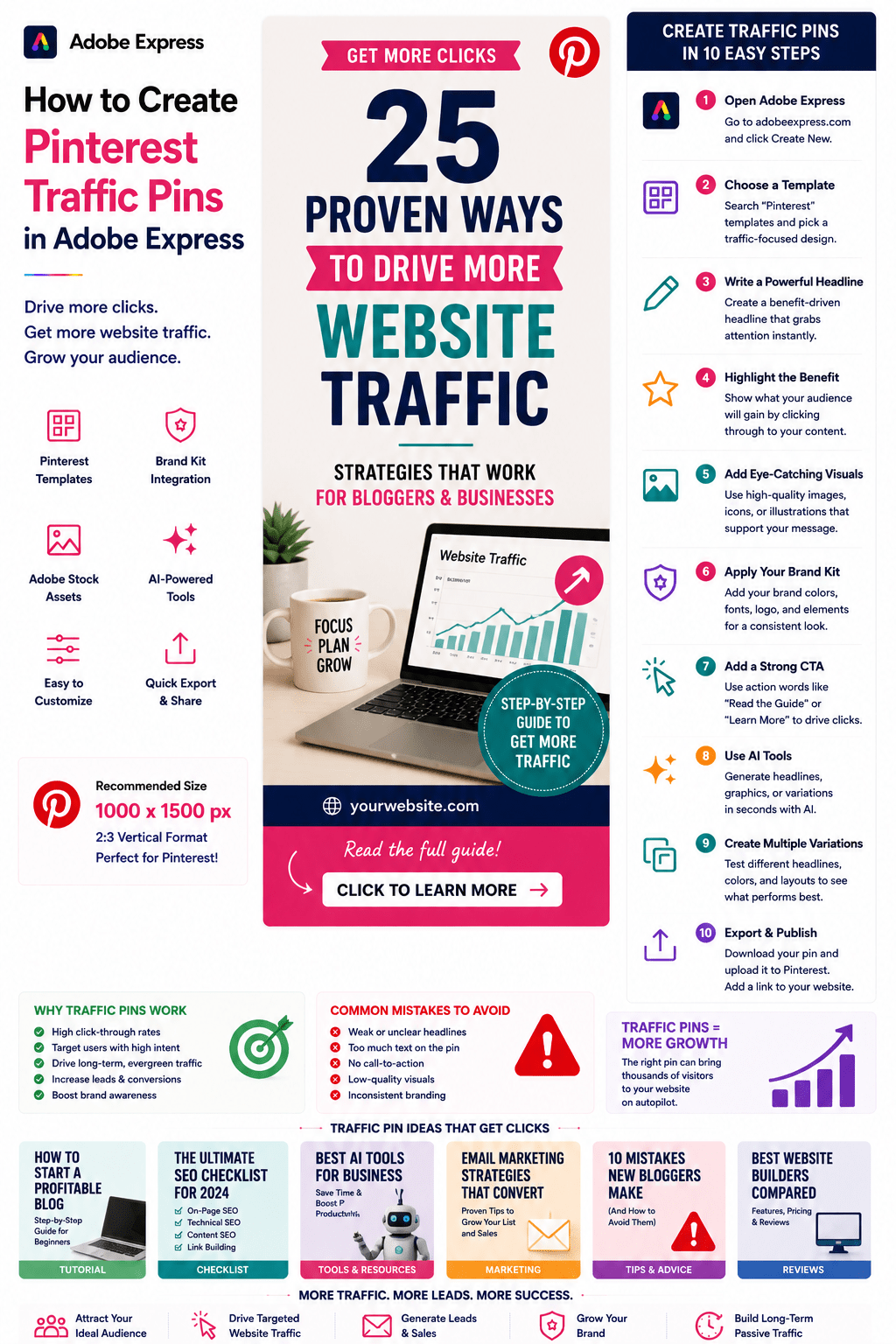
For many bloggers, affiliate marketers, niche website owners, content creators, and online businesses, Pinterest is one of the most valuable sources of website traffic.
Unlike platforms where content disappears after a few hours, Pinterest acts as a visual search engine. A well-designed Traffic Pin can continue sending visitors to your website for months or even years.
The purpose of a Traffic Pin is simple:
Get Clicks
While some Pinterest content focuses on engagement and saves, Traffic Pins are specifically designed to encourage users to visit your website.
Adobe Express makes it easy to create professional Pinterest Traffic Pins using:
- Pinterest templates
- Brand Kits
- AI-powered design tools
- Adobe Stock assets
- Professional typography
- Fast export workflows
In this guide, you’ll learn how to create Pinterest Traffic Pins using Adobe Express.
What Is a Pinterest Traffic Pin?
A Traffic Pin is a Pinterest graphic designed to drive visitors from Pinterest to a website.
Examples include:
Blog Posts
Tutorials
Buying Guides
Product Reviews
Affiliate Articles
Resource Pages
Lead Magnets
Landing Pages
The primary objective is website traffic rather than engagement alone.
Why Traffic Pins Matter
Pinterest users often search for:
Solutions
Tutorials
Product Recommendations
Checklists
Comparisons
Educational Content
These users are often ready to click and learn more.
Benefits include:
Long-Term Traffic
Better Content ROI
Lead Generation
Affiliate Revenue
Website Growth
Audience Building
A single successful Traffic Pin can generate thousands of visitors over time.
Best Content for Traffic Pins
Pinterest Traffic Pins work particularly well for:
Blog Articles
Tutorials
Resource Collections
Product Comparisons
Buying Guides
Industry Research
Case Studies
Free Downloads
Checklists
Educational Content
Focus on content that solves a problem.
Recommended Pinterest Traffic Pin Size
Pinterest recommends:
1000 × 1500 Pixels
2:3 Vertical Format
Adobe Express includes templates optimized for PinterestStep 1: Open Adobe Express
Sign in to Adobe Express.
From the dashboard:
Click Create New
or
Search Pinterest Templates
Adobe Express provides numerous Pinterest-ready layouts.
Step 2: Choose a Traffic Pin Template
Browse categories such as:
Blogging
Marketing
Business
Education
Tutorials
Social Media
Choose a clean, click-focused design.
Step 3: Create a Powerful Headline
The headline determines whether people click.
Examples:
25 AI Tools Every Business Should Know
The Ultimate SEO Checklist
How to Start a Blog in 2026
Best Productivity Apps Compared
10 Mistakes New Entrepreneurs Make
Focus on curiosity and value.
Step 4: Highlight the Benefit
Users should immediately understand what’s in it for them.
Examples:
Step-by-Step Guide
Free Template Included
Complete Tutorial
Proven Framework
Beginner Friendly
Benefits increase click-through rates.
Step 5: Use Attention-Grabbing Visuals
Visuals help stop scrolling.
Options include:
Adobe Stock Photos
Screenshots
Product Images
Icons
Illustrations
AI-Generated Graphics
Choose visuals that support the content topic.
Step 6: Apply Your Brand Kit
Adobe Express Brand Kits simplify consistency.
Apply:
Brand Colors
Brand Fonts
Logos
Design Elements
Brand recognition improves trust.
Step 7: Add a Strong Call-to-Action
Traffic Pins should encourage clicks.
Examples:
Read the Full Guide
Learn More
Get the Complete Checklist
Download Now
Visit the Website
Start Here
A CTA is critical for driving traffic.
Step 8: Use Adobe Express AI Features
Adobe Express AI tools can generate:
Headlines
Visual Concepts
Images
Design Variations
Marketing Copy
AI helps create more pin variations quickly.
Step 9: Create Multiple Pin Variations
Many Pinterest marketers create several versions of the same pin.
Test:
Different Headlines
Different Images
Different Colors
Different Layouts
Different CTAs
Variation testing often improves performance.
Step 10: Export and Publish
When complete:
Save Project
Download Pin
Create Additional Variations
Upload to Pinterest
Your Traffic Pin is ready.
Creating Blog Traffic Pins
Examples:
Tutorials
Guides
Resource Collections
Industry Insights
Educational Content
Blog traffic is one of Pinterest’s most common use cases.
Creating Affiliate Traffic Pins
Examples:
Product Reviews
Product Comparisons
Buying Guides
Recommended Tools
Best Software Lists
Affiliate content can generate long-term traffic.
Creating Lead Generation Pins
Examples:
Free Templates
Checklists
Worksheets
Ebooks
Guides
Lead magnets perform particularly well on Pinterest.
Creating Resource Pins
Examples:
Tool Lists
Framework Collections
Learning Resources
Industry Directories
Software Recommendations
Resource content often earns high save rates.
Creating Educational Traffic Pins
Examples:
AI Tutorials
Marketing Guides
SEO Lessons
Design Tips
Business Frameworks
Educational content remains evergreen.
Best Practices for Traffic Pins
Focus on Benefits
Show users what they’ll gain.
Use Large Headlines
Improve readability.
Create Curiosity
Encourage clicks.
Include Strong CTAs
Drive traffic intentionally.
Test Multiple Versions
Improve performance over time.
These practices increase click-through rates.
Common Traffic Pin Mistakes
Weak Headlines
Fail to attract clicks.
No CTA
Users don’t know what to do next.
Generic Images
Fail to stand out.
Too Much Text
Creates clutter.
Poor Branding
Reduces trust and recognition.
Avoiding these mistakes improves results.
Example Workflow
Imagine promoting an article.
Article
25 AI Tools Every Business Should Know
Headline
25 AI Tools Every Business Should Know
Benefit
Save Hours Every Week
CTA
Read the Full Guide
Visual
AI-themed illustration
This structure is highly effective for generating traffic.
Why Adobe Express Is Ideal for Traffic Pins
Adobe Express combines:
Professional Templates
Brand Management
AI Design Tools
Easy Editing
Fast Export
Pinterest-Friendly Layouts
This makes it one of the easiest tools for creating click-focused Pinterest content.
Conclusion
Pinterest Traffic Pins are one of the most effective ways to grow website traffic, generate leads, increase affiliate revenue, and build long-term audience growth.
By combining templates, Brand Kits, AI-powered tools, and streamlined workflows, Adobe Express enables creators and businesses to create professional Traffic Pins quickly and consistently.
Whether you’re promoting blog posts, tutorials, lead magnets, resource collections, or affiliate content, Adobe Express provides everything needed to create high-performing Pinterest Traffic Pins.
Continue Learning Adobe Express
To learn more about Pinterest content creation, explore these guides:
- How to Create Pinterest Pins in Adobe Express
- How to Create Pinterest Tutorial Pins in Adobe Express
- How to Create Pinterest Checklist Pins in Adobe Express
For advanced marketing workflows, also read:
- Adobe Express Content Calendars: The Complete Guide
- Adobe Express Marketing Automation: The Complete Guide
- Adobe Express Workflow Automation: The Complete Guide








