Introduction
Pinterest users love actionable content.
One of the highest-performing content formats on Pinterest is the checklist pin because it provides immediate value, is easy to consume, and encourages users to save the content for future reference.
Whether you’re a blogger, marketer, coach, educator, consultant, affiliate marketer, or business owner, checklist pins can help drive traffic, increase saves, and establish authority in your niche.
Adobe Express makes it easy to create professional Pinterest Checklist Pins using:
- Pinterest templates
- Brand Kits
- AI-powered design tools
- Adobe Stock assets
- Professional typography
- Fast export workflows
In this guide, you’ll learn how to create Pinterest Checklist Pins using Adobe Express.
What Are Pinterest Checklist Pins?
Checklist Pins are Pinterest graphics that present information as a structured list of actionable items.
Examples include:
SEO Checklists
Website Launch Checklists
Social Media Checklists
Blog Writing Checklists
Product Launch Checklists
Marketing Checklists
AI Workflow Checklists
Business Planning Checklists
The goal is to provide a simple, practical resource users can save and revisit.
Why Checklist Pins Perform Well
Pinterest users often search for:
Step-by-Step Processes
Templates
Frameworks
Planning Tools
Productivity Resources
How-To Content
Checklist Pins satisfy these needs.
Benefits include:
High Save Rates
Users bookmark them for later.
Strong Click-Through Rates
People want additional details.
Evergreen Traffic
Many checklists remain useful for years.
Authority Building
Demonstrates expertise.
Easy Content Repurposing
One article can generate multiple checklist pins.
Best Topics for Checklist Pins
Popular Pinterest checklist categories include:
Marketing
SEO
Blogging
Productivity
Small Business
Personal Finance
AI Tools
Design
Home Organization
Health and Wellness
Choose topics where step-by-step guidance is valuable.
Recommended Pinterest Checklist Pin Size
Pinterest recommends:
1000 × 1500 Pixels
2:3 Vertical Format
Adobe Express provides templates optimized for this format.
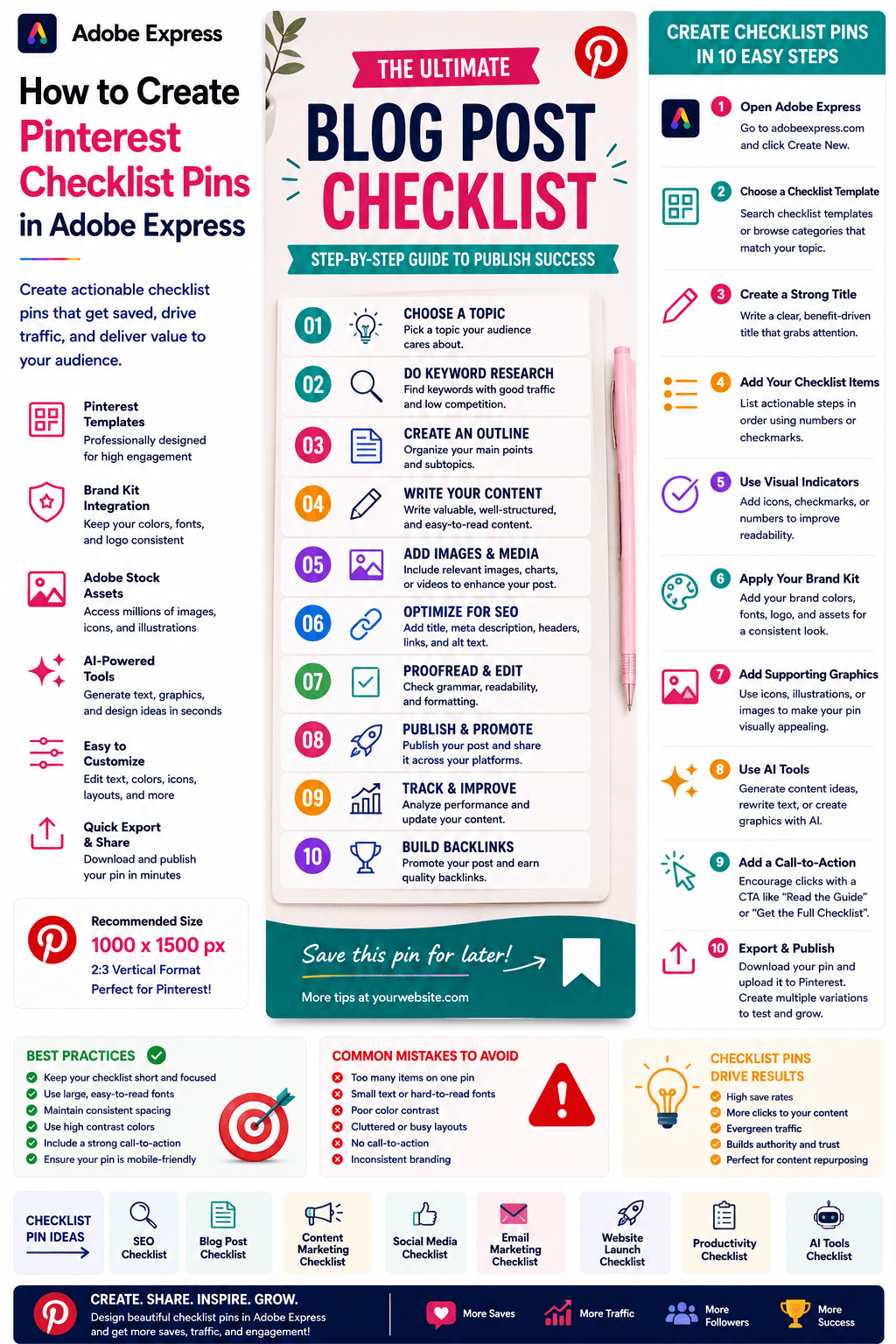
Step 1: Open Adobe Express
Sign in to Adobe Express.
From the dashboard:
Click Create New
or
Search Checklist Templates
Adobe Express offers many list-based layouts.
Step 2: Choose a Checklist Template
Browse categories such as:
Business
Marketing
Productivity
Education
Planning
Organization
Templates provide a professional foundation.
Step 3: Create a Strong Checklist Title
The title is the most important element.
Examples:
The Ultimate SEO Checklist
Website Launch Checklist
10-Step Content Marketing Checklist
AI Workflow Setup Checklist
Social Media Publishing Checklist
Focus on clarity and value.
Step 4: Organize the Checklist
Structure items logically.
Example:
Planning
Setup
Execution
Review
Optimization
Logical organization improves usability.
Step 5: Use Checkboxes and Visual Indicators
Visual cues improve readability.
Examples:
Checkmarks
Numbered Lists
Icons
Progress Indicators
Section Dividers
Pinterest users should quickly understand the content.
Step 6: Apply Your Brand Kit
Adobe Express Brand Kits simplify branding.
Apply:
Brand Colors
Brand Fonts
Logos
Design Elements
Consistent branding builds recognition.
Step 7: Add Supporting Graphics
Use:
Icons
Illustrations
Adobe Stock Assets
Screenshots
Diagrams
AI-Generated Visuals
Visuals should support the checklist rather than distract from it.
Step 8: Use Adobe Express AI Features
Adobe Express AI tools can generate:
Checklist Ideas
Headlines
Supporting Graphics
Visual Variations
Design Concepts
AI can significantly speed up content creation.
Step 9: Include a Call-to-Action
Examples:
Read the Full Guide
Download the Template
Learn More
Visit Our Website
Get the Complete Checklist
CTAs encourage additional engagement.
Step 10: Export and Publish
When complete:
Save Project
Download Checklist Pin
Create Variations
Upload to Pinterest
Your Checklist Pin is ready.
Creating SEO Checklist Pins
Examples:
On-Page SEO Checklist
Technical SEO Checklist
Blog SEO Checklist
Keyword Research Checklist
SEO checklists perform exceptionally well on Pinterest.
Creating Blogging Checklist Pins
Examples:
Blog Post Publishing Checklist
Content Planning Checklist
Pinterest Blogging Checklist
Affiliate Marketing Checklist
Bloggers frequently use checklist content to drive traffic.
Creating Marketing Checklist Pins
Examples:
Social Media Checklist
Product Launch Checklist
Email Marketing Checklist
Brand Building Checklist
Marketing content is highly searchable.
Creating Productivity Checklist Pins
Examples:
Daily Planning Checklist
Weekly Review Checklist
Project Management Checklist
Time Management Checklist
Productivity topics generate strong engagement.
Creating AI Checklist Pins
Examples:
AI Agent Setup Checklist
Prompt Engineering Checklist
AI Content Workflow Checklist
RAG Implementation Checklist
These emerging topics have strong growth potential.
Best Practices for Checklist Pins
Keep Lists Focused
Avoid overwhelming users.
Use Clear Typography
Improve readability.
Create Logical Structure
Guide readers through the checklist.
Include Branding
Build recognition.
Make It Actionable
Provide practical value.
These practices improve performance.
Common Checklist Pin Mistakes
Too Many Items
Makes the design difficult to scan.
Weak Title
Reduces click-through rates.
Poor Organization
Creates confusion.
Small Text
Hard to read on mobile devices.
Missing CTA
Misses traffic opportunities.
Avoiding these mistakes improves results.
Example Workflow
Imagine promoting an SEO article.
Title
The Ultimate Blog SEO Checklist
Checklist
✔ Keyword Research
✔ SEO Title
✔ Meta Description
✔ Internal Links
✔ Image Optimization
✔ Mobile Testing
CTA
Read the Full SEO Guide
This format performs very well on Pinterest.
Why Adobe Express Is Ideal for Checklist Pins
Adobe Express combines:
Professional Templates
Brand Management
AI Design Tools
Easy Editing
Fast Export
Pinterest-Friendly Layouts
This makes it one of the easiest tools for creating checklist content.
Conclusion
Pinterest Checklist Pins are highly effective for driving traffic, increasing saves, and providing value to audiences.
By combining templates, Brand Kits, AI-powered tools, and streamlined workflows, Adobe Express enables creators and businesses to create professional checklist pins quickly and consistently.
Whether you’re sharing SEO tips, marketing frameworks, productivity systems, or business processes, Adobe Express provides everything needed to create high-performing Pinterest Checklist Pins.
Continue Learning Adobe Express
To learn more about Pinterest content creation, explore these guides:
- How to Create Pinterest Pins in Adobe Express
- How to Create Pinterest Quote Pins in Adobe Express
- How to Create Pinterest Blog Promotion Pins in Adobe Express
For advanced marketing workflows, also read:
- Adobe Express Content Calendars: The Complete Guide
- Adobe Express Marketing Automation: The Complete Guide
- Adobe Express Workflow Automation: The Complete Guide








