Introduction
Fonts play a major role in how people perceive your brand.
The typography you use communicates personality, professionalism, and consistency across every piece of content you create.
Whether you’re designing:
- Social media graphics
- Marketing campaigns
- Presentations
- Videos
- Reports
- Internal communications
- Educational materials
using the correct fonts helps reinforce your brand identity.
Adobe Express allows you to add brand fonts to your Brand Kit so they can be applied quickly and consistently across all projects.
In this guide, you’ll learn how to add, manage, and use brand fonts in Adobe Express.
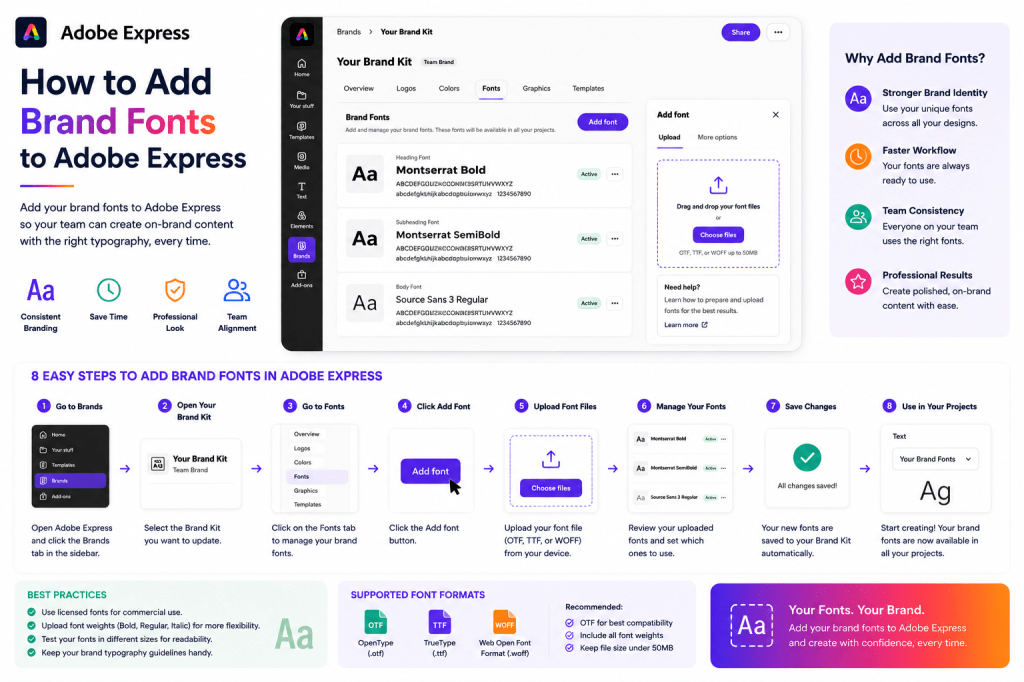
Why Brand Fonts Matter
Many organizations focus on logos and colors while overlooking typography.
However, fonts are one of the most visible parts of a brand.
Consistent typography helps:
Improve Brand Recognition
Content becomes instantly recognizable.
Increase Professionalism
Designs appear more polished.
Support Consistency
All content follows the same visual standards.
Save Time
Fonts are readily available.
Simplify Collaboration
Teams use approved typography.
Typography is a foundational part of visual identity.
What Are Brand Fonts?
Brand fonts are the official typefaces your organization uses.
Most brands typically define:
Heading Fonts
Used for titles and headlines.
Body Fonts
Used for paragraphs and long-form text.
Accent Fonts
Used sparingly for emphasis.
Display Fonts
Used for special campaigns and promotions.
Together these fonts create a cohesive visual system.
Examples of Brand Font Usage
Headline Fonts
Used for:
- Titles
- Hero sections
- Cover graphics
- Promotional banners
Headline fonts should attract attention.
Body Fonts
Used for:
- Paragraphs
- Reports
- Presentations
- Educational content
Readability is the priority.
Accent Fonts
Used for:
- Quotes
- Highlights
- Calls-to-action
These fonts provide visual variety.
Step 1: Gather Your Brand Fonts
Before opening Adobe Express, identify the fonts approved by your organization.
Common examples include:
Sans-Serif Fonts
- Montserrat
- Open Sans
- Inter
- Roboto
Serif Fonts
- Merriweather
- Georgia
- Playfair Display
Display Fonts
Used for specific campaigns and creative work.
Refer to your brand guidelines whenever possible.
Step 2: Open Adobe Express
Sign in to Adobe Express.
Navigate to:
Brand
or
Brand Kit
depending on your workspace.
This is where branding assets are stored.
Step 3: Open Your Brand Kit
Select the Brand Kit you want to update.
Examples:
- Corporate Brand Kit
- Marketing Brand Kit
- Department Brand Kit
Open the editing interface.
Step 4: Locate the Fonts Section
Within the Brand Kit, find:
Fonts
or
Brand Fonts
This area allows you to define typography standards.
Step 5: Add Your Primary Heading Font
Choose the font used for:
Headlines
Titles
Promotional Graphics
Presentations
Examples include:
- Montserrat
- Poppins
- Inter
- Avenir
Your heading font should align with your brand personality.
Step 6: Add Your Body Font
Select the font used for:
Paragraphs
Descriptions
Reports
Documentation
Examples include:
- Open Sans
- Roboto
- Lato
- Source Sans Pro
Readability should be the primary consideration.
Step 7: Add Additional Fonts
If your brand uses multiple typefaces, add them to the Brand Kit.
Examples:
Accent Fonts
Used sparingly.
Campaign Fonts
Specific promotions.
Seasonal Fonts
Special events.
Keep the collection manageable.
Step 8: Review Font Pairings
Font combinations should work together.
Common examples:
Montserrat + Open Sans
Modern and professional.
Poppins + Roboto
Clean and contemporary.
Playfair Display + Open Sans
Elegant and readable.
Strong pairings improve design quality.
Step 9: Save the Brand Kit
After adding fonts:
- Review all selections.
- Verify brand compliance.
- Save the Brand Kit.
Your typography system is now available across Adobe Express.
Using Brand Fonts in Projects
Once configured, fonts become available whenever you create content.
Examples include:
Social Media Graphics
Maintain consistency.
Presentations
Professional appearance.
Marketing Materials
Unified branding.
Videos
Consistent titles and overlays.
Adobe Express makes typography management significantly easier.
Using Brand Fonts for Social Media
Consistent typography helps create recognizable content.
Examples:
Instagram Posts
Unified visual style.
LinkedIn Graphics
Professional branding.
Facebook Posts
Improved recognition.
Pinterest Pins
Consistent design language.
Over time, audiences begin to associate typography with your brand.
Using Brand Fonts in Presentations
Presentations benefit greatly from typography consistency.
Examples:
Cover Slides
Strong visual impact.
Section Headers
Easy navigation.
Charts
Professional appearance.
Closing Slides
Consistent branding.
Brand fonts improve presentation quality.
Using Brand Fonts in Marketing Campaigns
Marketing teams often create:
- Product launches
- Promotions
- Event campaigns
- Lead magnets
Using approved typography ensures every asset looks connected.
Sharing Brand Fonts Across Teams
One major advantage of Brand Kits is standardization.
Benefits include:
One Source of Truth
Approved fonts only.
Better Collaboration
Consistent content creation.
Faster Design Work
Less decision-making.
Improved Governance
Brand compliance.
Shared Brand Kits help organizations scale efficiently.
Best Practices for Brand Fonts
Limit the Number of Fonts
Two or three fonts are usually enough.
Prioritize Readability
Especially for body text.
Maintain Consistency
Use approved typography.
Test Across Devices
Verify appearance on desktop and mobile.
Follow Brand Guidelines
Ensure compliance.
These habits improve long-term usability.
Common Font Mistakes
Using Too Many Fonts
Creates visual clutter.
Ignoring Brand Standards
Weakens consistency.
Choosing Trendy Fonts
Can quickly become outdated.
Poor Font Pairing
Reduces readability.
Using Decorative Fonts Everywhere
Makes content difficult to consume.
Avoiding these mistakes improves professionalism.
Example Brand Typography System
Imagine a technology company.
Heading Font
Montserrat
Body Font
Open Sans
Accent Font
Poppins
This simple structure can support thousands of content assets.
Why Brand Fonts Improve Productivity
Without Brand Fonts:
Search for Fonts
Repeated setup.
Risk Inconsistency
Different users choose different typefaces.
Slower Design Process
Manual decisions required.
With Brand Fonts:
Instant Access
Approved fonts always available.
Faster Creation
Less setup time.
Better Consistency
Unified typography.
Improved Collaboration
Shared visual standards.
The productivity gains are significant.
Conclusion
Adding brand fonts to Adobe Express is an important step in building a complete and consistent brand identity.
By storing approved typography within your Brand Kit, you can streamline content creation, improve collaboration, reduce design errors, and ensure every project reflects your organization’s visual standards.
Whether you’re creating social media graphics, presentations, videos, marketing campaigns, or internal communications, a well-defined typography system helps create professional content faster and more consistently.
Combined with logos and brand colors, fonts become a critical part of a scalable Adobe Express workflow.
Continue Learning Adobe Express
To learn more about branding and content operations, explore these guides:
- Adobe Express Brand Management: The Complete Guide
- Adobe Express Brand Kits: The Complete Guide
- Adobe Express Content Creation: The Complete Guide
If you’re building content systems across teams, also read:
- Adobe Express Team Collaboration: The Complete Guide
- Adobe Express Workflow Automation: The Complete Guide
- Adobe Express Content Operations: The Complete Guide








