One of the biggest productivity advantages in Adobe Express is the ability to duplicate existing projects.
Instead of creating every design from scratch, you can make a copy of an existing project and use it as the starting point for a new version.
This approach is especially useful when creating:
- Social media campaigns
- Marketing assets
- Presentation series
- Event promotions
- Product launches
- Training materials
- Brand templates
Duplicating projects helps maintain consistency while dramatically reducing content creation time.
In this guide, you’ll learn how to duplicate projects in Adobe Express and how to use duplication as part of a scalable content creation workflow.
What Does Duplicating a Project Mean?
When you duplicate a project, Adobe Express creates a copy of the original design.
The duplicate becomes a completely separate project.
This means you can:
Edit the Copy
Make changes safely.
Preserve the Original
Keep your master version intact.
Create Variations
Produce multiple versions quickly.
Reuse Layouts
Avoid rebuilding designs.
Think of duplication as creating a working copy.
Why Duplicate Projects?
Many content creators use duplication daily.
Benefits include:
Faster Content Creation
Reuse existing work.
Consistent Branding
Maintain visual standards.
Easier Campaign Management
Create multiple variations.
Better Organization
Build reusable content libraries.
Increased Productivity
Reduce repetitive design work.
For teams and businesses, duplication can save hours every week.
Common Uses for Project Duplication
Examples include:
Weekly LinkedIn Posts
Use the same design structure repeatedly.
Monthly Newsletters
Duplicate previous editions.
Event Promotions
Create variations for different dates.
Product Announcements
Reuse launch templates.
Training Materials
Update existing content.
Adobe Express makes all of these workflows easier.
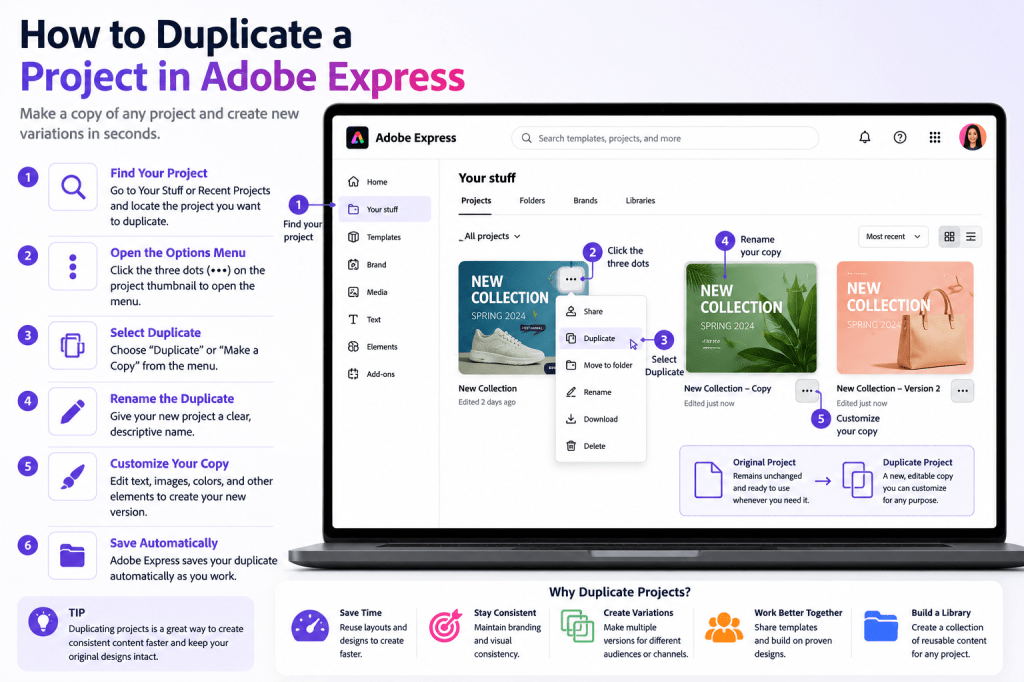
Step 1: Log In to Adobe Express
Begin by opening Adobe Express and signing in.
Navigate to:
Your Stuff
or
Recent Projects
Locate the project you want to duplicate.
Step 2: Find the Project
Browse your project library.
You can locate projects through:
Recent Projects
Recently edited assets.
Search
Find projects by name.
Your Stuff
Complete project library.
Select the project you want to copy.
Step 3: Open the Project Menu
Most projects include an options menu.
Look for:
Three Dots Menu
or
More Options
Click the menu to reveal available actions.
Step 4: Select Duplicate
Within the project menu, choose:
Duplicate
or
Make a Copy
Adobe Express will create a new version of the project.
The duplicate will appear in your project library.
Step 5: Rename the Duplicate
Immediately rename the copied project.
This prevents confusion later.
Example
Original:
LinkedIn Product Launch
Duplicate:
LinkedIn Product Launch – Version 2
or
LinkedIn Product Launch – Europe Campaign
Clear naming improves organization.
Step 6: Customize the New Version
Now that the duplicate exists, you can modify it safely.
Common changes include:
Text
Update messaging.
Images
Replace visuals.
Colors
Adapt branding.
Dates
Update event information.
Calls to Action
Target specific audiences.
The original remains untouched.
Understanding Original vs Duplicate Projects
It’s important to understand the difference.
Original Project
Your master version.
Duplicate Project
An independent copy.
Changes made to the duplicate do not affect the original.
Likewise, updates to the original do not affect existing duplicates.
Using Duplication for Social Media Content
Social media is one of the best use cases.
Example:
Original design:
LinkedIn Thought Leadership Post
Duplicate into:
- Monday Post
- Wednesday Post
- Friday Post
Each version maintains visual consistency while containing unique content.
Using Duplication for Marketing Campaigns
Marketing teams frequently duplicate:
Advertisements
Different offers.
Event Promotions
Multiple dates.
Product Launches
Audience-specific versions.
Campaign Graphics
Channel variations.
Duplication accelerates campaign production.
Using Duplication for Brand Templates
Many organizations create master templates.
Examples include:
Presentation Templates
Corporate slides.
Social Media Templates
Brand-approved designs.
Internal Communications
Standardized announcements.
Training Resources
Reusable educational materials.
Teams can duplicate these templates repeatedly.
Creating Content Variations
Duplicating projects is one of the easiest ways to test different approaches.
Examples include:
Headline Variations
Test messaging.
Visual Variations
Compare designs.
Call-to-Action Variations
Optimize engagement.
Audience Variations
Personalize content.
This supports content experimentation without rebuilding assets.
Building a Content Library
Over time, duplicated projects become part of a reusable content system.
Examples include:
Campaign Templates
Recurring promotions.
Brand Assets
Standardized designs.
Event Materials
Reusable graphics.
Educational Content
Training resources.
Adobe Express can become a valuable content repository.
Naming Best Practices
As duplicates accumulate, naming becomes critical.
Good Naming Examples
- Webinar Promotion Q1
- Webinar Promotion Q2
- Webinar Promotion Q3
Campaign Examples
- Product Launch US
- Product Launch Europe
- Product Launch APAC
Consistent naming improves searchability.
Common Duplication Mistakes
Forgetting to Rename Projects
Creates confusion later.
Editing the Original Instead
Always verify you’re working on the duplicate.
Creating Too Many Versions
Can clutter project libraries.
Poor Organization
Makes content difficult to locate.
No Naming Standards
Reduces efficiency.
Productivity Tips
To maximize duplication benefits:
Create Master Templates
Protect original assets.
Duplicate Before Major Changes
Avoid accidental edits.
Use Consistent Naming
Improve organization.
Organize by Campaign
Simplify management.
Archive Old Versions
Keep libraries clean.
These habits support scalable workflows.
Example Workflow
Imagine a monthly webinar series.
Step 1
Create a webinar promotion template.
Step 2
Duplicate it.
Step 3
Update the date.
Step 4
Update the speaker.
Step 5
Update the registration link.
Step 6
Publish.
Instead of rebuilding the design each month, you simply duplicate and update.
Why Duplication Improves Productivity
Duplication eliminates repetitive work.
Benefits include:
Faster Production
Less design effort.
Better Consistency
Maintain branding.
Easier Scaling
Support larger content volumes.
Improved Collaboration
Share approved templates.
Reduced Errors
Reuse proven layouts.
These advantages compound over time.
Conclusion
Duplicating projects in Adobe Express is one of the simplest ways to improve productivity and maintain consistency.
By creating copies of successful designs, you can build reusable content systems, streamline marketing campaigns, accelerate content creation, and support team collaboration.
Whether you’re creating social media graphics, presentations, videos, training materials, or business communications, duplication helps you work smarter rather than harder.
As your content library grows, mastering project duplication becomes an essential Adobe Express skill.
Continue Learning Adobe Express
To learn more about building scalable content systems, explore these guides:
- Adobe Express Content Creation: The Complete Guide
- Adobe Express Workflow Automation: The Complete Guide
- Adobe Express Business Productivity: The Complete Guide
If you’re creating content for teams and organizations, also read:
- Adobe Express Team Collaboration: The Complete Guide
- Adobe Express Content Operations: The Complete Guide
- Adobe Express Digital Asset Management: The Complete Guide








