Templates become even more powerful when they are shared across a team.
Instead of every employee creating content from scratch, organizations can provide approved templates that ensure consistency, improve productivity, and reduce design errors.
Whether you’re working in:
- Marketing
- Sales
- Human Resources
- Customer Success
- Education
- Communications
- Operations
Shared templates help everyone create content faster while maintaining brand standards.
In this guide, you’ll learn how to share templates with your team in Adobe Express and build a collaborative content creation system.
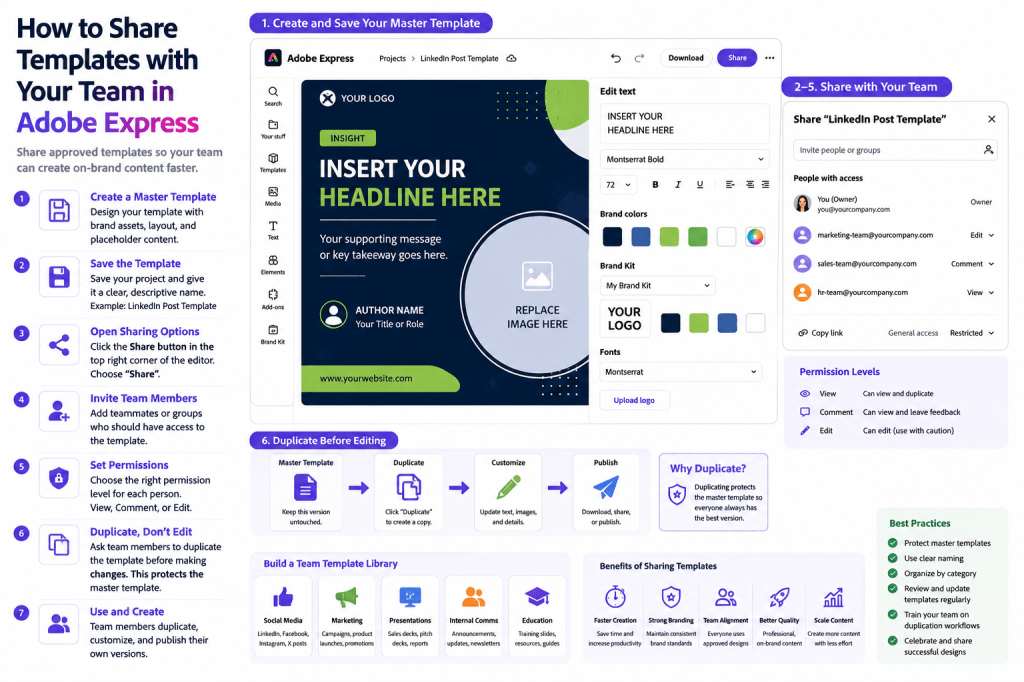
Why Share Templates?
Many organizations struggle with inconsistent branding.
Employees often use:
- Different colors
- Different fonts
- Different layouts
- Different logos
This creates a fragmented brand experience.
Shared templates solve this problem by providing approved starting points.
Benefits include:
Faster Content Creation
Employees start with ready-made designs.
Better Branding
Everyone uses approved assets.
Improved Consistency
Content follows company standards.
Easier Onboarding
New team members become productive quickly.
Higher Productivity
Less time spent designing from scratch.
What Types of Templates Should Be Shared?
Not every design needs to be shared.
Focus on frequently used content.
Examples include:
Social Media Templates
LinkedIn, Facebook, Instagram, and X.
Webinar Templates
Event promotions.
Presentation Templates
Corporate communications.
Employee Announcement Templates
Internal messaging.
Product Launch Templates
Marketing campaigns.
Customer Success Templates
Educational materials.
These templates often provide the greatest return on investment.
Understanding Shared Templates
A shared template is a reusable design that multiple team members can access.
Typically it includes:
Approved Branding
Official logos and colors.
Layout Structure
Standardized design framework.
Placeholder Content
Areas to customize.
Visual Elements
Reusable graphics and icons.
Shared templates help organizations maintain control while enabling flexibility.
Step 1: Create a Master Template
Before sharing, build a template that includes:
Logo Placement
Brand identity.
Typography
Approved fonts.
Color Palette
Brand standards.
Content Sections
Areas for future updates.
The master template becomes the foundation for all future versions.
Step 2: Add Placeholder Content
Templates should clearly indicate what can be changed.
Examples:
Replace Headline
Insert campaign title.
Replace Image
Upload project-specific visual.
Replace CTA
Add campaign action.
Replace Date
Update event information.
Placeholders make templates easier for team members to use.
Step 3: Save the Template
Save the project using a descriptive name.
Examples:
Good Template Names
- LinkedIn Thought Leadership Template
- Webinar Promotion Template
- Product Launch Template
- Monthly Newsletter Template
Clear names improve discoverability.
Step 4: Open Sharing Options
Adobe Express provides sharing capabilities for projects and team resources.
Locate:
Share
or
Invite
within the project controls.
This opens collaboration settings.
Step 5: Invite Team Members
Add collaborators who should have access.
Examples include:
Marketing Team
Campaign creation.
Sales Team
Customer-facing materials.
HR Team
Employee communications.
Customer Success Team
Educational resources.
Provide access only to users who need it.
Step 6: Configure Permissions
Permissions help protect templates.
Common options include:
View Only
Users can see the template.
Comment
Users can provide feedback.
Edit
Users can modify content.
For master templates, limited editing permissions are often recommended.
Step 7: Encourage Duplication Instead of Editing
One of the most important rules:
Never Edit the Master Template
Instead:
- Open the template.
- Duplicate it.
- Edit the copy.
This preserves the original.
Without this practice, valuable templates can become corrupted.
Creating a Team Template Library
As the number of templates grows, organization becomes important.
Create categories such as:
Marketing Templates
Examples:
- Campaign graphics
- Product launches
- Social media posts
Sales Templates
Examples:
- Presentations
- Customer proposals
- Product overviews
HR Templates
Examples:
- Recruitment materials
- Employee announcements
- Onboarding resources
Customer Success Templates
Examples:
- Training slides
- User guides
- Educational graphics
Organized libraries improve adoption.
Establishing Template Governance
Successful organizations define template rules.
Examples:
Who Can Create Templates?
Designers and brand managers.
Who Can Approve Templates?
Marketing leadership.
Who Can Edit Master Templates?
Limited group of administrators.
Who Uses Templates?
Entire organization.
Governance prevents template chaos.
Template Sharing Best Practices
Protect Master Templates
Keep originals safe.
Use Clear Naming Standards
Improve discoverability.
Create Categories
Organize by purpose.
Review Templates Regularly
Update branding when needed.
Train Team Members
Explain duplication workflows.
These practices improve long-term success.
Supporting Brand Consistency
Shared templates are one of the easiest ways to enforce branding.
Include:
Logos
Official versions only.
Colors
Approved palette.
Fonts
Brand typography.
Visual Style
Consistent appearance.
Templates become a practical branding tool.
Improving Employee Productivity
Templates reduce repetitive work.
Instead of designing from scratch:
Open Template
Ready to use.
Duplicate
Create working copy.
Customize
Update content.
Publish
Share or distribute.
This process dramatically reduces content creation time.
Example Marketing Workflow
Imagine a marketing team promoting monthly webinars.
Step 1
Create a Webinar Master Template.
Step 2
Share with the marketing team.
Step 3
Duplicate monthly.
Step 4
Update speaker and topic.
Step 5
Publish promotional graphics.
A process that once required hours may take only minutes.
Example HR Workflow
An HR department creates:
Hiring Templates
Recruitment graphics.
Employee Announcement Templates
Internal updates.
Onboarding Templates
New employee communications.
Shared templates help maintain professionalism and consistency.
Common Mistakes
Editing the Master Template
Can break future workflows.
Poor Naming Conventions
Makes templates difficult to find.
No Permission Controls
Creates unnecessary risk.
Too Many Similar Templates
Causes confusion.
Outdated Branding
Reduces effectiveness.
Avoiding these mistakes improves adoption.
Measuring Template Success
Evaluate template effectiveness using:
Usage Frequency
How often templates are used.
Content Production Speed
Time saved.
Brand Consistency
Reduced visual variation.
Employee Satisfaction
Ease of use.
Content Volume
Increase in output.
Shared templates often produce measurable productivity gains.
Why Shared Templates Matter
As organizations grow, content demands increase.
Shared templates help teams:
Scale Content Production
Create more assets.
Reduce Design Bottlenecks
Less reliance on designers.
Improve Consistency
Unified visual identity.
Support Collaboration
Shared standards.
Increase Efficiency
Faster content creation.
These benefits become increasingly valuable over time.
Conclusion
Sharing templates with your team is one of the most effective ways to improve content creation efficiency in Adobe Express.
By creating master templates, protecting originals, organizing template libraries, and implementing governance practices, organizations can dramatically increase productivity while maintaining strong brand consistency.
Whether you’re supporting marketing, sales, HR, customer success, or internal communications, shared templates provide a scalable foundation for professional content creation.
The more your team relies on shared templates, the faster and more consistent content production becomes.
Continue Learning Adobe Express
To learn more about collaborative content creation, explore these guides:
- Adobe Express Team Collaboration: The Complete Guide
- Adobe Express Content Operations: The Complete Guide
- Adobe Express Brand Management: The Complete Guide
If you’re building enterprise content workflows, also read:







 Acrobat Express Pro