Adobe Express offers a powerful free plan that allows users to create graphics, videos, presentations, social media content, and marketing materials.
However, as your content creation needs grow, you may find yourself wanting access to additional features, premium templates, advanced AI tools, and brand management capabilities.
That’s where Adobe Express Premium comes in.
This guide explains how to upgrade to Adobe Express Premium, what features you’ll gain access to, and how to determine whether the upgrade is worth it for your workflow.
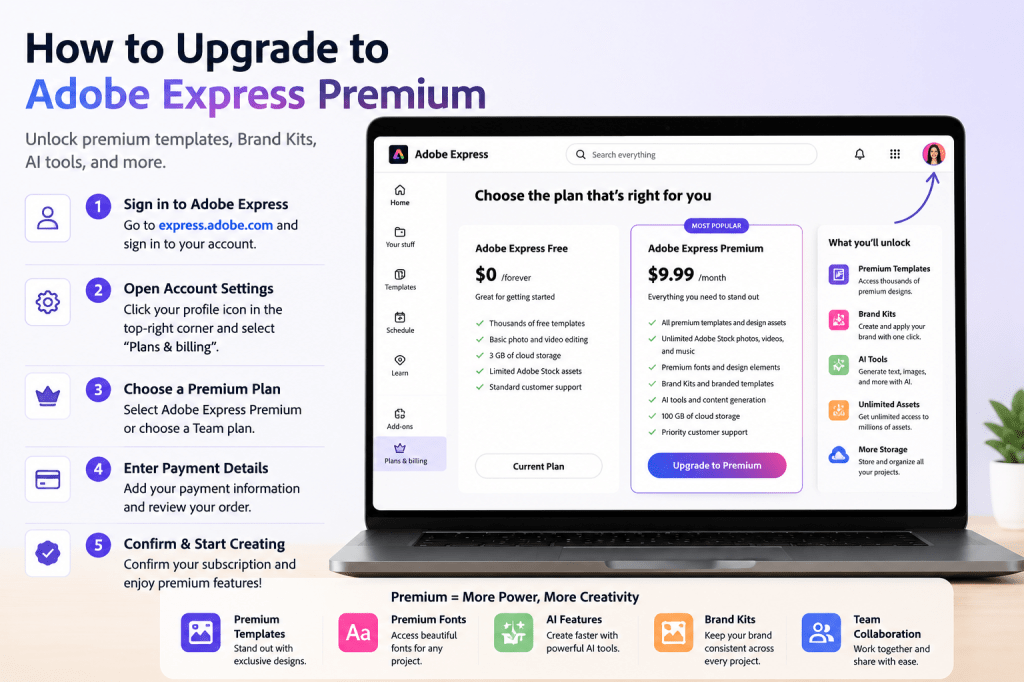
What Is Adobe Express Premium?
Adobe Express Premium is the paid version of Adobe Express.
It expands the capabilities available in the free plan and provides access to additional tools designed for professionals, businesses, educators, marketers, and content creators.
Premium subscribers typically gain access to:
- Premium templates
- Premium fonts
- Advanced AI features
- Brand Kits
- Additional stock assets
- Enhanced collaboration features
- Expanded content creation capabilities
For many users, Premium becomes a productivity tool rather than simply a design upgrade.
Why Upgrade to Premium?
Before upgrading, it’s helpful to understand the benefits.
Common reasons include:
Access to More Templates
Unlock thousands of professional designs.
Better Branding
Create and manage Brand Kits.
Faster Content Creation
Use premium assets and AI-powered features.
Team Collaboration
Support shared workflows.
Business Use
Scale content production efficiently.
If you’re regularly creating content, Premium can save significant time.
Step 1: Sign In to Adobe Express
Open Adobe Express and sign in to your account.
Use the same login method you used when creating your account.
Examples include:
- Adobe account
- Google account
- Apple account
- Facebook account
After signing in, you’ll be taken to your dashboard.
Step 2: Open Account Settings
Look for your profile icon in the top-right corner.
Click it to open your account menu.
You may see options such as:
- Account Settings
- Plans and Billing
- Subscription Information
- Manage Account
Select the option related to plans or subscriptions.
Step 3: Review Available Plans
Adobe may offer multiple subscription options.
Common choices include:
Adobe Express Free
Basic content creation features.
Adobe Express Premium
Full access to premium capabilities.
Team Plans
Designed for organizations and collaborative workflows.
Review each plan carefully before making a decision.
Step 4: Select Adobe Express Premium
Click the option to upgrade.
Adobe will display:
Pricing
Monthly or annual options.
Features
Premium benefits.
Billing Details
Subscription information.
Review these details before continuing.
Step 5: Choose Monthly or Annual Billing
Adobe often offers:
Monthly Billing
Pay month by month.
Advantages:
- Flexible
- Easy to cancel
Annual Billing
Commit for a year.
Advantages:
- Lower effective monthly cost
- Better value for long-term users
Choose the option that best fits your needs.
Step 6: Enter Payment Information
Adobe will request payment details.
Common options include:
Credit Card
Most widely accepted.
Debit Card
Available in many regions.
PayPal
Available in supported locations.
Enter your information carefully.
Step 7: Confirm Your Subscription
Review:
- Plan type
- Billing frequency
- Total cost
- Payment method
Once everything looks correct, confirm your purchase.
Adobe will activate your Premium subscription.
Step 8: Verify Premium Features
After upgrading, return to your dashboard.
You should now see access to:
Premium Templates
Additional design options.
Brand Kits
Business branding tools.
Premium Fonts
Expanded typography library.
AI Features
Enhanced content generation capabilities.
Premium Assets
Stock images, icons, and design elements.
Your account should reflect Premium status.
Features You’ll Unlock with Premium
Let’s look at some of the most valuable upgrades.
Premium Templates
Templates help users create content quickly.
Premium unlocks:
- Marketing templates
- Business templates
- Social media templates
- Presentation templates
- Event templates
These can dramatically reduce design time.
Brand Kits
Brand Kits help organizations maintain consistency.
Examples include:
Logos
Centralized branding.
Colors
Brand-approved palettes.
Fonts
Standardized typography.
Design Elements
Reusable visual assets.
Brand Kits are especially useful for businesses and agencies.
AI-Powered Features
Adobe Express continues expanding its AI capabilities.
Premium access often includes:
Content Generation
Create copy faster.
Image Generation
Generate visuals.
Design Assistance
Improve layouts and creativity.
Productivity Enhancements
Reduce repetitive work.
AI features can significantly accelerate workflows.
Premium Stock Assets
Premium subscribers generally gain access to a larger content library.
Examples include:
- Photos
- Icons
- Graphics
- Design elements
This helps create more polished content.
Collaboration Benefits
Premium users often gain improved collaboration capabilities.
Examples include:
Shared Branding
Maintain consistency across teams.
Shared Resources
Improve productivity.
Team Workflows
Support content operations.
These features become increasingly valuable as organizations grow.
Is Adobe Express Premium Worth It?
The answer depends on your usage.
Free Plan May Be Enough If:
You:
- Create content occasionally
- Work on personal projects
- Have limited branding requirements
Premium May Be Worth It If:
You:
- Create content weekly
- Manage multiple campaigns
- Operate a business
- Work in marketing
- Need Brand Kits
- Use AI features regularly
Many users recover the subscription cost through time savings alone.
Common Upgrade Questions
Can I Upgrade Later?
Yes.
Many users start with the free plan and upgrade when their needs grow.
Will My Existing Projects Remain Available?
Yes.
Your projects remain associated with your account.
Can I Cancel Premium?
Adobe typically allows subscription management through your account settings.
Review the current subscription terms before purchasing.
Can Teams Use Premium?
Yes.
Adobe offers solutions designed for teams and organizations.
Productivity Tips After Upgrading
To maximize your investment:
Build a Brand Kit
Create a consistent visual identity.
Save Favorite Templates
Speed up future projects.
Explore AI Tools
Improve productivity.
Organize Projects
Reduce content management friction.
Create Reusable Assets
Support content operations.
These habits help you get the most value from Premium.
Conclusion
Upgrading to Adobe Express Premium unlocks advanced features that can significantly improve content creation workflows.
From premium templates and Brand Kits to AI-powered tools and expanded asset libraries, Premium is designed to help individuals and teams create more professional content in less time.
If you’re regularly producing marketing materials, social media graphics, presentations, videos, or business content, Adobe Express Premium can become a valuable productivity investment.
As your content needs grow, the additional capabilities often help justify the upgrade through improved efficiency and consistency.
Continue Learning Adobe Express
To learn more about maximizing Adobe Express for business and content creation, explore these guides:
- Adobe Express Content Creation: The Complete Guide
- Adobe Express AI Productivity: The Complete Guide
- Adobe Express Business Productivity: The Complete Guide
If you’re managing content at scale, also read:
- Adobe Express Brand Management: The Complete Guide
- Adobe Express Team Collaboration: The Complete Guide
- Adobe Express Workflow Automation: The Complete Guide







 Acrobat Express Pro