Thought leadership content is one of the most effective ways to build credibility, grow an audience, and establish expertise on LinkedIn.
Whether you’re a consultant, executive, entrepreneur, marketer, coach, recruiter, educator, or industry specialist, sharing valuable insights through professional graphics can significantly increase engagement and visibility.
LinkedIn users actively seek:
- Industry expertise
- Business insights
- Professional advice
- Market trends
- Leadership perspectives
- Educational content
Adobe Express makes it easy to create polished thought leadership graphics using:
- LinkedIn templates
- Brand Kits
- AI-powered design tools
- Adobe Stock images
- Professional typography
- Fast export workflows
In this guide, you’ll learn how to create LinkedIn thought leadership graphics using Adobe Express.
Why Thought Leadership Graphics Matter
Most LinkedIn users scroll quickly through their feeds.
Strong graphics help:
Capture Attention
Stop users from scrolling.
Increase Engagement
Generate likes, comments, and shares.
Build Authority
Demonstrate expertise.
Improve Reach
Encourage reposting.
Grow Your Personal Brand
Become recognized within your industry.
Visual content often amplifies the impact of your ideas.
What Is Thought Leadership Content?
Thought leadership content shares valuable expertise and perspectives.
Examples include:
Industry Trends
Professional Advice
Lessons Learned
Business Frameworks
Research Findings
Leadership Insights
Case Studies
Predictions
The goal is to educate, inform, or inspire.
Step 1: Open Adobe Express
Sign in to Adobe Express.
From the dashboard:
Click Create New
or
Search LinkedIn Templates
Adobe Express includes many professional content templates.
Step 2: Select a Thought Leadership Template
Browse categories such as:
Business
Leadership
Marketing
Consulting
Technology
Education
Entrepreneurship
Choose a clean, professional design.
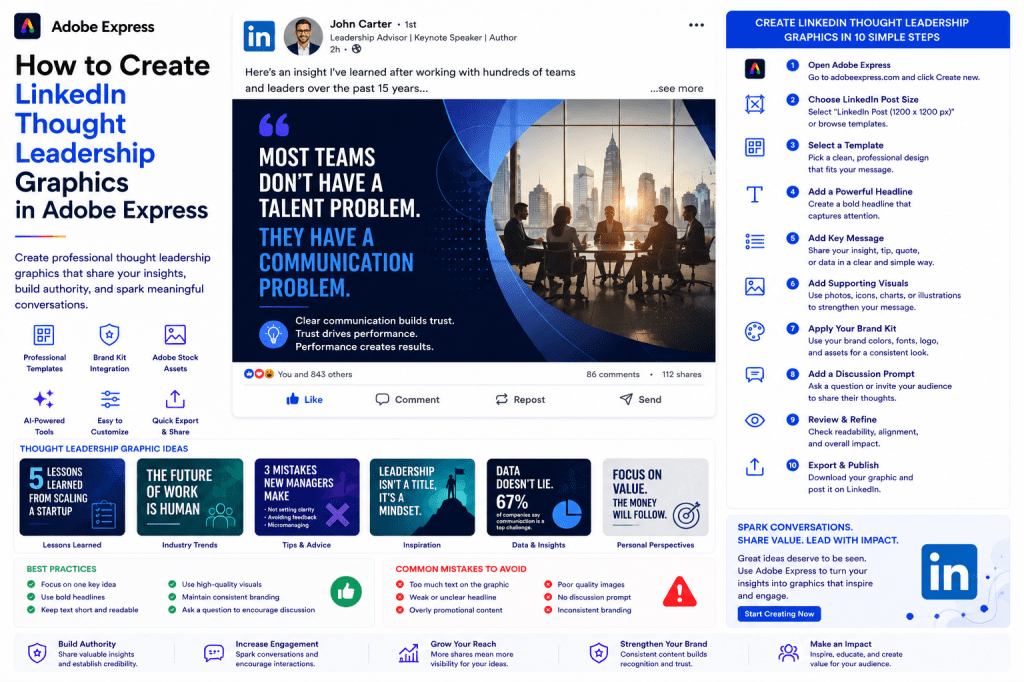
Step 3: Choose a Single Key Idea
The best thought leadership graphics focus on one concept.
Examples:
Why AI Won’t Replace Great Leaders
5 Lessons Learned from Scaling a Startup
The Future of Remote Work
Three Mistakes New Managers Make
How to Build Better Teams
One clear message is more memorable.
Step 4: Create a Strong Headline
Your headline should spark curiosity.
Examples:
Most Teams Have a Communication Problem
The Biggest Mistake Leaders Make
What 20 Years in IT Taught Me
Why Strategy Beats Tactics
The Future of Work Is Already Here
Strong headlines improve engagement.
Step 5: Add Supporting Visuals
Visuals should reinforce the message.
Options include:
Professional Photos
Adobe Stock Images
Icons
Charts
Diagrams
AI-Generated Graphics
Keep visuals simple and relevant.
Step 6: Apply Your Brand Kit
Adobe Express Brand Kits simplify branding.
Apply:
Brand Colors
Brand Fonts
Logos
Design Elements
Consistent branding builds recognition.
Step 7: Use a Professional Layout
Thought leadership graphics should emphasize clarity.
Focus on:
Large Headlines
Strong Contrast
White Space
Clear Hierarchy
Readability
Avoid clutter.
Step 8: Use Adobe Express AI Features
Adobe Express AI tools can accelerate content creation.
Examples:
Generate Headline Ideas
Create Quote Graphics
Generate Images
Remove Backgrounds
Expand Images
AI helps create content faster.
Step 9: Include a Discussion Prompt
Encourage engagement.
Examples:
What do you think?
Do you agree?
Have you experienced this?
What’s your perspective?
Share your experience below.
Discussion prompts often increase comments.
Step 10: Export and Publish
When complete:
Save Project
Download Graphic
Duplicate for Future Posts
Publish on LinkedIn
Your thought leadership graphic is ready.
Creating Quote Graphics
Quote graphics are among the simplest thought leadership formats.
Examples:
Leadership Quotes
Personal Lessons
Industry Observations
Success Principles
Focus on meaningful insights.
Creating Framework Graphics
Frameworks perform extremely well on LinkedIn.
Examples:
Decision-Making Models
Growth Frameworks
Productivity Systems
Leadership Models
Strategic Planning Frameworks
Visual frameworks are highly shareable.
Creating Data-Driven Graphics
Data often strengthens authority.
Examples:
Research Findings
Survey Results
Industry Statistics
Market Trends
Performance Metrics
Use charts and visual summaries.
Creating Lessons-Learned Graphics
Many professionals engage with real experiences.
Examples:
Lessons from Building a Business
Mistakes Made
Project Learnings
Leadership Experiences
Career Insights
Authenticity often outperforms perfection.
Creating Industry Trend Graphics
Trend graphics position you as an expert.
Examples:
AI Trends
Marketing Trends
Design Trends
Technology Forecasts
Workforce Changes
Focus on actionable insights.
Best Practices for Thought Leadership Graphics
Share Real Expertise
Focus on valuable insights.
Keep Designs Simple
Avoid unnecessary complexity.
Use Strong Headlines
Capture attention immediately.
Maintain Consistent Branding
Build recognition over time.
Encourage Discussion
Invite engagement.
These practices improve performance.
Common Thought Leadership Mistakes
Being Too Promotional
Reduces credibility.
Overcrowding the Design
Makes content harder to consume.
Weak Headlines
Lowers engagement.
Generic Advice
Fails to stand out.
No Discussion Prompt
Misses engagement opportunities.
Avoiding these mistakes improves results.
Example Workflow
Imagine sharing a leadership insight.
Step 1
Choose a LinkedIn template.
Step 2
Apply Brand Kit.
Step 3
Add headline:
“Most Teams Don’t Have a Talent Problem”
Step 4
Add supporting text:
“They Have a Communication Problem.”
Step 5
Insert professional visual.
Step 6
Add discussion prompt.
Step 7
Export.
Step 8
Publish.
The process often takes less than 15 minutes.
Why Adobe Express Is Ideal for Thought Leadership Content
Adobe Express combines:
Professional Templates
Brand Management
AI Design Tools
Easy Editing
Fast Publishing
This makes it an excellent platform for creating thought leadership graphics.
Conclusion
Thought leadership graphics help professionals build authority, grow audiences, increase engagement, and strengthen personal brands.
By combining templates, Brand Kits, AI-powered tools, and streamlined workflows, Adobe Express enables professionals to create high-quality LinkedIn content quickly and consistently.
Whether you’re sharing industry insights, leadership lessons, business frameworks, or professional advice, Adobe Express provides everything needed to create compelling thought leadership graphics.
Continue Learning Adobe Express
To learn more about LinkedIn content creation, explore these guides:
- How to Create LinkedIn Posts in Adobe Express
- How to Create LinkedIn Carousel Posts in Adobe Express
- How to Create LinkedIn Recruitment Graphics in Adobe Express
For advanced professional content workflows, also read:
- Adobe Express for LinkedIn Marketing: The Complete Guide
- Adobe Express Brand Management: The Complete Guide
- Adobe Express Content Calendars: The Complete Guide







 Acrobat Express Pro