Quote graphics are among the most popular and shareable content formats on X (formerly Twitter).
A strong quote graphic can quickly communicate an idea, inspire an audience, reinforce a brand message, or spark engagement. Whether you’re sharing business advice, leadership lessons, motivational insights, educational content, or customer testimonials, quote graphics help transform simple text into visually compelling content.
Adobe Express makes it easy to create professional quote graphics using:
- Quote graphic templates
- Brand Kits
- AI-powered design tools
- Adobe Stock assets
- Professional typography
- Fast export workflows
In this guide, you’ll learn how to create X quote graphics using Adobe Express.
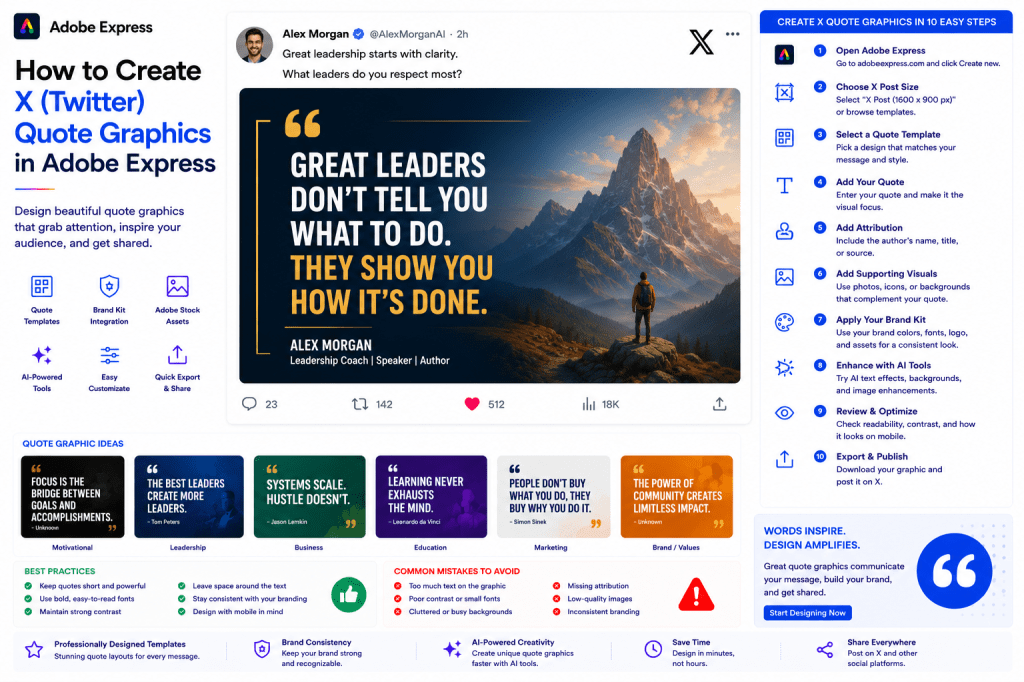
Why Quote Graphics Work on X
Users scroll quickly through their feeds.
Visual content helps stop the scroll.
Benefits include:
Increased Engagement
More likes, reposts, and replies.
Better Readability
Visual quotes stand out.
Stronger Branding
Consistent visual identity.
Easy Content Creation
Fast to design and publish.
Higher Shareability
People frequently repost inspiring quotes.
A good quote graphic can generate engagement long after publication.
Types of Quote Graphics
Adobe Express supports many quote styles.
Examples include:
Motivational Quotes
Leadership Quotes
Business Advice
Productivity Tips
Educational Insights
Industry Commentary
Customer Testimonials
Company Values
Choose a style that aligns with your audience.
Step 1: Open Adobe Express
Sign in to Adobe Express.
From the dashboard:
Click Create New
or
Search Quote Graphic Templates
Adobe Express offers many quote-focused layouts.
Step 2: Choose a Quote Template
Browse categories such as:
Business
Leadership
Education
Marketing
Motivation
Personal Branding
Templates provide a professional starting point.
Step 3: Select Your Quote
The quote is the centerpiece.
Examples:
Leadership
“The best leaders create more leaders.”
Productivity
“Focus creates progress.”
Business
“Systems scale. Hustle doesn’t.”
Marketing
“Attention is today’s most valuable currency.”
Keep quotes concise and impactful.
Step 4: Create Visual Emphasis
Your quote should dominate the design.
Focus on:
Large Typography
Strong Contrast
Readable Layouts
Clear Hierarchy
The quote should be instantly visible.
Step 5: Add Attribution
Include:
Author Name
Job Title
Company
Source
When applicable, attribution improves credibility.
Step 6: Apply Your Brand Kit
Adobe Express Brand Kits simplify consistency.
Apply:
Brand Colors
Brand Fonts
Logos
Design Elements
Consistent branding builds recognition.
Step 7: Add Supporting Visuals
Options include:
Professional Photos
Abstract Backgrounds
Adobe Stock Images
Icons
Patterns
AI-Generated Visuals
Visuals should support, not distract from, the quote.
Step 8: Use Adobe Express AI Features
Adobe Express AI tools can help generate:
Quote Variations
Visual Concepts
Background Images
Brand Graphics
Supporting Text
AI speeds up content creation.
Step 9: Optimize for Mobile Viewing
Many X users browse on smartphones.
Review:
Font Size
Contrast
Readability
Visual Balance
Layout Simplicity
Mobile optimization is essential.
Step 10: Export and Publish
When finished:
Save Project
Download Graphic
Create Variations
Publish on X
Your quote graphic is ready.
Creating Leadership Quote Graphics
Examples:
Leadership Lessons
Management Advice
Team Building Insights
Executive Perspectives
These often perform well with professional audiences.
Creating Business Quote Graphics
Examples:
Entrepreneurship Advice
Startup Lessons
Growth Strategies
Sales Insights
Business-focused quotes build authority.
Creating Motivational Quote Graphics
Popular examples include:
Goal Setting
Persistence
Success
Learning
Improvement
Motivational content is highly shareable.
Creating Educational Quote Graphics
Examples:
Industry Facts
Key Insights
Expert Observations
Research Findings
Educational content builds trust.
Creating Customer Testimonial Graphics
Highlight:
Customer Quotes
Success Stories
Results
Reviews
Case Study Highlights
Testimonials support credibility and marketing efforts.
Best Practices for Quote Graphics
Keep Quotes Short
Easy to read and share.
Use Large Typography
Improve visibility.
Focus on One Message
Avoid clutter.
Maintain Brand Consistency
Strengthen recognition.
Design for Mobile
Optimize for small screens.
These practices improve performance.
Common Quote Graphic Mistakes
Too Much Text
Difficult to read.
Poor Contrast
Reduces visibility.
Weak Typography
Lowers impact.
Overcrowded Layouts
Distract from the message.
Missing Attribution
Can reduce credibility.
Avoiding these mistakes improves results.
Example Workflow
Imagine sharing a leadership quote.
Step 1
Choose a quote template.
Step 2
Apply Brand Kit.
Step 3
Add quote:
“Great leaders create clarity.”
Step 4
Add attribution.
Step 5
Insert background image.
Step 6
Review mobile layout.
Step 7
Export.
Step 8
Publish on X.
The entire process often takes less than 10 minutes.
Why Adobe Express Is Ideal for Quote Graphics
Adobe Express combines:
Professional Templates
Brand Management
AI Design Tools
Easy Editing
Fast Export
This makes it one of the easiest platforms for creating quote graphics.
Conclusion
Quote graphics remain one of the most effective ways to share ideas, build authority, increase engagement, and strengthen branding on X.
By combining templates, Brand Kits, AI-powered tools, and streamlined workflows, Adobe Express enables users to create professional quote graphics quickly and consistently.
Whether you’re sharing leadership lessons, business advice, educational insights, or motivational content, Adobe Express provides everything needed to create compelling quote graphics.
Continue Learning Adobe Express
To learn more about X content creation, explore these guides:
- How to Create X Posts in Adobe Express
- How to Create X Header Images in Adobe Express
- Adobe Express for Social Media: The Complete Guide
For advanced workflows, also read:
- Adobe Express Brand Management: The Complete Guide
- Adobe Express Content Calendars: The Complete Guide
- Adobe Express Marketing Automation: The Complete Guide







 Acrobat Express Pro