Your X (formerly Twitter) header image is one of the first things visitors notice when they visit your profile.
While your profile picture identifies who you are, your header image communicates what you do, what you stand for, and why someone should follow you.
Whether you’re a creator, entrepreneur, consultant, business owner, educator, nonprofit organization, or marketer, a professional header image can strengthen your brand and improve your profile’s appearance.
Adobe Express makes it easy to create professional X header images using:
- X header templates
- Brand Kits
- AI-powered design tools
- Adobe Stock assets
- Professional typography
- Fast export workflows
In this guide, you’ll learn how to create X header images using Adobe Express.
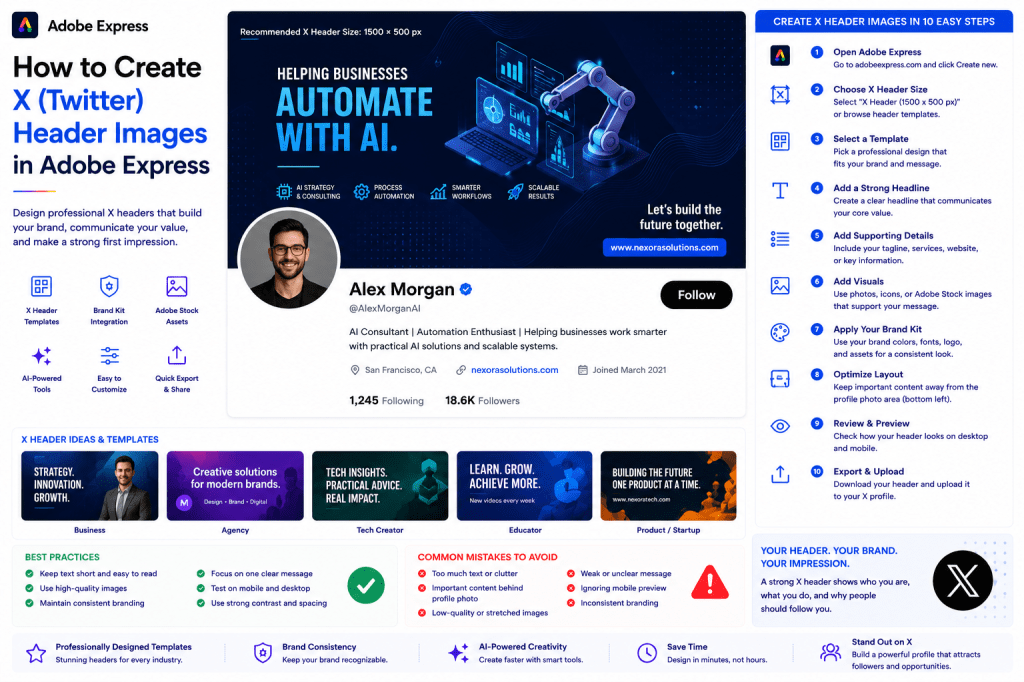
Why X Header Images Matter
Most users focus on posts but overlook their profile design.
A strong header image can:
Strengthen Branding
Reinforce your identity.
Increase Credibility
Appear more professional.
Communicate Value
Tell visitors what you do.
Promote Products or Services
Showcase offers and expertise.
Improve Profile Appearance
Create a polished first impression.
Think of your header as your profile billboard.
Recommended X Header Size
X currently recommends:
1500 × 500 Pixels
This size provides optimal quality across devices.
Adobe Express includes templates already sized correctly.
Types of X Header Images
Different users require different header styles.
Examples include:
Personal Branding Headers
Business Headers
Product Promotion Headers
Consultant Headers
Creator Headers
Event Promotion Headers
Nonprofit Headers
Choose a style that aligns with your goals.
Step 1: Open Adobe Express
Sign in to Adobe Express.
From the dashboard:
Click Create New
or
Search X Header Templates
Adobe Express provides numerous banner designs.
Step 2: Select an X Header Template
Browse categories such as:
Business
Marketing
Technology
Coaching
Education
Personal Branding
Templates provide a professional starting point.
Step 3: Define Your Core Message
Ask yourself:
What should visitors know immediately?
Examples:
Helping Businesses Automate with AI
UX Design for SaaS Startups
Marketing Strategies That Scale
Learn Data Analytics
Focus on one primary message.
Step 4: Create a Strong Headline
Examples:
Building Better AI Systems
Helping Teams Work Smarter
Creative Design for Growing Brands
Practical Marketing Advice
Keep headlines concise and memorable.
Step 5: Add Supporting Information
Consider including:
Website URL
Tagline
Core Services
Industry Focus
Certifications
Product Name
Avoid overcrowding the design.
Step 6: Apply Your Brand Kit
Adobe Express Brand Kits simplify branding.
Apply:
Brand Colors
Brand Fonts
Logos
Design Assets
Consistency strengthens recognition.
Step 7: Add Professional Visuals
Options include:
Professional Photos
Adobe Stock Images
Product Screenshots
Abstract Graphics
Industry Visuals
AI-Generated Images
Choose visuals that support your message.
Step 8: Design Around the Profile Photo
X places your profile image in the lower-left portion of the header.
Keep important content:
Centered
Right-Aligned
Away From Corners
Always preview before publishing.
Step 9: Use Adobe Express AI Features
Adobe Express AI tools can help create:
Headlines
Background Images
Promotional Graphics
Brand Concepts
Custom Illustrations
AI speeds up the design process significantly.
Step 10: Export and Upload
Once complete:
Save Project
Download Header
Create Variations
Upload to X
Your new header image is ready.
Personal Branding Header Ideas
Examples:
Consultant
Promote expertise.
Author
Showcase books.
Speaker
Promote speaking engagements.
Coach
Highlight services.
Creator
Promote content channels.
Personal branding headers build authority.
Business Header Ideas
Include:
Logo
Tagline
Services
Website
Product Information
Business headers should communicate value quickly.
Product Promotion Header Ideas
Showcase:
Product Screenshots
Key Benefits
Launch Dates
Website URL
Customer Results
Perfect for startups and SaaS companies.
Event Promotion Header Ideas
Promote:
Conferences
Webinars
Workshops
Live Events
Product Launches
Update headers during promotional campaigns.
Creator Header Ideas
Highlight:
YouTube Channels
Newsletters
Podcasts
Courses
Communities
Creators often use headers as promotional space.
Best Practices for X Headers
Focus on One Message
Avoid visual clutter.
Use Large Typography
Improve readability.
Stay On Brand
Maintain visual consistency.
Use High-Quality Images
Professional visuals matter.
Test Mobile Layouts
Ensure content remains visible.
These practices improve effectiveness.
Common X Header Mistakes
Too Much Text
Makes the banner difficult to read.
Ignoring Profile Photo Placement
Can hide important content.
Weak Branding
Reduces recognition.
Low-Quality Graphics
Looks unprofessional.
No Clear Value Proposition
Misses a branding opportunity.
Avoiding these mistakes improves results.
Example Workflow
Imagine an AI consultant creating a header.
Step 1
Choose a header template.
Step 2
Apply Brand Kit.
Step 3
Add headline:
“Helping Businesses Automate with AI”
Step 4
Upload professional photo.
Step 5
Add website URL.
Step 6
Review profile image overlap.
Step 7
Export.
Step 8
Upload to X.
The entire process often takes less than 15 minutes.
Why Adobe Express Is Ideal for X Headers
Adobe Express combines:
Professional Templates
Brand Management
AI Design Tools
Easy Editing
Fast Export
This makes it an excellent platform for header image creation.
Conclusion
A professional X header image helps communicate your expertise, strengthen branding, and create a strong first impression.
By combining templates, Brand Kits, AI-powered tools, and streamlined workflows, Adobe Express enables users to create high-quality profile banners quickly and consistently.
Whether you’re building a personal brand, promoting a business, launching a product, or growing an audience, Adobe Express provides everything needed to create effective X header images.
Continue Learning Adobe Express
To learn more about X content creation, explore these guides:
- How to Create X Posts in Adobe Express
- Adobe Express for Social Media: The Complete Guide
- Adobe Express Brand Management: The Complete Guide
For advanced workflows, also read:
- Adobe Express Content Calendars: The Complete Guide
- Adobe Express Marketing Automation: The Complete Guide
- Adobe Express Productivity Workflows: The Complete Guide







 Acrobat Express Pro