X (formerly Twitter) remains one of the fastest-moving social media platforms for sharing news, opinions, industry insights, announcements, and real-time conversations.
While text-based posts are still common, visual posts consistently attract more attention, generate higher engagement, and improve content visibility.
Whether you’re a creator, business owner, marketer, consultant, educator, journalist, or nonprofit organization, Adobe Express makes it easy to create professional X graphics that stand out in busy feeds.
Adobe Express provides:
- X-ready templates
- Brand Kits
- AI-powered design tools
- Adobe Stock assets
- Professional typography
- Fast export workflows
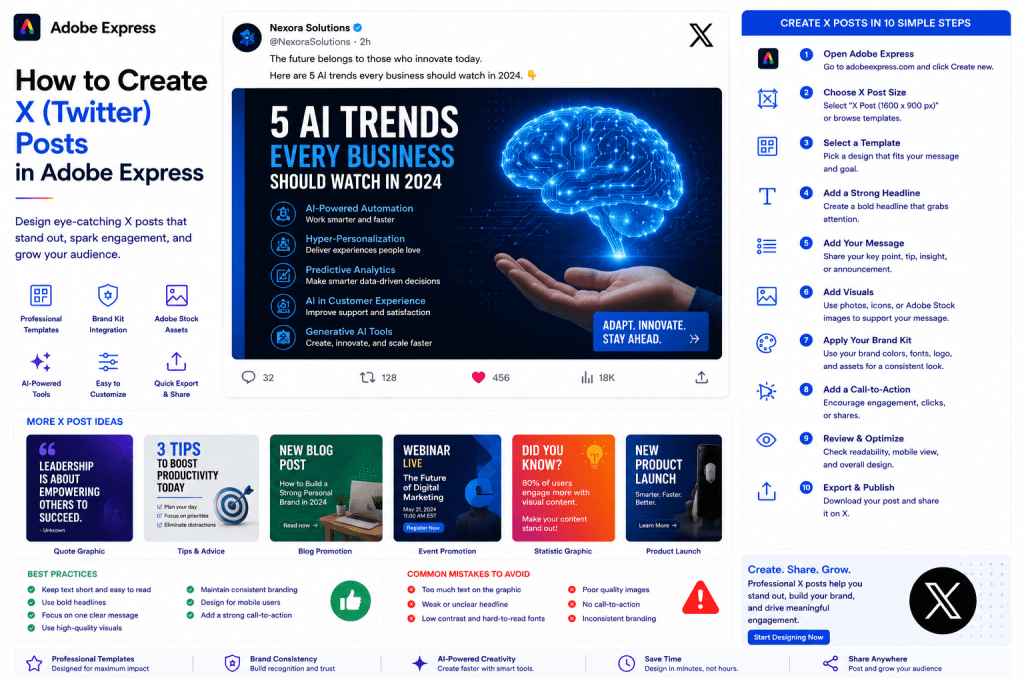
In this guide, you’ll learn how to create X posts using Adobe Express.
Why Visual X Posts Matter
X is a highly competitive platform.
Users scroll rapidly through hundreds of posts.
Strong visuals help:
Capture Attention
Stop users from scrolling.
Increase Engagement
Generate more likes, reposts, and replies.
Improve Visibility
Visual posts often receive more impressions.
Strengthen Branding
Build recognition over time.
Improve Click-Through Rates
Drive traffic to websites and content.
A strong graphic can dramatically increase post performance.
Types of X Posts You Can Create
Adobe Express supports many content formats.
Examples include:
Quote Graphics
News Announcements
Product Launches
Educational Posts
Industry Insights
Event Promotions
Statistics Graphics
Infographics
Poll Promotion Graphics
Thread Cover Images
Choose formats that align with your goals.
Recommended X Image Sizes
Common image sizes include:
1600 × 900 Pixels
Ideal for landscape graphics.
1200 × 675 Pixels
Excellent for feed visibility.
Adobe Express provides templates already optimized for X.
Step 1: Open Adobe Express
Sign in to Adobe Express.
From the dashboard:
Click Create New
or
Search X Post Templates
Adobe Express includes templates specifically designed for social media.
Step 2: Choose an X Template
Browse categories such as:
Business
Marketing
Technology
Education
News
Personal Branding
Templates provide a professional starting point.
Step 3: Define Your Objective
Determine what you want your audience to do.
Examples:
Read
Learn
Click
Share
Comment
Register
A clear objective improves results.
Step 4: Create a Strong Headline
Your headline is often the most important element.
Examples:
5 AI Trends to Watch This Year
The Biggest Mistake New Managers Make
New Product Launch Today
Why Most Startups Fail
Keep headlines concise and attention-grabbing.
Step 5: Add Visual Elements
Visuals increase engagement.
Options include:
Photos
Product Images
Adobe Stock Graphics
Icons
Charts
AI-Generated Images
Use visuals that support your message.
Step 6: Apply Your Brand Kit
Adobe Express Brand Kits help maintain consistency.
Apply:
Brand Colors
Brand Fonts
Logos
Design Assets
Consistent branding improves recognition
Step 7: Design for Mobile Users
A large percentage of X users browse on mobile devices.
Ensure:
Large Text
Strong Contrast
Simple Layouts
Clear Visual Hierarchy
Easy Readability
Mobile optimization is critical.
Step 8: Use Adobe Express AI Features
Adobe Express AI tools can speed up content creation.
Examples:
Generate Headlines
Generate Images
Create Marketing Copy
Remove Backgrounds
Expand Images
AI tools help reduce production time.
Step 9: Include a Call-to-Action
Examples:
Read More
Learn More
Follow for More Tips
Join the Discussion
Visit Our Website
Download the Guide
A CTA encourages engagement.
Step 10: Export and Publish
When your graphic is complete:
Save Project
Download Image
Duplicate Design
Publish on X
Your post is ready.
Creating Quote Graphics
Quote graphics are among the most popular X formats.
Examples:
Leadership Quotes
Business Advice
Motivational Statements
Industry Insights
Simple designs often perform well.
Creating Educational Graphics
Educational content drives engagement.
Examples:
Quick Tips
Checklists
Frameworks
Tutorials
Best Practices
Teach something useful.
Creating Thread Cover Images
Thread covers help increase visibility.
Examples:
10 Lessons from Building a Startup
AI Trends Explained
How to Grow Your Audience
The cover image introduces the thread topic.
Creating News Announcement Graphics
Use graphics to highlight:
Company Updates
Product Releases
Event Announcements
Industry News
Milestones
Focus on clarity.
Creating Promotional Graphics
Promote:
Products
Services
Events
Webinars
Courses
Downloads
Include a clear CTA.
Best Practices for X Graphics
Keep Designs Simple
Users scroll quickly.
Use Large Headlines
Improve readability.
Focus on One Message
Avoid clutter.
Stay Consistent
Apply your visual branding.
Design for Mobile
Optimize for small screens.
These practices improve performance.
Common X Graphic Mistakes
Too Much Text
Difficult to read.
Weak Headlines
Fails to attract attention.
Poor Contrast
Reduces readability.
Low-Quality Images
Looks unprofessional.
No CTA
Misses engagement opportunities.
Avoiding these mistakes improves results.
Example Workflow
Imagine sharing an AI insight.
Step 1
Choose an X template.
Step 2
Apply Brand Kit.
Step 3
Add headline:
“5 AI Trends Every Business Should Watch”
Step 4
Insert supporting graphic.
Step 5
Add CTA.
Step 6
Review mobile layout.
Step 7
Export.
Step 8
Publish on X.
The entire process often takes less than 10 minutes.
Why Adobe Express Is Ideal for X Content
Adobe Express combines:
Professional Templates
Brand Management
AI Design Tools
Easy Editing
Fast Publishing
This makes it an excellent platform for creating X graphics.
Conclusion
Visual posts help brands and creators stand out on X, increase engagement, and strengthen their online presence.
By combining templates, Brand Kits, AI-powered tools, and streamlined workflows, Adobe Express enables users to create high-quality X graphics quickly and consistently.
Whether you’re sharing insights, promoting products, announcing events, or growing your audience, Adobe Express provides everything needed to create effective X content.
Continue Learning Adobe Express
To learn more about social media content creation, explore these guides:
- How to Create LinkedIn Posts in Adobe Express
- How to Create LinkedIn Thought Leadership Graphics in Adobe Express
- How to Create Instagram Posts in Adobe Express
For advanced social workflows, also read:
- Adobe Express for Social Media: The Complete Guide
- Adobe Express Content Calendars: The Complete Guide
- Adobe Express Marketing Automation: The Complete Guide







 Acrobat Express Pro