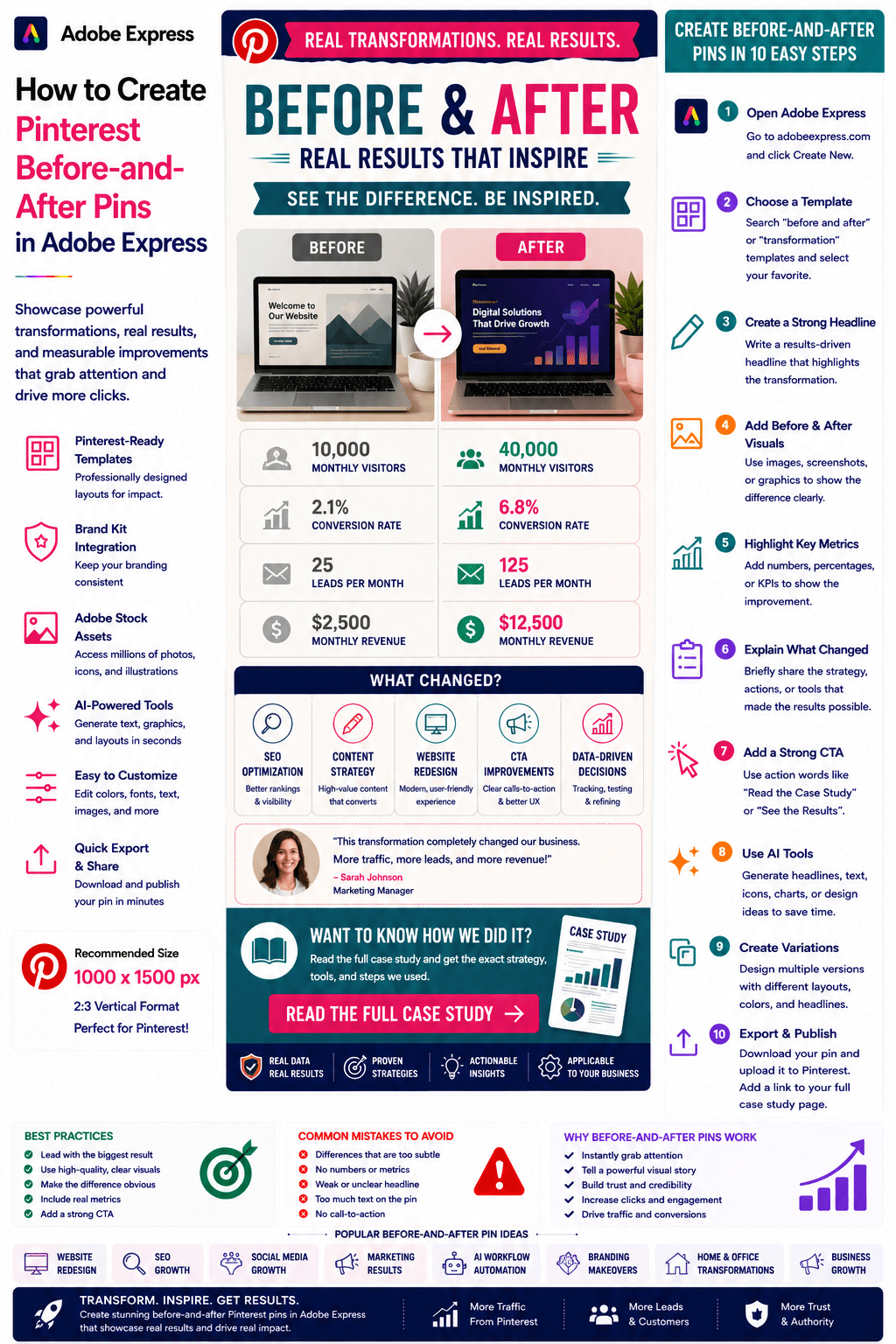
Before-and-after content is one of the most compelling visual formats on Pinterest.
People are naturally drawn to transformations. Whether it’s a business improvement, design makeover, fitness journey, website redesign, home renovation, marketing success story, or AI workflow optimization, users want to see the difference between the starting point and the final result.
Pinterest Before-and-After Pins capitalize on this curiosity and often generate high engagement, strong click-through rates, and excellent save rates.
Adobe Express makes it easy to create professional Before-and-After Pins using:
- Pinterest templates
- Brand Kits
- AI-powered design tools
- Adobe Stock assets
- Image editing tools
- Fast export workflows
In this guide, you’ll learn how to create Pinterest Before-and-After Pins using Adobe Express.
What Are Pinterest Before-and-After Pins?
Before-and-After Pins visually compare a starting situation with a final outcome.
Examples include:
Website Redesigns
SEO Improvements
Social Media Growth
Logo Redesigns
Home Renovations
Productivity Workflows
Marketing Campaign Results
AI Automation Projects
The goal is to showcase transformation and encourage users to learn how it was achieved.
Why Before-and-After Pins Perform Well
People love visual proof.
Benefits include:
High Engagement
Transformations naturally attract attention.
Strong Click-Through Rates
Users want to know how the results were achieved.
Increased Saves
People save inspiring examples.
Better Credibility
Visual evidence builds trust.
Excellent Storytelling
A transformation creates a compelling narrative.
These pins often outperform generic informational content.
Best Topics for Before-and-After Pins
Popular categories include:
Design
Marketing
SEO
Blogging
Productivity
AI Automation
Business Growth
Home Improvement
Health and Fitness
Branding
Choose transformations that are easy to visualize.
Recommended Pinterest Pin Size
Pinterest recommends:
1000 × 1500 Pixels
2:3 Vertical Format
Adobe Express includes Pinterest-ready templates optimized for engagement.
Step 1: Open Adobe Express
Sign in to Adobe Express.
From the dashboard:
Click Create New
or
Search Pinterest Templates
Adobe Express provides layouts perfect for comparisons.
Step 2: Choose a Before-and-After Template
Browse categories such as:
Business
Design
Marketing
Transformation
Success Stories
Comparisons
Choose a layout with a clear side-by-side structure.
Step 3: Create a Strong Headline
Examples:
Website Traffic: Before vs After
How We Increased Leads by 200%
AI Workflow Transformation
Complete Website Redesign Results
Branding Before and After
The headline should emphasize the improvement.
Step 4: Showcase the Transformation
Place the comparison front and center.
Examples:
Left Side: Before
Right Side: After
Top: Before
Bottom: After
The difference should be obvious at a glance.
Step 5: Highlight Key Metrics
Examples:
+300% Traffic
+150% Leads
20 Hours Saved Weekly
Revenue Doubled
Conversion Rate Improved
Numbers add credibility.
Step 6: Apply Your Brand Kit
Adobe Express Brand Kits simplify branding.
Apply:
Brand Colors
Brand Fonts
Logos
Design Elements
Consistent branding improves recognition.
Step 7: Explain What Changed
Provide a brief summary.
Examples:
New Design System
SEO Strategy
Marketing Automation
AI Workflow
Content Optimization
This creates curiosity and encourages clicks.
Step 8: Use Adobe Express AI Features
Adobe Express AI tools can generate:
Headlines
Comparison Graphics
Design Variations
Supporting Visuals
Marketing Copy
AI can significantly speed up production.
Step 9: Add a Strong Call-to-Action
Examples:
Read the Full Story
See the Complete Transformation
Learn the Strategy
Discover the Process
View the Case Study
A CTA increases click-through rates.
Step 10: Export and Publish
When complete:
Save Project
Download Pin
Create Multiple Variations
Upload to Pinterest
Your Before-and-After Pin is ready.
Creating Website Redesign Pins
Examples:
Old Website vs New Website
Landing Page Improvements
UX Enhancements
Design System Upgrades
Visual transformations are easy to showcase.
Creating SEO Before-and-After Pins
Examples:
Traffic Growth
Keyword Rankings
Search Visibility
Organic Leads
SEO improvements often produce strong metrics.
Creating Marketing Transformation Pins
Examples:
Lead Generation Growth
Conversion Improvements
Campaign Results
Funnel Optimization
Marketing audiences love measurable improvements.
Creating AI Workflow Pins
Examples:
Manual Process vs Automation
Time Savings
Productivity Improvements
Agent Workflow Results
AI transformations are increasingly popular.
Creating Branding Before-and-After Pins
Examples:
Logo Redesigns
Brand Refreshes
Visual Identity Updates
Marketing Asset Improvements
These projects are highly visual and shareable.
Best Practices for Before-and-After Pins
Make the Difference Obvious
Users should immediately understand the transformation.
Use Real Results
Authentic examples build trust.
Include Metrics
Numbers strengthen credibility.
Keep Layouts Clean
Avoid clutter.
Use Strong CTAs
Drive traffic to the full story.
These practices improve performance.
Common Before-and-After Pin Mistakes
Subtle Differences
Users may not notice the transformation.
No Metrics
Results feel less convincing.
Weak Headlines
Reduce engagement.
Too Much Text
Distracts from visuals.
Missing CTA
Misses traffic opportunities.
Avoiding these mistakes improves results.
Example Workflow
Imagine promoting a redesign project.
Headline
Website Traffic Before and After
Before
10,000 Monthly Visitors
After
40,000 Monthly Visitors
Change
SEO Content Strategy
CTA
Read the Full Case Study
This structure performs exceptionally well on Pinterest.
Why Adobe Express Is Ideal for Before-and-After Pins
Adobe Express combines:
Professional Templates
Brand Management
AI Design Tools
Image Editing Features
Easy Layout Controls
Fast Export
Pinterest-Friendly Formats
This makes it one of the easiest tools for creating transformation-focused Pinterest content.
Conclusion
Pinterest Before-and-After Pins are highly effective for showcasing results, building authority, generating engagement, and driving website traffic.
By combining templates, Brand Kits, AI-powered tools, and streamlined workflows, Adobe Express enables creators and businesses to create professional transformation-focused pins quickly and consistently.
Whether you’re highlighting SEO growth, design improvements, AI automation, business success, or branding projects, Adobe Express provides everything needed to create high-performing Before-and-After Pins.
Continue Learning Adobe Express
To learn more about Pinterest marketing, explore these guides:
- How to Create Pinterest Case Study Pins in Adobe Express
- How to Create Pinterest Resource Guide Pins in Adobe Express
- How to Create Pinterest Template Promotion Pins in Adobe Express
For advanced marketing workflows, also read:
- Adobe Express Marketing Automation: The Complete Guide
- Adobe Express Content Calendars: The Complete Guide
- Adobe Express Workflow Automation: The Complete Guide








