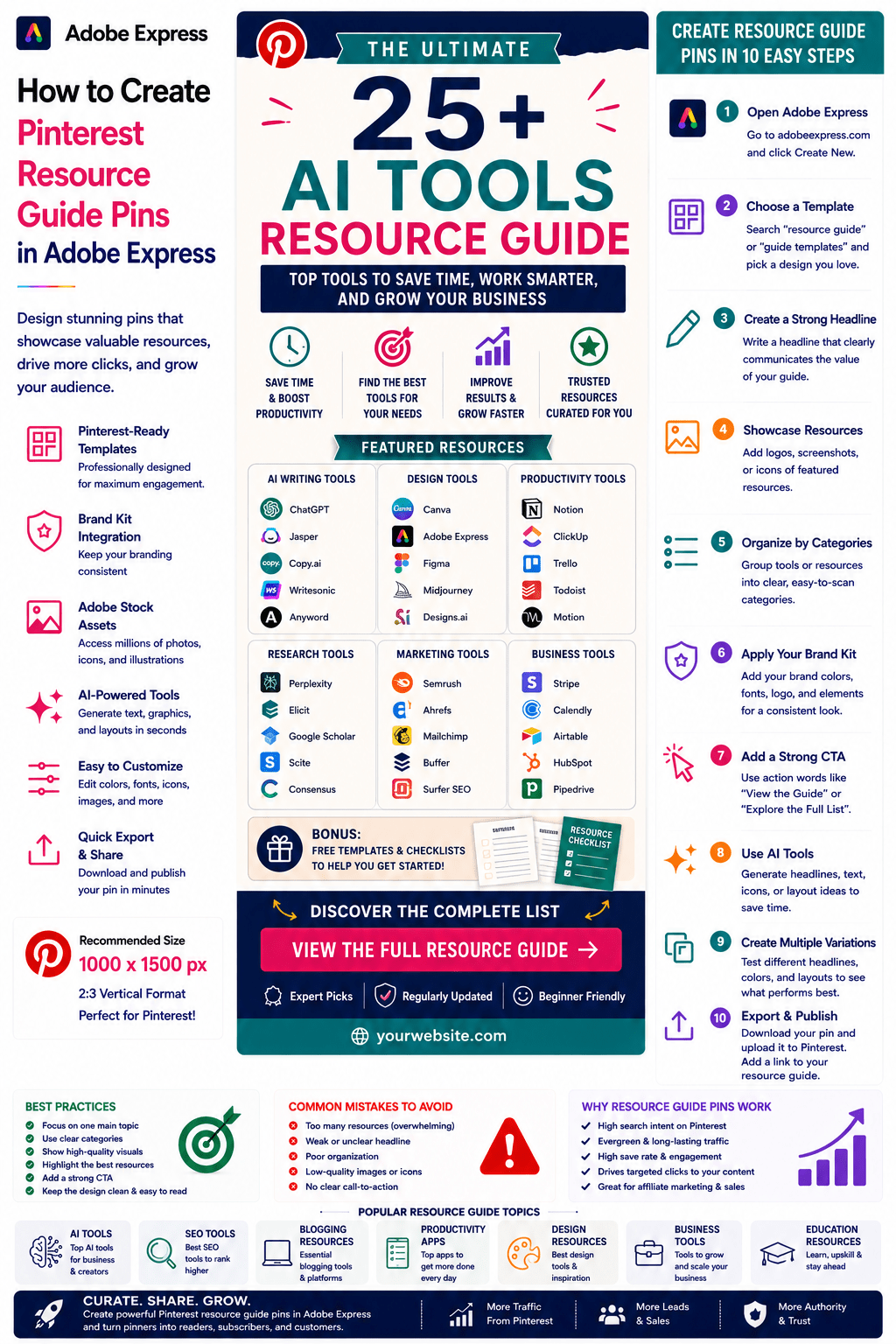
Pinterest users love discovering curated resources.
Whether they are searching for tools, websites, templates, books, software, AI platforms, educational materials, or productivity systems, users often save and share content that helps them solve problems faster.
This makes Resource Guide Pins one of the most effective Pinterest content formats for generating:
- Website traffic
- Email subscribers
- Affiliate commissions
- Brand authority
- Social shares
- Long-term engagement
Resource Guide Pins allow you to package useful information into a highly clickable Pinterest graphic that encourages users to explore a larger collection of resources.
Adobe Express makes it easy to create professional Resource Guide Pins using:
- Pinterest templates
- Brand Kits
- AI-powered design tools
- Adobe Stock assets
- Professional typography
- Fast export workflows
In this guide, you’ll learn how to create Pinterest Resource Guide Pins using Adobe Express.
What Are Pinterest Resource Guide Pins?
Resource Guide Pins are Pinterest graphics that promote a collection of useful resources around a specific topic.
Examples include:
Best AI Tools for Marketers
Top SEO Resources
Essential Blogging Tools
Free Adobe Express Templates
Productivity Apps Guide
Business Growth Resources
Website Launch Toolkit
Design Inspiration Collection
The goal is to encourage users to click through and explore the complete guide.
Why Resource Guide Pins Perform Well
Pinterest users actively seek solutions.
Benefits include:
High Search Intent
Users want recommendations.
Strong Save Rates
People bookmark resources for future use.
Excellent Click-Through Rates
Users often need the full guide.
Long-Term Traffic
Resource guides remain relevant for years.
Affiliate Marketing Opportunities
Many guides include recommended products.
Resource Guide Pins are highly versatile and evergreen.
Best Topics for Resource Guide Pins
Popular categories include:
AI Tools
Marketing Tools
Blogging Resources
SEO Tools
Design Resources
Productivity Apps
Small Business Tools
Educational Resources
Website Building Tools
Software Collections
Choose topics with strong user demand
Recommended Pinterest Pin Size
Pinterest recommends:
1000 × 1500 Pixels
2:3 Vertical Format
Adobe Express includes Pinterest-ready templates.
Step 1: Open Adobe Express
Sign in to Adobe Express.
From the dashboard:
Click Create New
or
Search Pinterest Templates
Adobe Express provides numerous layouts suitable for resource guides.
Step 2: Choose a Resource Guide Template
Browse categories such as:
Business
Education
Marketing
Blogging
Technology
Resource Collections
Choose a design that emphasizes organization and readability.
Step 3: Create a Strong Headline
Examples:
25 AI Tools Every Business Should Know
The Ultimate SEO Resource Guide
Top Productivity Apps for Entrepreneurs
Best Design Resources for Creators
Essential Blogging Tools
The headline should clearly communicate value.
Step 4: Showcase Featured Resources
Highlight several resources from the guide.
Examples:
Tool Logos
Product Screenshots
Book Covers
Website Thumbnails
App Icons
Resource Categories
Visual previews increase engagement.
Step 5: Organize Resources into Categories
Examples:
AI Tools
Productivity Tools
Marketing Tools
Design Resources
Business Software
Categories improve readability.
Step 6: Apply Your Brand Kit
Adobe Express Brand Kits simplify branding.
Apply:
Brand Colors
Brand Fonts
Logos
Design Elements
Consistent branding improves recognition.
Step 7: Highlight Benefits
Examples:
Save Time
Find Better Tools
Improve Productivity
Learn Faster
Grow Your Business
Focus on the outcomes users can achieve.
Step 8: Use Adobe Express AI Features
Adobe Express AI tools can generate:
Headlines
Resource Graphics
Design Concepts
Visual Variations
Marketing Copy
AI can significantly speed up production.
Step 9: Add a Strong Call-to-Action
Examples:
View the Complete Guide
Explore All Resources
Discover the Full List
Learn More
See the Top Tools
A strong CTA drives clicks.
Step 10: Export and Publish
When complete:
Save Project
Download Pin
Create Variations
Upload to Pinterest
Your Resource Guide Pin is ready.
Creating AI Resource Guide Pins
Examples:
Best AI Tools
AI Agent Frameworks
Prompt Engineering Resources
AI Productivity Tools
AI-related content continues to attract significant attention.
Creating Marketing Resource Guide Pins
Examples:
SEO Tool Collections
Content Marketing Resources
Social Media Tools
Email Marketing Platforms
Marketing guides perform extremely well on Pinterest.
Creating Blogging Resource Guide Pins
Examples:
Blogging Tools
Website Resources
Affiliate Marketing Tools
Content Creation Resources
Bloggers frequently use Pinterest as a traffic source.
Creating Design Resource Guide Pins
Examples:
Figma Resources
Adobe Express Templates
Design Inspiration Sites
UI Design Tools
Design-focused audiences actively search Pinterest.
Creating Business Resource Guide Pins
Examples:
Startup Toolkits
Small Business Resources
Productivity Systems
Project Management Tools
Business content attracts high-value audiences.
Best Practices for Resource Guide Pins
Focus on One Topic
Avoid covering unrelated resources.
Use Clear Categories
Improve organization.
Show Featured Resources
Visual previews increase engagement.
Create Strong Headlines
Communicate value immediately.
Include a CTA
Encourage clicks.
These practices improve performance.
Common Resource Guide Mistakes
Too Many Resources
Creates visual clutter.
Weak Headlines
Reduce engagement.
Poor Organization
Confuses users.
No Resource Previews
Lowers interest.
Missing CTA
Misses traffic opportunities.
Avoiding these mistakes improves results
Example Workflow
Imagine promoting a resource guide.
Guide
25 AI Tools Every Business Should Know
Categories
- Writing Tools
- Design Tools
- Research Tools
- Productivity Tools
Benefit
Save Hours Every Week
CTA
View the Complete Guide
This structure performs extremely well on Pinterest.
Why Adobe Express Is Ideal for Resource Guide Pins
Adobe Express combines:
Professional Templates
Brand Management
AI Design Tools
Easy Editing
Fast Export
Pinterest-Friendly Layouts
This makes it one of the easiest tools for creating resource-focused Pinterest content.
Conclusion
Pinterest Resource Guide Pins are highly effective for driving traffic, generating affiliate revenue, building authority, and helping users discover valuable resources.
By combining templates, Brand Kits, AI-powered tools, and streamlined workflows, Adobe Express enables creators and businesses to create professional Resource Guide Pins quickly and consistently.
Whether you’re sharing AI tools, marketing resources, business software, educational materials, or productivity systems, Adobe Express provides everything needed to create high-performing Resource Guide Pins.
Continue Learning Adobe Express
To learn more about Pinterest marketing, explore these guides:
- How to Create Pinterest Template Promotion Pins in Adobe Express
- How to Create Pinterest Ebook Promotion Pins in Adobe Express
- How to Create Pinterest Lead Magnet Pins in Adobe Express
For advanced marketing workflows, also read:
- Adobe Express Marketing Automation: The Complete Guide
- Adobe Express Content Calendars: The Complete Guide
- Adobe Express Workflow Automation: The Complete Guide








