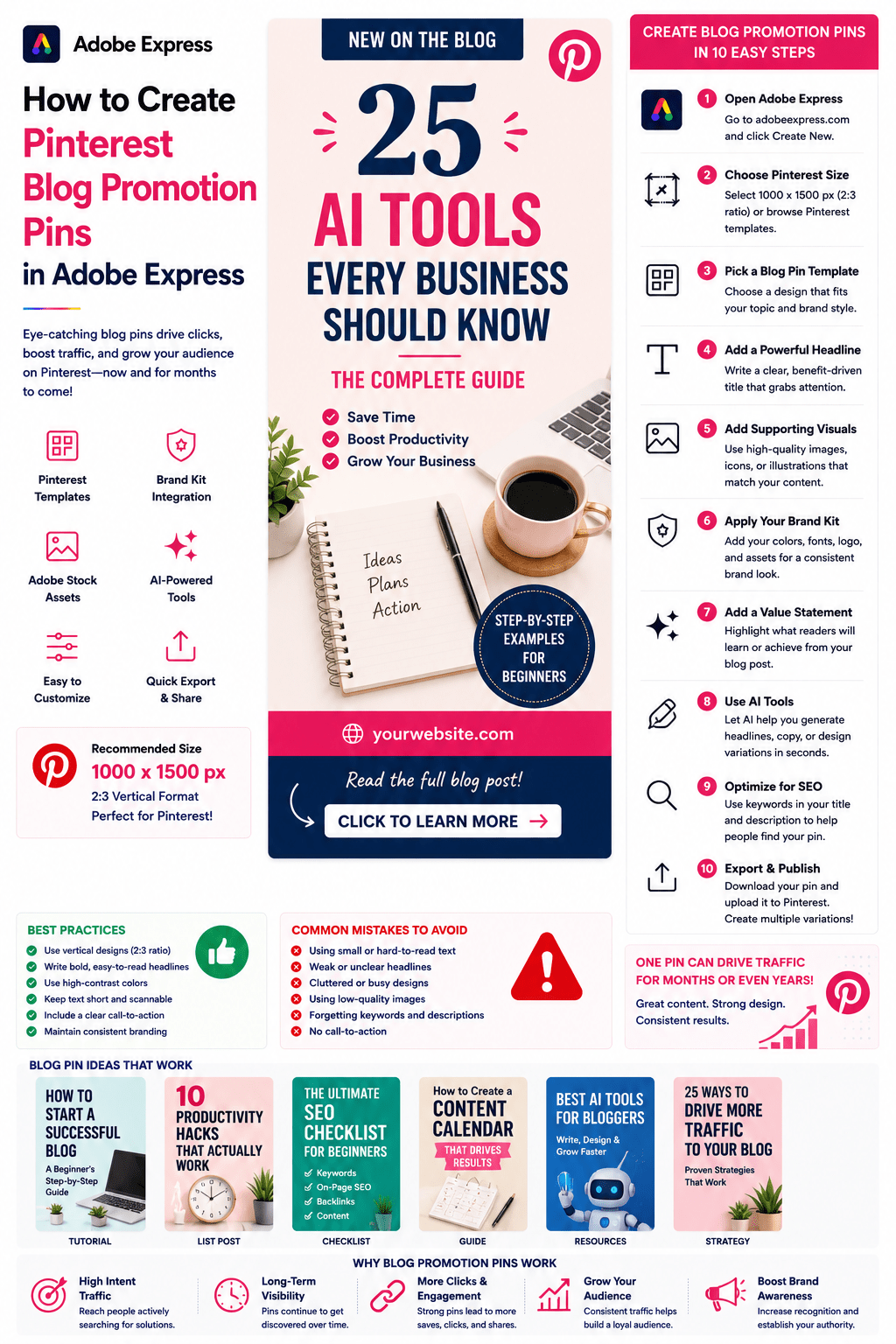
Pinterest is one of the most effective platforms for promoting blog content.
Unlike traditional social media platforms where content quickly disappears from feeds, Pinterest functions as a visual search engine. A well-designed blog promotion pin can continue generating traffic for months or even years after publication.
For bloggers, affiliate marketers, niche website owners, educators, consultants, and businesses, Pinterest can become a major source of consistent organic traffic.
Adobe Express makes it easy to create professional blog promotion pins using:
- Pinterest templates
- Brand Kits
- AI-powered design tools
- Adobe Stock assets
- Professional typography
- Fast export workflows
In this guide, you’ll learn how to create Pinterest blog promotion pins using Adobe Express.
Why Pinterest Works for Blog Promotion
Pinterest users actively search for:
Solutions
Tutorials
Guides
Inspiration
Product Recommendations
Educational Content
Unlike social networks focused on conversation, Pinterest users often have intent to learn and take action.
Benefits include:
Long-Term Traffic
Better Discoverability
Increased Click-Through Rates
More Content Exposure
Higher Content ROI
A single pin can drive traffic long after publication.
What Is a Blog Promotion Pin?
A blog promotion pin is a Pinterest graphic designed to encourage users to click through and read an article.
Most blog pins include:
Blog Title
Supporting Visual
Branding
Value Proposition
Call-to-Action
The goal is to generate curiosity and clicks.
Best Blog Topics for Pinterest
Pinterest performs particularly well for:
Marketing
Business
AI
Productivity
Personal Finance
Home Improvement
Recipes
Health and Fitness
Education
Design
DIY Projects
Career Advice
Choose topics that solve problems or teach skills.
Recommended Pinterest Blog Pin Size
Pinterest recommends:
1000 × 1500 Pixels
2:3 Vertical Format
This size maximizes visibility in feeds.
Adobe Express provides templates optimized for Pinterest.
Step 1: Open Adobe Express
Sign in to Adobe Express.
From the dashboard:
Click Create New
or
Search Pinterest Templates
Adobe Express includes numerous blog-focused layouts.
Step 2: Choose a Blog Pin Template
Browse categories such as:
Blogging
Business
Marketing
Education
Lifestyle
Technology
Templates provide a professional starting point.
Step 3: Create a Strong Blog Title
The title is the most important element.
Examples:
25 AI Tools Every Business Should Know
How to Start a Successful Blog
The Ultimate SEO Checklist
10 Productivity Habits That Actually Work
Beginner’s Guide to Pinterest Marketing
Your title should clearly communicate value.
Step 4: Use Large Typography
Pinterest users scan quickly.
Focus on:
Large Headlines
Strong Contrast
Bold Fonts
Easy Readability
Your title should be visible immediately.
Step 5: Add Supporting Visuals
Choose visuals that support the article topic.
Examples:
Blog Graphics
Adobe Stock Images
Screenshots
Product Photos
Icons
AI-Generated Visuals
Relevant visuals improve engagement.
Step 6: Apply Your Brand Kit
Adobe Express Brand Kits simplify consistency.
Apply:
Brand Colors
Brand Fonts
Logos
Design Assets
Consistent branding improves recognition.
Step 7: Add a Value Statement
Examples:
Step-by-Step Guide
Beginner Friendly
Free Checklist Included
Proven Framework
Complete Tutorial
Value statements increase clicks.
Step 8: Use Adobe Express AI Features
Adobe Express AI tools can generate:
Headlines
Design Variations
Marketing Copy
Images
Supporting Graphics
AI helps accelerate content production.
Step 9: Optimize for Pinterest SEO
Pinterest is a search engine.
Include:
Keywords
Search-Friendly Titles
Relevant Categories
Descriptive Pin Text
SEO improves discoverability.
Step 10: Export and Publish
When complete:
Save Project
Download Pin
Create Variations
Upload to Pinterest
Your blog promotion pin is ready.
Creating Tutorial Pins
Examples:
How to Build a Website
How to Use Adobe Express
How to Improve SEO
How to Create Content Calendars
Tutorials consistently perform well.
Creating List-Style Pins
Examples:
25 AI Tools for Marketers
10 Ways to Increase Productivity
15 Social Media Tips
50 Blog Post Ideas
Lists often generate strong click-through rates.
Creating Checklist Pins
Examples:
SEO Checklist
Website Launch Checklist
Content Marketing Checklist
Product Launch Checklist
Checklists are highly saveable.
Creating Resource Pins
Examples:
Free Templates
Tool Collections
Learning Resources
Business Guides
Resource-based content attracts clicks.
Creating Affiliate Blog Pins
Examples:
Product Reviews
Tool Comparisons
Buying Guides
Recommended Software
Affiliate marketers frequently use Pinterest traffic strategies.
Best Practices for Blog Promotion Pins
Focus on the Headline
The title drives clicks.
Use Vertical Designs
Pinterest favors vertical content.
Include Strong Visuals
Improve engagement.
Stay Consistent
Maintain branding.
Create Multiple Variations
Test different headlines and layouts.
These practices improve results.
Common Blog Pin Mistakes
Weak Headlines
Reduce click-through rates.
Small Text
Difficult to read.
Generic Images
Fail to attract attention.
No Branding
Misses recognition opportunities.
Missing Keywords
Reduces discoverability.
Avoiding these mistakes improves performance.
Example Workflow
Imagine promoting an articleBlog Title
25 AI Tools Every Business Should Know
Visual
AI-themed illustration
Value Statement
Complete Guide for Beginners
CTA
Read the Full Article
This simple structure performs well on Pinterest.
Why Adobe Express Is Ideal for Blog Promotion
Adobe Express combines:
Professional Templates
Brand Management
AI Design Tools
Easy Editing
Fast Export
Pinterest-Friendly Layouts
This makes it one of the easiest tools for blog promotion.
Conclusion
Pinterest blog promotion pins can generate long-term traffic, increase content visibility, and support audience growth.
By combining templates, Brand Kits, AI-powered tools, and streamlined workflows, Adobe Express enables creators and businesses to create professional blog promotion pins quickly and consistently.
Whether you’re promoting tutorials, guides, checklists, resource collections, or affiliate content, Adobe Express provides everything needed to create high-performing Pinterest blog pins.
Continue Learning Adobe Express
To learn more about Pinterest marketing, explore these guides:
- How to Create Pinterest Pins in Adobe Express
- How to Create Pinterest Idea Pins in Adobe Express
- How to Create Pinterest Product Pins in Adobe Express
For advanced content workflows, also read:
- Adobe Express Content Calendars: The Complete Guide
- Adobe Express Marketing Automation: The Complete Guide
- Adobe Express Content Creation: The Complete Guide








