Introduction
Pinterest Idea Pins are one of the most engaging content formats available on Pinterest.
Unlike standard Pins, Idea Pins allow creators and businesses to publish multi-page visual stories that combine images, graphics, videos, text overlays, and educational content into an immersive experience.
Idea Pins are perfect for:
- Tutorials
- Step-by-step guides
- Recipes
- Product demonstrations
- Design inspiration
- Educational content
- Business tips
- Creative storytelling
Adobe Express makes it easy to create professional Pinterest Idea Pins using:
- Multi-page templates
- Brand Kits
- AI-powered design tools
- Adobe Stock assets
- Video editing features
- Fast export workflows
In this guide, you’ll learn how to create Pinterest Idea Pins using Adobe Express.
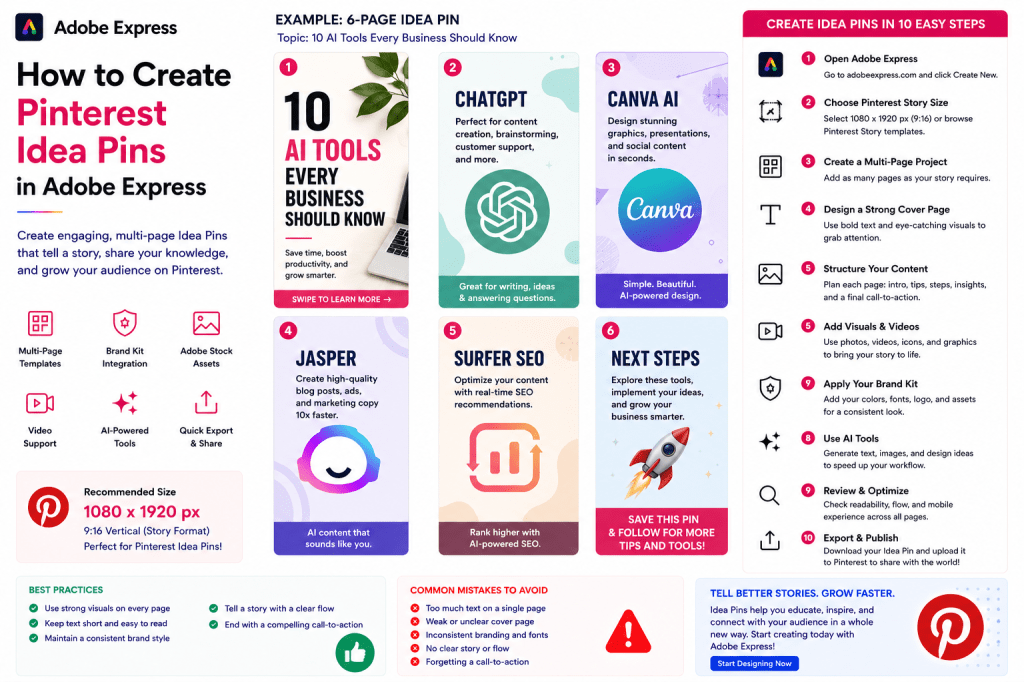
What Are Pinterest Idea Pins?
Idea Pins are Pinterest’s story-style content format.
Unlike traditional Pins, they support multiple pages.
A typical Idea Pin might include:
Page 1
Attention-grabbing introduction
Pages 2–5
Educational or instructional content
Final Page
Call-to-action
This format keeps users engaged longer.
Why Pinterest Idea Pins Matter
Idea Pins offer several advantages.
Increased Engagement
Users spend more time interacting.
Better Storytelling
Multiple pages allow deeper explanations.
More Visibility
Pinterest often promotes engaging Idea Pins.
Stronger Branding
Consistent visual experiences.
Educational Value
Perfect for teaching concepts.
Idea Pins can significantly expand your Pinterest reach.
Best Use Cases for Idea Pins
Adobe Express can be used to create Idea Pins for:
Tutorials
Recipes
Home Decor Ideas
Marketing Tips
Business Advice
DIY Projects
Product Walkthroughs
Educational Guides
Design Inspiration
Fitness Tips
Choose topics that benefit from a step-by-step format.
Recommended Idea Pin Format
Pinterest Idea Pins typically use:
1080 × 1920 Pixels
Vertical mobile-friendly format.
Adobe Express provides templates optimized for this size.
Step 1: Open Adobe Express
Sign in to Adobe Express.
From the dashboard:
Click Create New
or
Search Pinterest Story Templates
These work well for Idea Pins.
Step 2: Create a Multi-Page Project
Idea Pins consist of multiple slides.
Examples:
Cover Page
Educational Pages
Summary Page
CTA Page
Adobe Express allows easy page duplication and management.
Step 3: Create a Strong Cover Page
Your cover is critical.
Examples:
10 AI Tools Every Business Should Know
How to Build a Brand Kit
The Ultimate Pinterest Marketing Guide
5 Productivity Hacks That Work
The cover should create curiosity.
Step 4: Structure Your Content
A simple structure works best.
Page 1
Introduction
Page 2
Tip #1
Page 3
Tip #2
Page 4
Tip #3
Page 5
Summary
Page 6
Call-to-Action
Clear structure improves engagement.
Step 5: Add High-Quality Visuals
Visual content is essential.
Options include:
Photos
Screenshots
Adobe Stock Images
Product Images
Graphics
AI-Generated Visuals
Each page should support the story.
Step 6: Apply Your Brand Kit
Adobe Express Brand Kits simplify branding.
Apply:
Brand Colors
Brand Fonts
Logos
Design Assets
Consistency improves recognition.
Step 7: Use Text Overlays
Pinterest users often consume content quickly.
Use:
Large Headlines
Short Explanations
Numbered Steps
Key Takeaways
Keep text concise.
Step 8: Add Video Content
Adobe Express supports video slides.
Examples:
Product Demonstrations
Tutorials
Behind-the-Scenes Clips
Process Walkthroughs
Before-and-After Examples
Video often increases engagement.
Step 9: Use Adobe Express AI Features
Adobe Express AI tools can help create:
Slide Headlines
Story Concepts
Visual Assets
Supporting Text
Design Variations
AI can significantly accelerate production.
Step 10: Export and Publish
When complete:
Save Project
Review All Pages
Export Content
Upload to Pinterest
Your Idea Pin is ready.
Creating Tutorial Idea Pins
One of the most successful formats.
Examples:
How to Design a Logo
How to Build a Website
How to Create Pinterest Pins
How to Start a Blog
Tutorials generate strong engagement.
Creating Marketing Idea Pins
Examples:
Social Media Tips
SEO Strategies
Content Marketing Frameworks
Branding Lessons
Business Growth Ideas
Educational marketing content performs well.
Creating Product Demonstration Idea Pins
Show:
Features
Benefits
Use Cases
Results
Customer Outcomes
Excellent for product marketing.
Creating Recipe Idea Pins
Popular format for Pinterest.
Include:
Ingredients
Preparation Steps
Final Result
Cooking Tips
Recipes often receive significant engagement.
Creating Educational Idea Pins
Examples:
Industry Insights
Frameworks
Checklists
Learning Resources
Business Advice
Educational content is highly shareable.
Best Practices for Pinterest Idea Pins
Start with a Strong Cover
Capture attention immediately.
Keep Slides Simple
Avoid clutter.
Focus on One Topic
Maintain clarity
Use Consistent Branding
Build recognition.
End with a CTA
Encourage action.
These practices improve performance.
Common Idea Pin Mistakes
Too Much Text
Reduces readability.
Weak Cover Page
Lowers engagement.
Poor Visual Quality
Looks unprofessional.
No Story Flow
Creates confusio
Missing CTA
Misses conversion opportunities.
Avoiding these mistakes improves results.
Example Workflow
Imagine creating an Idea Pin:
Topic
10 AI Tools Every Business Should Know
Page 1
Cover
Pages 2–10
One AI tool per page
Final Page
Visit our website for the full guide
This format is easy to create and performs well.
Why Adobe Express Is Ideal for Idea Pins
Adobe Express combines:
Multi-Page Editing
Professional Templates
Brand Management
AI Design Tools
Easy Export
This makes it an excellent platform for Pinterest Idea Pins.
Conclusion
Pinterest Idea Pins are one of the most engaging content formats on the platform.
By combining storytelling, education, visuals, and branding, Idea Pins help businesses and creators increase visibility, grow audiences, and strengthen their Pinterest presence.
With Adobe Express, you can quickly create professional multi-page Idea Pins that educate, inspire, and drive results.
Continue Learning Adobe Express
To learn more about Pinterest content creation, explore these guides:
- How to Create Pinterest Pins in Adobe Express
- Adobe Express for Social Media: The Complete Guide
- Adobe Express Content Creation: The Complete Guide
For advanced workflows, also read:
- Adobe Express Content Calendars: The Complete Guide
- Adobe Express Marketing Automation: The Complete Guide
- Adobe Express Workflow Automation: The Complete Guide








