Introduction
Pinterest is one of the most effective platforms for generating leads.
Unlike many social networks that focus primarily on engagement, Pinterest users actively search for solutions, resources, templates, guides, and tools. This makes Pinterest an ideal platform for promoting lead magnets and growing an email list.
Whether you’re offering:
- Free ebooks
- Checklists
- Templates
- Worksheets
- Guides
- Toolkits
- Prompt packs
- Resource libraries
Pinterest Lead Magnet Pins can help drive highly targeted traffic to your landing pages and convert visitors into subscribers.
Adobe Express makes it easy to create professional lead generation pins using:
- Pinterest templates
- Brand Kits
- AI-powered design tools
- Adobe Stock assets
- Professional typography
- Fast export workflows
In this guide, you’ll learn how to create Pinterest Lead Magnet Pins using Adobe Express.
What Is a Pinterest Lead Magnet Pin?
A Lead Magnet Pin is a Pinterest graphic designed to promote a free resource in exchange for an email address.
Examples include:
Free Ebook
Free Checklist
Downloadable Template
AI Prompt Pack
Marketing Toolkit
Business Planner
SEO Worksheet
Resource Guide
The objective is to move users from Pinterest to a landing page where they can subscribe.
Why Lead Magnet Pins Work
Pinterest users often search for practical resources.
Benefits include:
Email List Growth
Build a long-term audience.
High Intent Traffic
Users actively seek solutions.
Evergreen Visibility
Pins remain searchable for years.
Better Conversion Rates
Free resources attract engagement.
Business Growth
Email subscribers are valuable assets.
Lead Magnet Pins are often among the highest ROI content types.
Best Lead Magnets for Pinterest
Popular options include:
Checklists
Templates
Planners
Worksheets
Cheat Sheets
Toolkits
Resource Lists
AI Prompt Collections
Spreadsheets
Mini Courses
The best lead magnets solve a specific problem.
Recommended Pinterest Pin Size
Pinterest recommends:
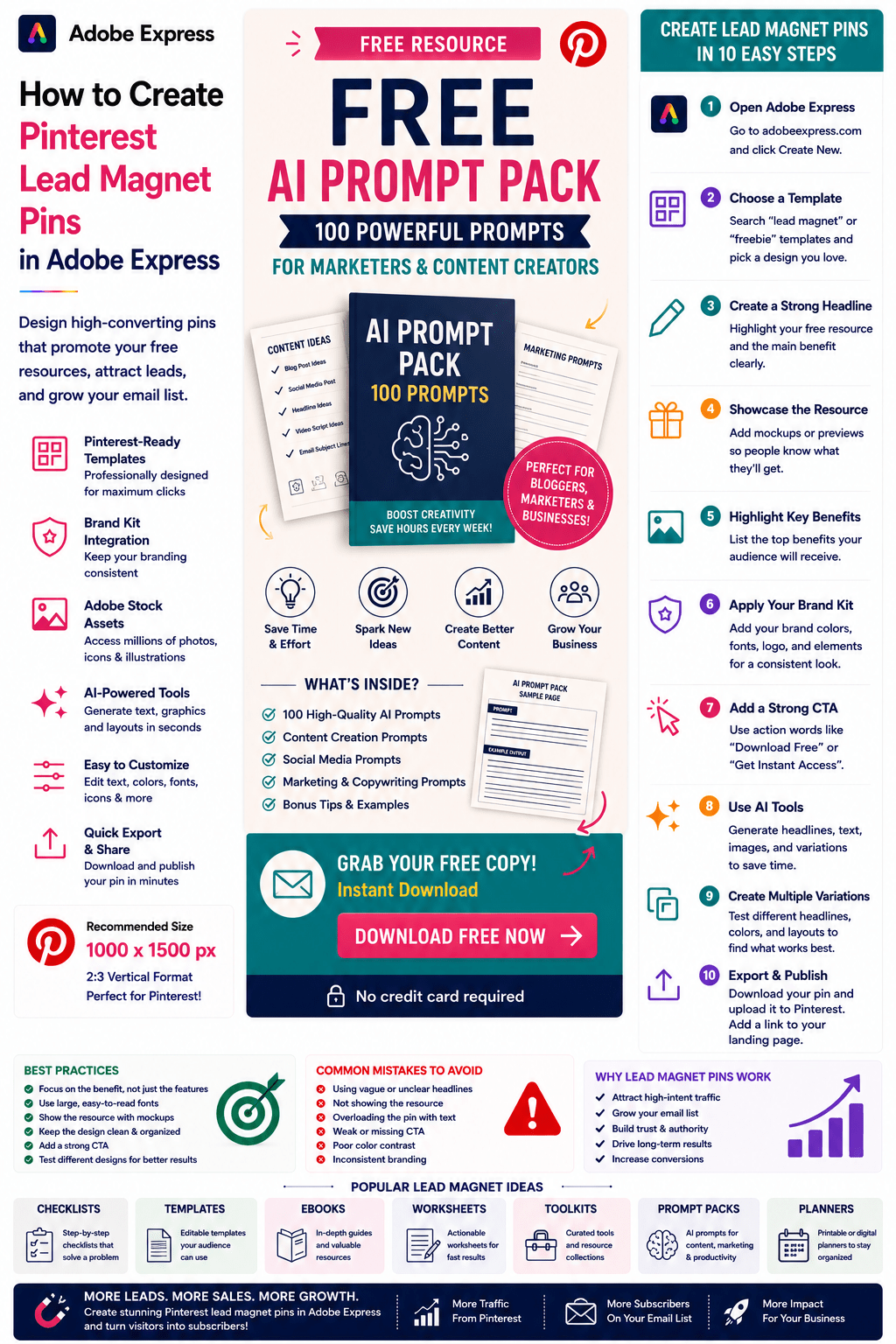
1000 × 1500 Pixels
2:3 Vertical Format
Adobe Express includes templates optimized for Pinterest.
Step 1: Open Adobe Express
Sign in to Adobe Express.
From the dashboard:
Click Create New
or
Search Pinterest Templates
Adobe Express provides many lead-generation-friendly layouts.
Step 2: Choose a Lead Magnet Template
Browse categories such as:
Marketing
Business
Education
Productivity
Downloads
Resources
Choose a clean and conversion-focused design.
Step 3: Create a Strong Headline
Examples:
Free AI Prompt Pack
Download the Ultimate SEO Checklist
Free Business Planning Workbook
Get the Content Marketing Toolkit
Free Website Launch Checklist
The headline should communicate value immediately.
Step 4: Showcase the Resource
Users should quickly understand what they receive.
Examples:
50-Page Ebook
100 AI Prompts
Complete Checklist
Editable Template
Resource Bundle
Specificity improves conversions.
Step 5: Add Resource Mockups
Visualizing the lead magnet increases perceived value.
Examples:
Ebook Covers
Workbook Mockups
Spreadsheet Screenshots
Template Previews
Toolkit Graphics
Resource Bundle Images
Mockups help users understand what they receive.
Step 6: Apply Your Brand Kit
Adobe Express Brand Kits simplify consistency.
Apply:
Brand Colors
Brand Fonts
Logos
Design Elements
Brand consistency builds trust.
Step 7: Highlight Key Benefits
Examples:
Save Time
Increase Productivity
Improve Results
Avoid Common Mistakes
Learn Faster
Benefits often outperform feature-focused messaging.
Step 8: Use Adobe Express AI Features
Adobe Express AI tools can generate:
Headlines
Marketing Copy
Visual Concepts
Design Variations
Resource Graphics
AI can significantly speed up design work.
Step 9: Add a Strong Call-to-Action
Examples:
Download Free
Get Instant Access
Grab Your Copy
Download the Toolkit
Claim Your Free Guide
Access the Resource
A clear CTA is critical.
Step 10: Export and Publish
When complete:
Save Project
Download Pin
Create Variations
Upload to Pinterest
Your Lead Magnet Pin is ready.
Creating Ebook Lead Magnet Pins
Examples:
AI Strategy Guide
Pinterest Marketing Handbook
Beginner’s SEO Guide
Social Media Playbook
Ebooks remain highly effective lead magnets.
Creating Checklist Pins
Examples:
Website Launch Checklist
Blog Publishing Checklist
SEO Audit Checklist
Product Launch Checklist
Checklists are easy to consume and highly valuable.
Creating Template Pins
Examples:
Content Calendar Template
Business Plan Template
Marketing Dashboard
Project Planner
Templates often convert exceptionally well.
Creating AI Prompt Pack Pins
Examples:
500 Marketing Prompts
LinkedIn Content Prompts
AI Image Generation Prompts
Productivity Prompt Bundle
These lead magnets continue growing in popularity.
Creating Resource Toolkit Pins
Examples:
Startup Toolkit
Blogger Resource Pack
Marketing Toolkit
Productivity Toolkit
Bundled resources increase perceived value.
Best Practices for Lead Magnet Pins
Focus on Value
Clearly communicate benefits.
Show the Resource
Use mockups and previews.
Keep Headlines Simple
Improve readability.
Create Curiosity
Encourage clicks.
Include a Strong CTA
Drive conversions.
These practices improve performance.
Common Lead Magnet Pin Mistakes
Generic Headlines
Fail to communicate value.
No Visual Mockup
Reduces perceived value.
Weak CTA
Misses conversion opportunities.
Too Much Text
Creates clutter.
Unclear Benefits
Makes users less likely to click.
Avoiding these mistakes improves results.
Example Workflow
Imagine promoting a free resource.
Lead Magnet
100 AI Prompts for Marketers
Headline
Free AI Prompt Pack
Benefit
Save Hours Every Week
Visual
Prompt Pack Mockup
CTA
Download Free
This structure consistently performs well on Pinterest.
Why Adobe Express Is Ideal for Lead Magnet Pins
Adobe Express combines:
Professional Templates
Brand Management
AI Design Tools
Easy Editing
Fast Export
Pinterest-Friendly Layouts
This makes it one of the easiest platforms for creating lead generation content.
Conclusion
Pinterest Lead Magnet Pins are one of the most effective ways to build an email list, generate leads, and grow your audience.
By combining templates, Brand Kits, AI-powered tools, and streamlined workflows, Adobe Express enables creators and businesses to create professional lead generation pins quickly and consistently.
Whether you’re promoting ebooks, templates, checklists, AI prompt packs, or resource bundles, Adobe Express provides everything needed to create high-converting Pinterest Lead Magnet Pins.
Continue Learning Adobe Express
To learn more about Pinterest marketing, explore these guides:
- How to Create Pinterest Product Comparison Pins in Adobe Express
- How to Create Pinterest Affiliate Marketing Pins in Adobe Express
- How to Create Pinterest Traffic Pins in Adobe Express
For advanced marketing workflows, also read:
- Adobe Express Marketing Automation: The Complete Guide
- Adobe Express Content Calendars: The Complete Guide
- Adobe Express Workflow Automation: The Complete Guide








